

Free or Fee: Paywall Detector & Free or Paid Link Checker

Overview
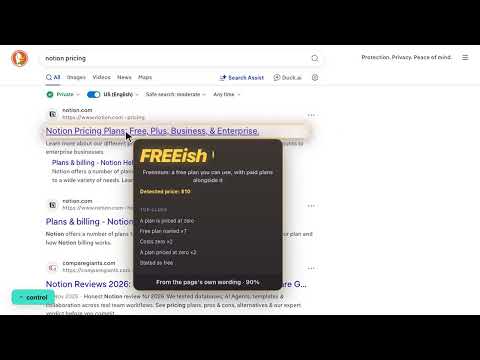
Paywall detector for any link: hover to see if a page is free, freemium, paid or login walled before you click. Runs on your device.
Free or Fee tells you what a link will cost you before you click it. Hold a key, hover any link, and a small card tells you which of four things is waiting on the other side: - Free. Nothing to pay, nothing to sign up for. - Freemium. A free tier you can use, with paid plans alongside it. - Login. Free to use, and an account is the only thing between you and it. Where the account leads to paid plans or a trial, it says freemium or paid instead. - Paid. A subscription, a licence, a purchase, or a paywall. Every card shows the words it found and which method decided, so you can see why it said what it said. When a page does not say, it tells you it is unsure instead of guessing, and an unsure result never uses up one of your scans. HOW IT DECIDES Three methods, used in order, each one stronger than the last, and the card names the one that answered. 1. A database of known sites. Hundreds of domains whose answer cannot drift: Wikipedia and every Stack Exchange site, government domains, the big paywalls, the big stores, the big login walls, and the weather, recipe, reference and news sites everyone lands on. These answer instantly, with no network call at all. 2. The page's own words. For everything else it fetches the page, finds its pricing page, and reads every sentence around the word "free", including the data that script-built sites keep hidden in the page. It knows the difference between "free forever" and "free for 14 days", between a plan priced at zero and a first-month promotion, and it ignores "free shipping" and "start for free" buttons. A page that only draws itself with code gets opened quietly in the background so the finished page can be read. 3. A model that runs on your own machine. Chrome can run a small language model entirely on your computer. Free or Fee uses it to read the page properly, to write a one-line summary of what it found, and to settle the cases the wording alone leaves open. It is not allowed to guess: it has to quote the words on the page that decided it, and the extension checks that the quote is really there and says what the model claims. It is a one-time download of about 4 GB that Chrome keeps for you. Everything works from the first minute without it, and the sharper reading switches itself on the moment the download is done. MEASURED, NOT PROMISED We test the finished extension on real sites, with live pages. On 63 real sites it answered nine times in ten, got the free-or-paid question right every time it answered, and named the exact tier right 84% of the time. On sites it had never seen, with no help from the database, it chose to answer six times in ten and was right on free-or-paid eight times in ten; the rest of the time it said unsure rather than guess. PRIVATE BY DESIGN There is no account and no tracking. The verdict is worked out on your own machine. The page it reads is fetched by the extension rather than by you, without your cookies. The one exception is a page that only builds itself with code: Free or Fee opens that one in a muted background tab, like a normal visit, and you can switch that off in the settings. Links that sign you out or only work once are never opened. The model is Chrome's own and runs offline. Nothing about your browsing is collected or sent to anyone. FREE, WITH PRO FOR HEAVY USE The free plan is the full extension, every method included, with five scans a day. Pro is a single payment, no subscription, and it gives you: - Scan as much as you like. Every day, with nothing counting down. - See the real price. The actual figure detected on a paid page. - Five card themes. Midnight, Carbon, Ocean, Daylight and Paper. - Scan with no key held. Hovering alone is enough. - Keep a card open. Pin it while you compare against the next link. - Keep your scan history. Stored on your machine, exportable as a spreadsheet. Every new install gets a seven-day Pro trial with everything switched on.
0 out of 5No ratings
Details
- Version1.4.0
- UpdatedOctober 19, 2026
- FeaturesOffers in-app purchases
- Offered bykoreanparticles.com
- Size214KiB
- Languages16 languages
- Developer
Email
paquinho1@gmail.com - Non-traderThis developer has not identified itself as a trader. For consumers in the European Union, please note that consumer rights do not apply to contracts between you and this developer.
Privacy

This developer declares that your data is
- Not being sold to third parties, outside of the approved use cases
- Not being used or transferred for purposes that are unrelated to the item's core functionality
- Not being used or transferred to determine creditworthiness or for lending purposes