

Free Google Maps Timeline Export to Excel
41 个评分
)
概述
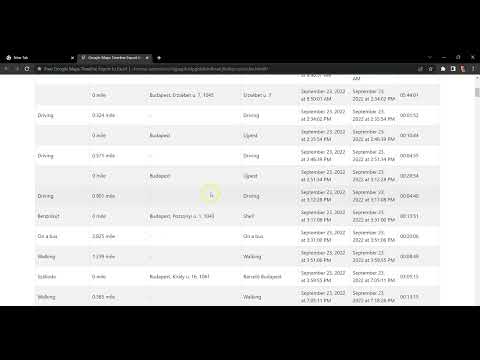
Export your trips and mileage from Google Maps Timeline to Excel for your mileage tax deduction.
🗺️ Free Google Maps Timeline Export to Excel ❎ Export your trips and mileage from Google Maps Timeline to Excel for your mileage tax deduction. This Chrome extension enables generating mileage and time sheet reports / exports. None of your location data goes through a server. Everything is processed locally in your browser to ensure your privacy. ⚠️ Attention ⚠️ Your trips exported from Google Maps Timeline with any tool are not sufficient as an IRS-compliant mileage log - points out my sponsor, MileageWise. They on the other hand, are able to convert these exported trips into an IRS-Proof mileage log. 📢 Notice 📢 Google has recently relocated Timeline Location History data to local storage on mobile devices. Some Takeout files still contain the necessary data, but for others, the data is no longer included. Therefore the efficiency of this extension has been inconsistent. MileageWise can now integrate Timeline data that is locally stored on phones! If my extension doesn't work, this might be your solution: 💻https://www.mileagewise.com/google-maps-mileage-tracker/ 📱https://play.google.com/store/apps/details?id=com.mileagewise.timelineapp
4.2 星(5 星制)41 个评分
详情
- 版本0.1.9
- 上次更新日期2025年12月18日
- 提供方Mark Fazekas
- 大小1.02MiB
- 语言English (United States)
- 开发者
邮箱
mark.fazekas.1980@gmail.com - 非交易者该开发者尚未将自己标识为交易者。欧盟地区消费者须知:消费者权利可能不适用于您与该开发者达成的合约。
隐私权
该开发者已声明,您的数据:
- 不会因未获批准的用途出售给第三方
- 不会为实现与产品核心功能无关的目的而使用或转移
- 不会为确定信用度或放贷目的而使用或转移
支持
若有任何疑问、建议或问题,请在桌面浏览器中打开此页面