


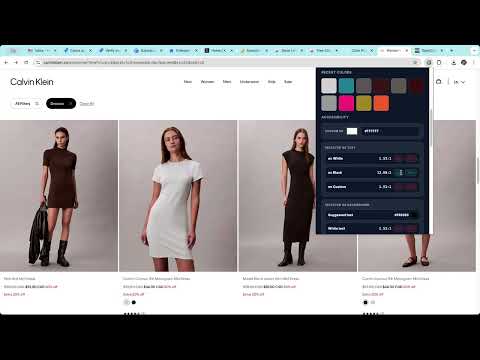
Overview
The #1 Free Color Picker. Instantly pick colors from any website, save history, and generate beautiful palettes.
🎨 Color Picker Pro - The Ultimate FREE Color Tool for Chrome Pick any color from your screen in seconds with the most intuitive color picker extension for Chrome. Perfect for web designers, developers, digital artists, and anyone working with colors. ✨ KEY FEATURES 🎯 Screen Color Picker • Click anywhere on your screen to capture any color • Uses Chrome's native EyeDropper API for pixel-perfect accuracy • Works on websites, images, videos, and any visible content 🏷️ Automatic Color Naming • Get the nearest color name instantly (e.g., "Midnight Blue", "Coral Pink") • Database of 30,000+ color names provided by OpenColors.org • Perfect for design documentation and communication 🌈 Smart Palette Generation • Auto-generates 6 complementary colors from any picked color • Includes complementary, analogous, triadic, and split-complementary schemes • Smart saturation boost for grayscale colors • One-click to select any suggested color 📋 Quick Copy • HEX values copied to clipboard automatically • Click to copy RGB values separately • No extra steps - instant workflow integration 🕐 Color History • Saves your last 12 picked colors • Click any historical color to reuse it • Persistent storage - never lose your palette ⌨️ Keyboard Shortcuts • Ctrl+Shift+E (Windows/Linux) or Cmd+Shift+E (Mac) • Open extension from anywhere • Customize shortcuts in Chrome settings 🌓 Dark Mode Support • Beautiful interface in both light and dark themes • Automatically adapts to your system preferences • Easy on the eyes during long design sessions 💡 PERFECT FOR • Web Designers & UI/UX Designers • Frontend Developers • Graphic Designers & Digital Artists • Content Creators & Video Editors • Brand Managers & Marketers • Anyone working with colors! 🚀 WHY CHOOSE COLOR PICKER PRO? ✓ 100% Free - No hidden fees or premium upsells ✓ No Account Required - Works instantly ✓ Privacy-Focused - All data stored locally ✓ Lightning Fast - Optimized performance ✓ Clean Interface - No clutter, just features ✓ Regular Updates - Continuously improved 📖 HOW TO USE 1. Click the Color Picker Pro icon in your toolbar 2. Click "Pick Color" button 3. Your cursor becomes an eyedropper 4. Click any pixel on your screen 5. Color is instantly copied to your clipboard! 6. View color details, suggested palette, and history 🎓 PRO TIPS • Click any color in your history or palette to reselect it • Use keyboard shortcuts for faster access • Explore suggested palettes for instant color schemes • Click HEX or RGB labels to copy specific formats 🔒 PRIVACY & PERMISSIONS This extension requires NO special permissions. Your color data is stored locally on your device and never transmitted anywhere. We respect your privacy. 📞 SUPPORT Need help? Have suggestions? Contact us through the Chrome Web Store or visit our support page. ⭐ If you love Color Picker Pro, please rate us 5 stars! Your feedback helps us grow and improve. --- Created using the API provided by OpenColors.org 🎨 Download Color Picker Pro now and revolutionize your color workflow! #ColorPicker #EyeDropper #WebDesign #ColorPalette #DesignTools #ChromeExtension #HEX #RGB #ColorTool #UIDesign
5 out of 52 ratings
Details
- Version1.4
- UpdatedJanuary 5, 2026
- Size42.35KiB
- LanguagesEnglish
- Developer
- Non-traderThis developer has not identified itself as a trader. For consumers in the European Union, please note that consumer rights do not apply to contracts between you and this developer.
Privacy

This developer declares that your data is
- Not being sold to third parties, outside of the approved use cases
- Not being used or transferred for purposes that are unrelated to the item's core functionality
- Not being used or transferred to determine creditworthiness or for lending purposes
Support
For help with questions, suggestions, or problems, visit the developer's support site