

FramedShot: Screenshot Editor, Blur & Redact

Overview
Full page screenshot, annotate, blur or auto-redact private data, browser frame mockups, screen recorder. Runs locally, no upload.
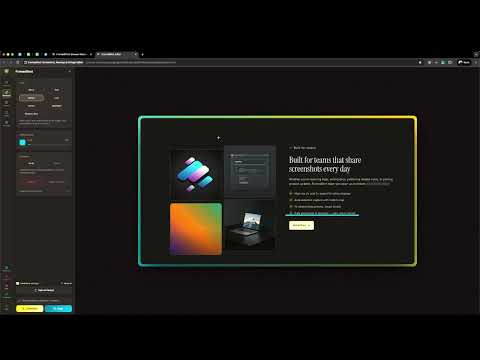
Hide emails, API keys and card numbers before you share a screenshot. FramedShot is a screen capture tool and editor that reads your image on your device and flags what should not be seen: emails, phone numbers, card and IBAN numbers, API keys, tokens and labelled passwords. Blur or cover them in one click, annotate with arrows and step numbers, set the image in a browser frame mockup and copy it straight into a bug report, a doc or a launch post. No account, no upload, no watermark. Auto-redact: 10 free a month, unlimited with Pro. HOW IT WORKS 1. Capture a full page, the visible tab or an area, or paste a shot from any desktop app (Ctrl/Cmd+V) 2. Auto-redact lists what looks sensitive; review it and cover everything in one click 3. Annotate with arrows, text and numbered steps, pick a frame and background, then copy or export WHY PEOPLE USE IT • Bug reports and support replies that don't expose a customer's email or an API key • Docs, changelogs and launch posts that look designed, made in seconds • Tutorials in one go: capture steps turns up to 8 areas into a ready-made tutorial collage • Peace of mind: images and recordings are processed on your device and never uploaded CAPTURE • Full page screenshot (auto-scroll and stitch), the visible tab, or a selected area • Tab screen recorder: record, trim, add a frame and export WebM • Quick copy: skip the editor and put a styled image straight on your clipboard • Paste (Ctrl/Cmd+V) or open any image you already have ANNOTATE AND MARK UP • Text with optional background, arrows, lines, rectangles, circles, pen and highlighter • Step numbers: click to drop 1, 2, 3; delete one and the rest renumber • Magnifier: enlarge small text in a round lens (Pro on export) • Move, resize and rotate anything; undo and redo; single-key tool shortcuts BLUR AND REDACT • Blur, pixelate or cover any area by hand, free and unlimited • Auto-redact: review what was found, then cover it all in one click • Copy text (OCR): extract English text from any image, free MAKE IT LOOK GOOD • Mac and Windows browser frames that turn a capture into a clean mockup • Gradient, solid or transparent backgrounds, padding, rounded corners, shadow and tilt • Your logo (Pro on export): place it anywhere and move it like any annotation; your last 3 logos stay one click away • Crop and rotate, then save up to 10 styles EXPORT AND SHARE • PNG, JPG or WebP at 1x, 2x or 3x, or copy with Ctrl/Cmd+C • Social media sizes for posts, stories, galleries and video thumbnails, plus custom sizes; export a whole social pack as one ZIP • Side-by-side collages, great for before and after GREAT FOR Bug reports, documentation, tutorials and onboarding guides, release notes, support replies, product launches and social posts. PRIVATE BY DESIGN Your images and recordings are processed on your device and never uploaded. FramedShot collects anonymous usage analytics (like which features are used) to improve the extension; analytics never include image or recording content, page URLs or text, filenames, browsing history, or personal information. If you buy Pro, payment runs through Stripe, your checkout email is used only for purchase messages, and a random install ID (no images, no email) is checked with our server about once a day. Otherwise email is optional: supporters only get product updates. 9 LANGUAGES English, German, Spanish, French, Indonesian, Japanese, Portuguese (Brazil), Russian and Turkish, following your browser language. FREE CORE, OPTIONAL PRO Capture, annotation, manual blur, frames, backgrounds, recording and export are free, with no watermark. FramedShot Pro ($19 a year or $39 once) keeps your logo and the magnifier in exported images, adds your logo to new screenshots automatically, makes auto-redact unlimited (free: 10 a month) and adds a verify pass that reads the finished image back and lists any emails, keys or numbers still readable. You can place and preview Pro items for free; without Pro, exports simply leave them out.
5 out of 513 ratings
Details
- Version4.0.1
- UpdatedNovember 24, 2026
- Size3.78MiB
- Languages9 languages
- DeveloperWebsite
Email
andrei.projects@proton.me - Non-traderThis developer has not identified itself as a trader. For consumers in the European Union, please note that consumer rights do not apply to contracts between you and this developer.
Privacy

FramedShot: Screenshot Editor, Blur & Redact has disclosed the following information regarding the collection and usage of your data. More detailed information can be found in the developer's privacy policy.
FramedShot: Screenshot Editor, Blur & Redact handles the following:
This developer declares that your data is
- Not being sold to third parties, outside of the approved use cases
- Not being used or transferred for purposes that are unrelated to the item's core functionality
- Not being used or transferred to determine creditworthiness or for lending purposes
Support
For help with questions, suggestions, or problems, visit the developer's support site