


Overview
You don't need a tab manager, you need a focus manager.
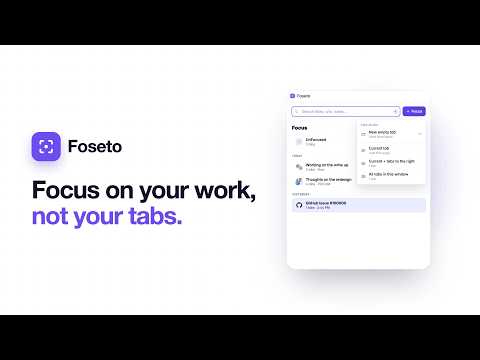
Browsers hold tabs. Foseto holds your focus - the set of tabs you're working in right now. The moment something else comes up, switch to a new focus, do the thing, and switch back - nothing to set up beforehand, nothing to clean up after, nothing to manage. 🔔 THE MOMENT FOSETO IS BUILT FOR A teammate pings you with an urgent question. A quick task pops up between meetings. You remember a side project you wanted to research before the end of the day. Repeat that a few times a day, and your browser becomes your memory: tabs stacked across windows, yesterday's context buried somewhere on the right, everything kept open just in case. ⚙️ HOW IT WORKS 1. Start a focus from one or more open tabs, or with an empty tab (Alt+T). 2. Switch your focus in one click, anytime. Your old tabs wait exactly as you left them, ready whenever you come back. 3. Revisit any focus, even months later. Search your full history by title, URL, or note. 🚫 WHAT YOU DON'T HAVE TO DO • No tab groups or workspaces to build and maintain • No tabs to drag, name, or sort • No cleanup after a quick context switch • No sessions to remember to save before closing 🛠️ FEATURES • One-click focus switching - swap your full set of tabs without losing your place • Search everything - find any tab in any focus by title, URL, or note • Focus notes - auto-saved, searchable notes • Visit history - find anything you've looked at in a focus, even tabs you've closed • Side panel + popup - keep your focus list visible while you work, or use the compact popup 🔒 PRIVATE BY DEFAULT. SYNC WHEN YOU WANT. Foseto stores everything on your machine. Your tabs, URLs, and notes never leave your computer unless you choose to turn on Google Drive sync. Connect Google Drive (optional upgrade) to unlock: • Unlimited storage - save every focus, tab, and note without limits • Backups - automatic, so you never lose a focus • Snapshots - capture and annotate any page in a focus • Multi-device - pick up any focus from any computer with Foseto installed • Share a focus - send a teammate a link to any focus Even with Drive sync on, Foseto never sees your data. Your tabs, URLs, and notes sync directly between your computer and your own Google Drive - and within Drive, Foseto only sees files it creates, never your other documents. 🎯 BUILT FOR THE WAY REAL WORK HAPPENS Foseto isn't a tab manager you spend time configuring. It's a focus switcher you reach for the moment something interrupts you. Set a focus, get the work done, swap right back.
5 out of 51 rating
Details
- Version1.8.14
- UpdatedAugust 15, 2026
- FeaturesOffers in-app purchases
- Size648KiB
- LanguagesEnglish (United States)
- DeveloperGreenLakeSoftware LLCWebsite
522 W Riverside Ave #10175 Spokane, WA 99201-0580 USEmail
support@foseto.comPhone
+1 360-382-7631 - TraderThis developer has identified itself as a trader per the definition from the European Union and committed to only offer products or services that comply with EU laws.
- D-U-N-S145019813
Privacy

This developer declares that your data is
- Not being sold to third parties, outside of the approved use cases
- Not being used or transferred for purposes that are unrelated to the item's core functionality
- Not being used or transferred to determine creditworthiness or for lending purposes
Support
For help with questions, suggestions, or problems, visit the developer's support site