

ForTex
2 ratings
)
Overview
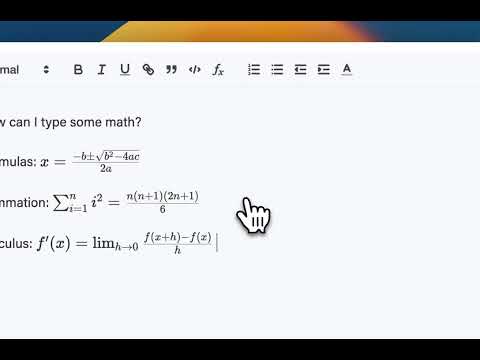
Create flexible-sized, multi-line LaTeX formulas on a Quill text editor.
If you're regularly typing equations in an external platform and ending up with clunky plain text, this extension is for you. ForTex adds a flexible LaTeX formula button to Quill-based text editors. Once installed, ForTex adds a small formula button to supported Quill editor toolbars. Click it to open a math editor where you type LaTeX code. When you save, the rendered formula appears at your cursor position in the editor. Key features: - Add a LaTeX formula button with flexible sizing for multi-line equations to Quill-based text editors. - Type LaTeX code (similar to Overleaf) and insert rendered formulas directly into the editor. Privacy and data: - ForTex runs only on pages that match the configured URLs (Quill-based editors). - It does not send any content to external servers. LaTeX is processed directly in the page where you are editing. - No analytics or tracking are included in this extension. Disclaimer: ForTex is an independent project and is not affiliated with or endorsed by Quill, or any learning platform providers.
5 out of 52 ratings
Details
- Version2.1
- UpdatedSeptember 19, 2026
- Offered byForTex Extension
- Size19.08MiB
- LanguagesEnglish (United States)
- Developer
Email
fortex.extension@gmail.com - Non-traderThis developer has not identified itself as a trader. For consumers in the European Union, please note that consumer rights do not apply to contracts between you and this developer.
Privacy

This developer declares that your data is
- Not being sold to third parties, outside of the approved use cases
- Not being used or transferred for purposes that are unrelated to the item's core functionality
- Not being used or transferred to determine creditworthiness or for lending purposes
Support
For help with questions, suggestions, or problems, please open this page on your desktop browser