

Formigo — smart form filler
1 rating
)
Overview
Fill forms with realistic Faker test data: smart field detection, custom rules, 70+ data languages, files of the right type.
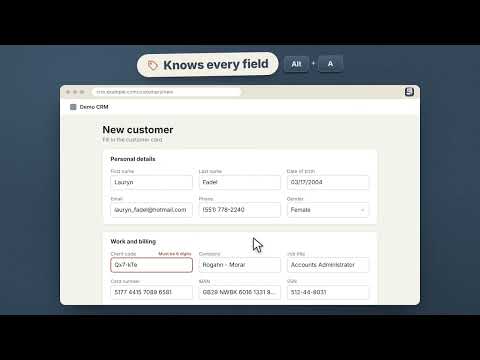
Formigo fills web forms with plausible test data in a single click. This extension is designed for QA engineers, developers, and anyone who finds themselves repeatedly entering the same information into forms throughout the day. KEY FEATURES • Context-aware: It identifies the purpose of a field by analyzing its label, attributes, placeholder text, surrounding text, and section headers. For example, a "Number" field within a passport section will be populated with a passport number, while the same field in a credit card section will receive a card number. • Consistent data: It ensures that fields like first name, last name, email, and username belong to a single, coherent persona. Repeated fields—such as password or email confirmation—will always match the original entry. • Supports over 85 field types: Including full names, addresses, phone numbers, dates of birth, company names, bank card numbers (with valid checksums), IBANs, various Russian tax/identification numbers (INN, SNILS, OGRN), IMEI, VIN, vehicle license plates, colors, and more. • Multilingual support: Generates data in 76 languages using the Faker library. • Handles complex interfaces: Works with custom dropdowns (Select2, Chosen, ng-select, MUI, Ant), datepickers, input masks, checkboxes with hidden inputs, tile-based selection lists, modal windows, Shadow DOM, and iframes. Fully compatible with React, Angular, and Vue. • File uploads: Automatically attaches files to upload fields. It determines the required format based on the `accept` attribute, surrounding text, or labels. Formigo can either use your own test files or generate valid, functional files—including image formats. It will not replace files that are already attached. • Respects field constraints: Takes into account `maxlength`, `pattern`, `min/max` values, "digits-only" requirements, and input masks defined in placeholders. THREE FILLING MODES • Entire page (or just the modal window, if one is open) • Current form • Single field CUSTOM RULES WITHOUT CODING Click "Field Rule" and select a field on the page. Formigo will suggest a reliable way to locate it (using `data-testid`, `id`, `name`, a label, or XPath), indicate whether the locator is unique, and offer suggestions for the value to be inserted. A rule can be saved with a single click. For any field type, you can refine how it’s identified and specify a custom value—such as a regular expression (RegExp), a template, or a list of options. CONVENIENCE • Customizable keyboard shortcuts • "Show Field Types" mode explains why a field was identified in a particular way • Option to fill only empty fields, leaving existing data untouched • Import and export all settings as a single file to share with your team • Light and dark themes; interface available in 18 languages BENEFITS • No more manual form filling before every test or check • Data looks authentic, ensuring forms pass validation • Suitable for complex enterprise interfaces where standard autofill tools fail • Create custom rules in seconds—no regular expressions required PRIVACY All data is generated locally within your browser. Formigo does not collect or transmit your data. The only network requests made are for retrieving images for file-upload fields—a feature that can be disabled in the settings.
5 out of 51 rating
Details
- Version1.6.0
- UpdatedOctober 25, 2026
- Offered byTostes
- Size1.25MiB
- Languages18 languages
- Developer
Email
roger.roger.11142@gmail.com - Non-traderThis developer has not identified itself as a trader. For consumers in the European Union, please note that consumer rights do not apply to contracts between you and this developer.
Privacy

Formigo — smart form filler has disclosed the following information regarding the collection and usage of your data. More detailed information can be found in the developer's privacy policy.
Formigo — smart form filler handles the following:
This developer declares that your data is
- Not being sold to third parties, outside of the approved use cases
- Not being used or transferred for purposes that are unrelated to the item's core functionality
- Not being used or transferred to determine creditworthiness or for lending purposes