

FormForge — Form Filler & Autofill for QA Testing

Overview
Autofill any web form with realistic test data in one click. React, shadow DOM, iframes. 100% offline, no account.
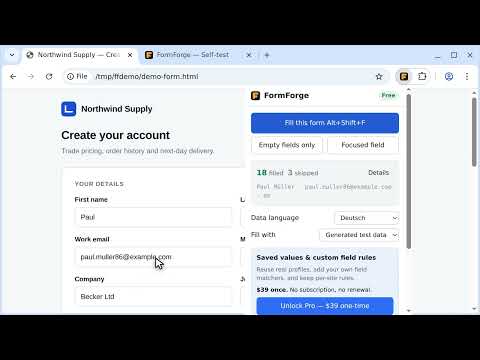
FormForge fills web forms with realistic test data in one click — including the React, Vue and Angular forms that ordinary autofill silently fails on. Built for QA engineers, developers and testers who fill the same form fifty times a day. Everything runs on your own machine: no account, no cloud, no AI, and no network requests of any kind. Whether you call it test data, dummy data or fake data, the job is the same — a form full of values that are plausible enough to submit, generated fresh every time. WHY NOT JUST USE AUTOFILL Browser and password-manager autofill are built for one person filling in their own details. That is the opposite of what testing needs. They fill your real name, your real address and your real email, they only offer to fill fields they recognise as yours, and they leave everything else blank. Run them twice and you get the same person twice, so you cannot tell one test signup from another. FormForge generates a new fictional person on every fill, fills every field on the form rather than the handful autofill recognises, and never touches your saved personal data because it does not have access to it. If you have ever wondered why autofill does nothing on a particular form, the answer is usually that the form is built with a framework that discards the value, or that the fields are not the ones autofill knows how to name. Both cases are what FormForge is for. WHY ANOTHER FORM FILLER Most form fillers work on a simple login page and quietly fail on a real application. FormForge is built around the cases that break the others: • React, Vue and Angular controlled inputs — values are written through the native property setter and the framework's own change tracking, so your app actually registers the input instead of discarding it on the next render. • Shadow DOM, including nested shadow roots and custom elements. • react-select and similar custom dropdowns, including the type-to-search kind where you must type before any option appears. • Native multi-selects. • Same-origin iframes. • Rich-text editors and contenteditable regions — text is inserted using the browser's own editing command rather than by overwriting the element's content, so an editor that keeps its own internal model stays in step with what is on screen. • Field names containing dots, dashes and other characters that break naive selector matching. One limit worth knowing before you install: a form inside a CROSS-ORIGIN iframe is not filled, and cannot be. Reaching into another site's frame would require standing access to that site, which FormForge deliberately does not ask for. Same-origin frames fill normally. REALISTIC DATA, NOT RANDOM STRINGS A random string in a phone field just fails validation. FormForge reads each field's type, label, placeholder, ARIA attributes and autocomplete token, then generates something that fits: • Names, addresses and phone numbers in English, German, French, Spanish and Portuguese, with separate data for Portugal and Brazil — matched to the page's own language automatically, with a sensible fallback when the page does not say. • Numbers that respect min, max and step. • Dates inside the field's own allowed range — and dates that make sense for the field they are in. A date of birth lands in the past, a delivery date in the future, a joined date behind today. A field is not just a date format, it is a meaning. • Luhn-valid test card numbers. • One consistent fictional person per fill, so the filled form reads like a real submission rather than a bag of unrelated values. • Email prefix — set a prefix like "qa" and every generated address becomes qa+4821@yourdomain.com, so all your test signups land in one inbox you control. • Values that FIT a field's maxlength by choosing a narrower format — a 10-character mobile field gets 5551234567, never a clipped "(555) 123-". The same applies to short postcode and date fields. Address and email fields are told apart rather than treated as one kind. A billing address, a shipping address and a current address get different addresses. A user email and a customer email are not assumed to be the same person's. Free-text boxes get language that fits the field — a delivery-notes box reads like a delivery note, a bio like a bio. No lorem ipsum: you can look at a filled form and tell at a glance whether it is plausible. Set a seed (Pro) and you get identical data every run on the same version, so a failing regression run can be replayed with exactly the same values. HOW IT DECIDES WHAT A FIELD IS Most fillers match on the name attribute and give up when it is unhelpful. FormForge reads every signal the field offers and weighs them: • A visible label, including one that wraps the input rather than pointing at it. • aria-labelledby, for fields labelled by another element entirely. • The placeholder, when there is no label at all. • The autocomplete token. • The name and id, segmented on camelCase and on dots, dashes and underscores. When the label and the id disagree, the label wins. A field with id "userName" and a label reading "Full Name" gets a full name, because that is what the person filling the form is being asked for. Field names are read in five languages, not only English. First name, surname, street, city, postcode, country, phone and email are recognised by many of their German, French, Spanish and Portuguese names and labels, and so is a date of birth. A few short words are deliberately left out because they are also ordinary English and would misfire on English forms — German "Land" and French "Pays" for country, and French "portable" for a mobile number. Every other field type is matched on its English name. IT NEVER TOUCHES WHAT IT SHOULDN'T CAPTCHA fields, hidden inputs, disabled and readonly fields, file pickers and anything genuinely invisible are left strictly alone. Required checkboxes are always ticked, because a form that cannot submit is not filled, and a box the page itself shipped ticked is never cleared. Honeypot fields are refused. A honeypot is a trap field a site hides with CSS — moved off-screen, sized to a single pixel, or set to zero opacity — so that a person never sees it and a bot fills it anyway. Fill one and the site silently discards your submission: no error, no message, just a form that appears to work and quietly does nothing. It is one of the most confusing failures you can hit when testing a signup flow, and most fillers walk straight into it. Telling a honeypot from a real control is harder than it sounds, because custom-styled radios and checkboxes hide their real input exactly the same way. Material UI, Tailwind and older Bootstrap all put the working input behind a styled label. FormForge tells them apart by whether the control has a label a person can actually see, so styled checkboxes and radio groups fill normally while the traps stay untouched. WHEN IT CANNOT FILL SOMETHING, IT SAYS SO Every fill returns a report showing which fields were filled, which were skipped and why, and which were written but then rejected by the page — the silent failure that leaves you staring at an empty form wondering what happened. Custom widgets that cannot be driven honestly are reported as unsupported rather than being stuffed with raw text. Writing text into a dropdown that never registers a selection looks like success and submits nothing, so FormForge refuses to do it and tells you instead. A field that is disabled because it depends on another field is reported too, rather than quietly vanishing from the count. BUILT-IN SELF-TEST Browser updates break extensions. FormForge ships a self-test page that runs the real engine against deliberately awkward field types and tells you what works in your browser build — and gives you a report you can paste into a support email. In FormForge 1.0.4 that suite is 140 fixtures and 165 graded cases, covering frameworks, shadow DOM, iframes, custom widgets, date semantics, maxlength handling and the refusal cases above. The 1.0.4 build scores 148 passed, 0 failed and 17 correctly skipped. You do not have to take that number from a screenshot — open the page and run it yourself, on your machine, in your browser. PERMISSIONS: AS CLOSE TO NONE AS CHROME ALLOWS FormForge has NO standing access to any website. It cannot read a page until you click the toolbar icon, press the shortcut, or use the right-click menu — and that access expires the moment the fill finishes. It declares no optional permissions at all, so there is no site access it can ever ask you for later — not for one site, not for all of them. There is no analytics, no telemetry, no tracking, and no remote code. The extension makes no network calls at all — your data never leaves your browser because there is nothing for it to be sent to. PRICING — ONE PAYMENT, NO SUBSCRIPTION FREE — $0, permanently • Unlimited fills — no daily limit, ever • Every field type, shadow DOM, iframes, frameworks • Test data in five languages • The self-test page, and its report is yours to export • One saved profile and two field rules, so you can try them properly PRO — $39, ONE TIME This is a single payment of US$39. It is NOT a subscription. Nothing renews, nothing recurs, and there is no billing cycle to cancel. • Unlimited saved profiles: fill with your own values, not generated ones • Unlimited custom field rules: match a field by pattern, set your value or skip it • Seeded reproducible data — the same seed replays the same values on the same version, so a failing test can be reproduced exactly How you get it: buy on flinthive.com, and a signed licence key is emailed to you. Paste it into the extension's Settings page once. The extension checks the signature on your own device — it never contacts a server to verify a licence, which is how it can make no network calls at all. Refunds are handled by Paddle. Once a refund is issued the licence is no longer yours to use, and we ask that you remove it from the extension — there is a "Remove this licence" button in Settings. TEAM LICENSING Need several seats? Email support@flinthive.com and tell me what you need. THE 7-DAY TRIAL, IN PLAIN TERMS • No card. No account. No payment details of any kind are collected. • It is a local unlock on your own device — no payment processor is involved, so there is nothing that could charge you and nothing to cancel. • It starts only when you press the button, and pressing it again will not start a second one. • After 7 days the extension simply returns to the Free tier. • Nothing is deleted and nothing is locked — every profile and rule stays visible and editable. The free tier applies one profile and your first two enabled rules. If the profile you had selected is beyond that, fills use the first profile you created and say so. Your choice is remembered and comes back the moment you buy Pro. KEYBOARD Alt+Shift+F Fill every field Alt+Shift+D Fill just the focused field A fill started from the keyboard or the right-click menu reports what it did in the page itself, so you are not left guessing when the popup is not open. A third command, "Fill only empty fields", ships without a default key — useful for topping up a half-completed form without disturbing what you have already typed. All three are set and remapped at chrome://extensions/shortcuts. Questions, bugs, or a site that won't fill properly: support@flinthive.com Privacy policy: https://flinthive.com/formforge/privacy What changed in each version: https://flinthive.com/formforge/changelog
5 out of 51 rating
Details
- Version1.0.4
- UpdatedSeptember 23, 2026
- FeaturesOffers in-app purchases
- Size167KiB
- LanguagesEnglish
- DeveloperMD. ARAFAT UDDINWebsite
Rohima Bhavan, Noapara, North Pahartali Chittagong 4207 BDEmail
support@flinthive.comPhone
+880 1818-475643 - TraderThis developer has identified itself as a trader per the definition from the European Union and committed to only offer products or services that comply with EU laws.
Privacy

This developer declares that your data is
- Not being sold to third parties, outside of the approved use cases
- Not being used or transferred for purposes that are unrelated to the item's core functionality
- Not being used or transferred to determine creditworthiness or for lending purposes
Support
For help with questions, suggestions, or problems, visit the developer's support site