


Overview
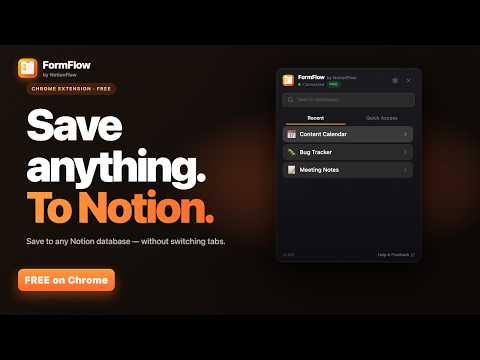
Quick-capture into any Notion database. Auto-fill source URL & date, pin your top databases, save without leaving your tab.
Quick capture for Notion databases — without the friction. FormFlow is the form-capture Chrome extension for Notion users who want to drop a structured entry into a database without the tab dance. Click the popup, pick the database, fill the form, save. No new tab, no navigating Notion's sidebar, no losing your train of thought before you finish typing. Whether you're logging tasks, saving articles to a reading list, capturing CRM contacts, tracking bugs, building a research index, or running a daily content calendar — FormFlow makes "send this to Notion" the path of least resistance. ━━━━━━━━━━━━━━━━━━━━━━ HOW IT WORKS ━━━━━━━━━━━━━━━━━━━━━━ 1. Connect your Notion workspace once via OAuth. 2. Click the FormFlow toolbar icon. The popup opens with your databases. 3. Pick a database — the form rebuilds itself from that database's actual schema (title, status, select, multi-select, date, person, URL, number — all of it). 4. Type the title, fill any required fields, hit save (or Cmd+Enter / Ctrl+Enter). 5. The new page lands in Notion. The popup closes. You're back to your tab in seconds. That's it. Capture-to-Notion goes from a 30-second context switch to a 5-second popup. ━━━━━━━━━━━━━━━━━━━━━━ WHY FORMFLOW ━━━━━━━━━━━━━━━━━━━━━━ • Save to ANY of your Notion databases — every database you've shared with the integration is in the picker. • Smart form auto-built from your database schema — it knows your title field, your status options, your select tags, your dates. • Auto-fill source URL — the page you're on becomes the source field automatically. • Auto-fill today's date — date fields default to today, so you never type "2026" again. • Quick Access slots — pin your most-used databases at the top, drag to reorder, one-click save. • Save history — see your last entries with click-through to the source URL you saved from. • Light & dark mode (auto-follows your system or pin one). • Keyboard-first — Cmd+Enter (Mac) / Ctrl+Enter (Windows) submits the form. Never leave the keyboard. • Real popup, not a sidebar overlay — works on any tab, any site. ━━━━━━━━━━━━━━━━━━━━━━ WHO IT'S FOR ━━━━━━━━━━━━━━━━━━━━━━ • Knowledge workers — drop tasks, ideas, contacts, links into Notion the moment you have them. • Researchers & writers — save articles to a reading list with the source URL preserved automatically. • Project managers — log bugs, feature requests, sprint items into the right database without context-switching. • Sales & CRM users — add contacts and meeting notes without opening Notion. • Anyone who runs their workflow in Notion databases — FormFlow removes the friction between "I should capture this" and actually capturing it. ━━━━━━━━━━━━━━━━━━━━━━ 100% FREE — EVERYTHING INCLUDED ━━━━━━━━━━━━━━━━━━━━━━ • Unlimited saves per month. • 5 Quick Access database slots. • 50-entry save history. • Auto-fill source URL and today's date on every save. • Smart defaults — FormFlow remembers your last-used values. • No subscription, no license key, no catch. ━━━━━━━━━━━━━━━━━━━━━━ PRIVACY-FIRST DESIGN ━━━━━━━━━━━━━━━━━━━━━━ • Your Notion access token is encrypted at rest (AES-GCM) on our servers — never stored in plaintext, never readable from the extension. • FormFlow does NOT read, index, or transmit the content of your existing Notion pages. We only see what you explicitly type into the save form. • Save history records (title, database name, source URL) are stored on our servers so the list persists across devices. You can clear it any time. • No telemetry, no browsing tracking, no ads, no data sales. FormFlow only runs when you click it. • Disconnect Notion any time from Settings — your OAuth token is permanently deleted within 30 days. Full policy: https://www.notionflow.io/formflow/privacy ━━━━━━━━━━━━━━━━━━━━━━ WHY FORMFLOW vs. ━━━━━━━━━━━━━━━━━━━━━━ vs. opening Notion in a new tab — FormFlow saves you the navigation, the database hunt, and the focus break. vs. a Notion template button — FormFlow works from any tab on any site, not just inside Notion. vs. a generic web clipper — FormFlow saves to a structured database with real properties, not just a free-form note. vs. typing into Notion's quick-capture — FormFlow auto-fills the source URL and date, and lets you pick the destination database in one click. ━━━━━━━━━━━━━━━━━━━━━━ SUPPORT ━━━━━━━━━━━━━━━━━━━━━━ • Help and feedback: https://www.notionflow.io/formflow/support • Privacy policy: https://www.notionflow.io/formflow/privacy • Terms of service: https://www.notionflow.io/terms FormFlow is part of the NotionFlow suite by Beast Creative LLC.
0 out of 5No ratings
Details
- Version1.0.2
- UpdatedOctober 4, 2026
- FeaturesOffers in-app purchases
- Size1.25MiB
- LanguagesEnglish
- DeveloperBeast Creative LLCWebsite
30 N Gould St Ste N Sheridan, WY 82801-6317 USEmail
treyinchina@gmail.comPhone
+1 503-308-8900 - TraderThis developer has identified itself as a trader per the definition from the European Union and committed to only offer products or services that comply with EU laws.
- D-U-N-S143977674
Privacy

FormFlow — Save to Any Notion Database has disclosed the following information regarding the collection and usage of your data. More detailed information can be found in the developer's privacy policy.
FormFlow — Save to Any Notion Database handles the following:
This developer declares that your data is
- Not being sold to third parties, outside of the approved use cases
- Not being used or transferred for purposes that are unrelated to the item's core functionality
- Not being used or transferred to determine creditworthiness or for lending purposes
Support
For help with questions, suggestions, or problems, visit the developer's support site