


Overview
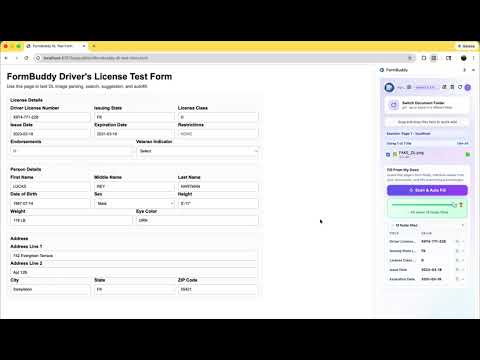
Fill any web form instantly from your personal documents — locally, privately, with AI-powered suggestions and full citations.
Paste this into the Description field: FormBuddy is an AI-powered form-filling assistant that reads your personal documents — passports, tax forms, insurance cards, utility bills — and intelligently suggests the right value for every form field you click on any website. HOW IT WORKS 1. Point FormBuddy to a folder on your computer containing your documents (PDFs, images, text files) 2. FormBuddy indexes the documents locally — nothing is uploaded anywhere 3. When you click any form field on any website, FormBuddy finds the right answer from your documents and shows it as a suggestion 4. Accept with one click — the field fills instantly EVERY SUGGESTION COMES WITH A CITATION FormBuddy never guesses. Every suggestion shows you exactly where the data came from: Passport Number: AB1234567 From: passport_scan.pdf, Page 1 — "Document Number" PRIVACY BY DESIGN • Your documents never leave your device • No FormBuddy backend server — the extension is entirely client-side • API keys are stored in the browser's encrypted local storage • Only text snippets (not full documents) are sent to your chosen AI provider • You control exactly which folder FormBuddy can read BRING YOUR OWN AI KEY (BYOK) FormBuddy uses your own API key from Anthropic (Claude), OpenAI (GPT-4o), or Google (Gemini). This means: • No FormBuddy subscription or monthly fee • Pay only for what you use, directly to the AI provider • Full transparency into your AI usage and costs WORKS ON ANY FORM • Tax returns (W-2, 1099, Schedule forms) • Visa and passport applications • Insurance claims • Travel and hotel bookings • Medical and government forms • Any website with input fields MULTI-PAGE FORM SUPPORT FormBuddy tracks which fields you have already filled across page navigations. On page 2 of a multi-page form, it never repeats a suggestion you already used on page 1. QUICK ADD Add new information without leaving the page: • Drag and drop files directly into the side panel • Right-click any text on a web page → "Add to FormBuddy folder" • Type a quick note and save it • Take a screenshot of anything on screen — it is indexed immediately SUPPORTED DOCUMENT TYPES • PDF (text-based and scanned) • PNG, JPG (passport scans, insurance cards) • Text notes SUPPORTED AI PROVIDERS • Anthropic Claude (claude-sonnet, claude-haiku) • OpenAI (GPT-4o, GPT-4o mini) • Google Gemini (gemini-2.0-flash, gemini-1.5-pro)
0 out of 5No ratings
Details
- Version1.0.0
- UpdatedFebruary 27, 2026
- Size588KiB
- LanguagesEnglish
- DeveloperWebsite
Email
venkateshpoosarla@gmail.com - Non-traderThis developer has not identified itself as a trader. For consumers in the European Union, please note that consumer rights do not apply to contracts between you and this developer.
Privacy

This developer declares that your data is
- Not being sold to third parties, outside of the approved use cases
- Not being used or transferred for purposes that are unrelated to the item's core functionality
- Not being used or transferred to determine creditworthiness or for lending purposes
Support
For help with questions, suggestions, or problems, please open this page on your desktop browser