

FormBlessed

Overview
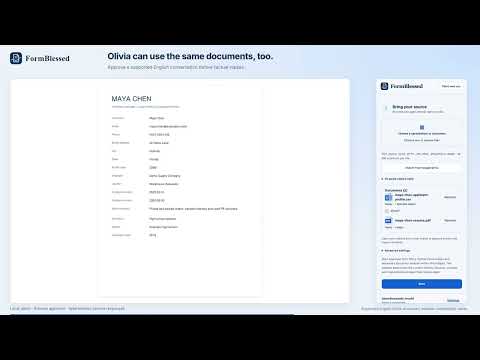
Interpret spreadsheet and document records, review their sources and fill approved website forms.
FormBlessed fills supported online forms from information in your documents, spreadsheets, images and selected Drive files. HOW IT WORKS Choose a source and open the form you want to complete. FormBlessed matches information to supported fields without manual mapping or a fixed template. Review source references for matched values, correct anything that is flagged or uncertain, and check the filled page before saving. Saving and submitting on the website remain your choice. Website compatibility and readable source requirements vary. SOURCES AND PRIVACY Import supported documents, spreadsheets, presentations and images up to 16 MB each, or choose individual Google Drive files when Drive access is available. Drive imports are snapshots and do not edit or sync the originals. Selected source content and relevant form context are sent to the hosted service and its processors to provide the requested work. Review the privacy notice before importing personal or confidential information. ACCOUNT AND CREDITS Connect your CopyCat account and access credit purchases directly from the extension panel. An account connection and processing credits are required for document analysis and AI matching. Credits come from the shared CopyCat wallet. Trial availability and eligibility are verified in CopyCat; connecting an account does not claim a trial. PREFERENCES Autofill preferences let you choose: - Automatic continuation across form pages - Automatic clearing of old browser data - Reuse of previous results - An extraction credit limit Cleanup and page continuation start enabled and can be turned off.
0 out of 5No ratings
Details
- Version0.1.6
- UpdatedOctober 22, 2026
- FeaturesOffers in-app purchases
- Offered bybane6080
- Size945KiB
- LanguagesEnglish (United States)
- DeveloperFREEMAN SENECHARLES
6577 Rivermill Club Dr Lake Worth, FL 33463 USEmail
support@lavenberry.comPhone
+1 561-809-8479 - TraderThis developer has identified itself as a trader per the definition from the European Union and committed to only offer products or services that comply with EU laws.
Privacy

FormBlessed has disclosed the following information regarding the collection and usage of your data. More detailed information can be found in the developer's privacy policy.
FormBlessed handles the following:
This developer declares that your data is
- Not being sold to third parties, outside of the approved use cases
- Not being used or transferred for purposes that are unrelated to the item's core functionality
- Not being used or transferred to determine creditworthiness or for lending purposes
Support
For help with questions, suggestions, or problems, visit the developer's support site