


Overview
Copy CSS styles from any web element and instantly apply them to other elements.
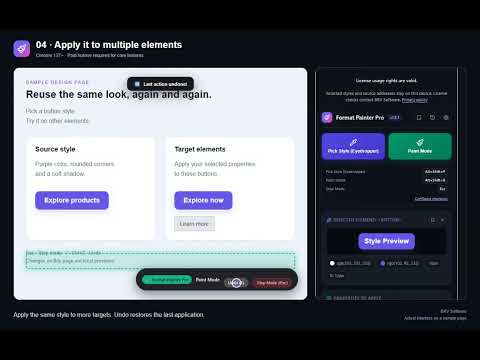
Format Painter Pro brings a visual CSS workflow to Chrome. Pick a web element, apply its styles to other elements, save reusable presets and copy the generated code into your project. FREE TRIAL AND LICENSE: A one-day free trial is available to try Format Painter Pro’s core features. After the trial ends, a valid BRV Software license is required to capture styles, paint elements and create or edit presets. Activate your trial or purchased license in the extension’s Options page. Without a valid trial or paid license, existing users retain limited access to their three most recent accessible saved presets and can export a JSON backup. Get started at https://brvsoftware.com/. FEATURES • Pick computed styles from a supported webpage. • Choose which properties to apply: typography, colors, box model, effects and layout. • Paint multiple elements, undo applications and press Esc to exit. • Save named presets and revisit recent selections. • Export CSS, Tailwind CSS suggestions, React style objects or inline styles. • Back up and import preset collections as JSON with a valid license. • View keyboard shortcuts and open Chrome’s shortcut settings to customize them. • Automatically follows your browser language, with support for English, Turkish, German, Portuguese, Spanish, Hindi, Arabic, Chinese, Korean, Japanese, French, Italian and Indonesian, including right-to-left layouts for Arabic. REQUIREMENTS AND LIMITATIONS Chrome 137 or later is required. Chrome settings pages, the Chrome Web Store and other protected pages cannot be styled. To use the extension on local files, enable “Allow access to file URLs” in Chrome’s extension settings. Changes are temporary local previews. The extension does not edit website files or publish changes to website servers. Tailwind CSS output is a conversion aid and may need adjustments for your project. PRIVACY Selected styles and source page addresses are stored on your device. Newly captured source addresses exclude URL query parameters and fragments. License activation and verification communicate with BRV Software over HTTPS; saved styles and source page addresses are not uploaded as part of these requests. The extension contains no advertising or analytics SDK. Privacy policy: https://brvsoftware.com/privacy-policy/ PURCHASE AND SUPPORT Licenses are sold by BRV Software, not Google. Pricing, taxes, activation limits, license duration and any renewal terms are provided on the purchase website and at checkout. Purchase: https://brvsoftware.com/ Support: info@brvsoftware.com
5 out of 52 ratings
Details
- Version1.2.1
- UpdatedNovember 6, 2026
- Size200KiB
- Languages15 languages
- DeveloperCihan BorovaWebsite
Karapinar mh. 1185 sok. No:11/15 Dikmen Şeref apartmanı Çankaya, Ankara 06450 TREmail
cihanborova@gmail.comPhone
+90 510 223 20 35 - TraderThis developer has identified itself as a trader per the definition from the European Union and committed to only offer products or services that comply with EU laws.
Privacy

Format Painter Pro has disclosed the following information regarding the collection and usage of your data. More detailed information can be found in the developer's privacy policy.
Format Painter Pro handles the following:
This developer declares that your data is
- Not being sold to third parties, outside of the approved use cases
- Not being used or transferred for purposes that are unrelated to the item's core functionality
- Not being used or transferred to determine creditworthiness or for lending purposes
Support
For help with questions, suggestions, or problems, please open this page on your desktop browser