

Forma
4 ratings
)
Overview
Smart autofill for job portals, Microsoft Forms, and Google Forms.
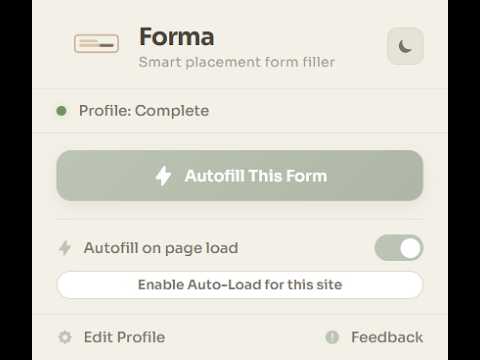
Forma — Smart Placement Form Filler You know the drill. Another placement drive, another Google Form asking for your name, roll number, CGPA, 10th percentage, 12th percentage, phone number, email, LinkedIn, GitHub, resume link, department, batch, backlogs... and you type the exact same answers. Again. Forma exists so you never have to do that again. Set up your profile once. Click one button. Every form fills itself — accurately, instantly, and completely privately on your device. WHAT FORMA ACTUALLY DOES Forma is not your browser's basic autofill. Chrome's built-in autofill knows your name and address. It has no idea what "University Enrollment Number" means, or that "UID" and "Roll No" are the same thing, or that "Phone (without country code)" means it should strip the +91. Forma understands all of this. It reads every form field, figures out what it's actually asking for, and fills the correct value from your saved profile. It works on Google Forms, Microsoft Forms, Greenhouse, Lever, Workday, and virtually any other website with a form. AI-POWERED MATCHING (Runs 100% on Your Device) Some forms use unusual labels. "Guardian's Contact", "Permanent Address Line 2", "Preferred Programming Language" — these aren't standard fields, and simple keyword matching won't cut it. This is where Forma's built-in AI steps in. Forma uses Chrome's Gemini Nano, a local AI model that runs entirely on your computer, to semantically understand what a form field is asking and match it to the right piece of your profile. No internet connection needed for processing. No data sent to any server. The AI runs on your hardware, in your browser, on your machine. And here's the important part — the AI only maps fields to your existing data. It will never make up an answer. If you haven't provided a value for something, Forma leaves it blank rather than guessing. Your data stays honest. Don't have AI support? No problem. If your browser doesn't support Gemini Nano or you prefer not to enable it, Forma works beautifully without it. The core matching engine handles the vast majority of form fields on its own. The AI is a powerful bonus, not a requirement. ONE CLICK. EVERY FORM. Here's how simple it is: 1. Install Forma and click "Edit Profile" 2. Fill in your details once — name, academics, scores, contact info, links 3. Visit any form. Click "Autofill This Form" in the popup 4. Done. Fields light up green (filled) or amber (skipped) so you can review at a glance That's it. No accounts to create, no passwords to remember, no cloud sync to configure. ZERO-CLICK MODE For sites you use all the time, you can go even further. Enable "Autofill on page load" and add the domain to your whitelist. The next time you open a form on that site, Forma fills it automatically before you even touch the keyboard. Add or remove sites from your whitelist with a single click right from the popup. YOUR DATA STAYS ON YOUR MACHINE This is non-negotiable. Forma has zero cloud infrastructure. There is no server. There is no database. There is no account system. Your profile data lives exclusively in your browser's local storage and never leaves your device. The AI model? Also local. It's Chrome's own built-in model running on your hardware. Analytics or tracking? None. Forma contains no telemetry, no usage monitoring, and no data collection of any kind. You can verify all of this yourself — the entire source code is open on GitHub. WORKS EVERYWHERE Forma isn't locked to one platform. It uses smart parsing that reads accessibility labels, walks through the page structure, and even waits for modern web apps (React, Angular) to finish loading before it starts filling. Tested and working on: - Google Forms - Microsoft Forms - Greenhouse - Lever - Workday - Any standard HTML form CUSTOM FIELDS Not every form asks standard questions. Some want your father's name, your blood group, your team name, or a specific project URL. Forma lets you create unlimited custom fields — just add a label and a value. These custom fields are fully integrated into the matching engine and the AI pipeline, so they work just as well as the built-in ones. BEAUTIFUL, THOUGHTFUL DESIGN Forma's interface is designed to feel calm and premium during what is usually a stressful time. The profile editor features a warm, earthy color palette, smooth animations, and a layout that makes managing 40+ fields feel organized rather than overwhelming. Switch between light and dark mode with a single click. See your profile completeness at a glance with the progress ring. Export your entire profile as a JSON file and import it on another machine whenever you need to. AI SETUP (Optional) If you want to enable the AI features, here's what you need: - Chrome version 128 or higher - Enable two flags in chrome://flags: • "Prompt API for Gemini Nano" → Enabled • "Optimization Guide On Device Model" → Enabled BypassPerfRequirement - Restart Chrome - Go to chrome://components and update "Optimization Guide On Device Model" - Open Forma's Settings tab and click "Initialize & Wake Up AI" The AI model downloads once in the background. After that, everything runs locally and offline. If your device doesn't meet these requirements, don't worry. Forma's keyword and fuzzy matching engines are already excellent at handling standard placement forms. You'll still save hours of typing. WHO IS FORMA FOR? - Students going through campus placement drives who are tired of filling the same 40 fields across 30 different forms - Job seekers applying on multiple ATS platforms like Greenhouse, Workday, and Lever - Anyone who values their time and wants to stop doing data entry that a machine should be doing for them Stop typing the same details into every form. Let Forma handle it. Built with precision and purpose. For the students, by a student. PRIVACY POLICY Your data never leaves your device. For our full privacy commitment, visit: https://github.com/chahalgoyal/FORMA/blob/main/PRIVACY_POLICY.md
5 out of 54 ratings
Details
- Version2.0.4
- UpdatedMay 13, 2026
- Offered bychahalgoyal
- Size3.92MiB
- LanguagesEnglish
- Developer
Email
chahalgoyal16@gmail.com - Non-traderThis developer has not identified itself as a trader. For consumers in the European Union, please note that consumer rights do not apply to contracts between you and this developer.
Privacy

Forma has disclosed the following information regarding the collection and usage of your data. More detailed information can be found in the developer's privacy policy.
Forma handles the following:
This developer declares that your data is
- Not being sold to third parties, outside of the approved use cases
- Not being used or transferred for purposes that are unrelated to the item's core functionality
- Not being used or transferred to determine creditworthiness or for lending purposes