

ForceKIT

Overview
Salesforce extension: SOQL console, inline API names, Profile/PermissionSet comparator, dark mode, UI switch, sync.
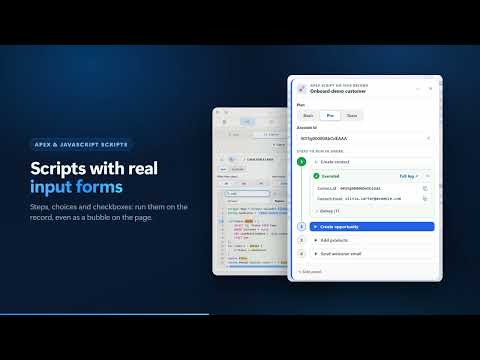
# ForceKIT for Salesforce **The ultimate Salesforce toolkit for developers, administrators, and technical professionals.** ForceKIT turns Chrome into a complete Salesforce work environment, bringing Org management, SOQL/SOSL, Record Detail, Data Loader, Debug Logs, Apex scripts and tests, a REST Explorer, administration tools, and powerful Salesforce UI enhancements together in one extension. **Fewer steps. Fewer tabs. More control over your Org.** --- ## ⚡ All your Salesforce tools in one place ForceKIT is designed to streamline the daily work of **Salesforce Developers, Administrators, and Technical Consultants**, reducing the need to switch constantly between Salesforce Setup, Developer Console, Query Editor, Data Loader, and other tools. ### 🔐 Org & Session Management Manage all your Salesforce Orgs directly from Chrome. * **Org Switcher** — detects Salesforce sessions currently open in the browser and lets you switch between Orgs instantly. * **Session Bar** — always shows the current Org, user, and environment. * **Side Panel or Full Page** — use ForceKIT in Chrome's side panel or in a dedicated browser tab. * Open an Org in a new tab, window, or Incognito mode while keeping the current Salesforce session. * **Share Session** — quickly generate an access link for the current Org. ### 🗂️ Saved Orgs Organize and access all your Orgs in seconds. * Sign in using **username/password, OAuth/PKCE, or API Login**. * Create **custom groups** with names, colors, and drag & drop organization. * Identify environments instantly using tab colors and colored favicons. * See which Org is currently active. * Fast search and sorting. * Trash area for deleted Orgs. --- ## 🔑 MFA & Authenticator A built-in TOTP authenticator directly inside ForceKIT. * Real-time MFA codes with countdown timers. * Copy codes with one click. * Import accounts from **QR codes, screenshots, or Google Authenticator exports**. * Link an MFA account to a specific Org. * Automatically use the correct authenticator during Salesforce login. ### 🚪 Salesforce Login ForceKIT brings its tools directly into the Salesforce login experience. * ForceKIT icon directly inside Salesforce login fields. * Select a saved Org and automatically fill in credentials. * Unlock using **Master Password or Passkey**. * Automatically fill MFA codes on **Verify Your Identity** pages. * After a manual login, ForceKIT offers to save or update the credentials. --- # 🔎 SOQL & SOSL Query A complete query workspace built for Salesforce developers. ### ✦ Smart Query Editor * Syntax highlighting. * Autocomplete for objects, fields, relationships, and subqueries. * Automatic formatting. * Undo support. * Automatic **REST API / Tooling API** detection. * Multiple queries organized into tabs and reorderable with drag & drop. * Query history and saved queries. * Query import/export. ### ✦ Field Selector — `*`, `*s`, `*c` One of ForceKIT's most distinctive productivity features. Instead of manually searching for dozens or hundreds of fields, use: * `*` → inserts **all fields**, standard and custom. * `*s` → inserts **standard fields only**. * `*c` → inserts **custom fields only**. ForceKIT automatically expands the command into the object's field list. ### 📊 Advanced Query Results Turn query results into a powerful data analysis and editing workspace: * A→Z / Z→A / no sorting. * Resize columns with drag & drop. * Automatic column sizing. * Copy API Names. * Hide one or multiple columns. * Undo column changes. * Instant filtering. * `field:value` filtering syntax. * Jump directly to a column by typing its name. * **Inline record editing** with double-click. * Edit data returned from subqueries as well. * Full-screen results or overlay mode on top of Salesforce. ### 📤 Export & Data Operations Export results to: * CSV * Excel `.xlsx` * JSON * Clipboard You can also perform **bulk record deletion** on query results through Data Loader. --- # 📄 Record Detail Inspect any Salesforce record without constantly navigating through the standard Salesforce UI. * Complete field view with **Label, API Name, and field type**. * Field properties at a glance: required, unique, External ID, formula, encrypted, and help text. * Navigate through lookup-related records. * Breadcrumb navigation. * Automatically identify **Related Records** by analyzing the Org schema. * Display related record counts. * Edit, clone, delete, and undelete records. * Manage records in the **Recycle Bin**. * **Record history** from tracked fields. * Filter by field type. * Hide empty fields. * Search and sort. * Copy record IDs. * Open records directly in Salesforce. * Open a record simply by pasting its Salesforce URL. * Inspect the record currently open in the browser tab. --- # 📊 My Activity A dedicated activity timeline for your Salesforce Org. Quickly see what you have recently: * created; * modified; * deleted. Works across **standard objects, custom objects, and managed package objects**. ### Activity Tracking * Timeline of your recent operations. * **Setup Activity** from Setup Audit Trail as a separate source. * Filter by operation, object, date range, and text. * Save favorite searches. * Run a complete Org scan on demand. * Open records and related records with one click. Example saved search: `Accounts · Created · Last 7 Days` --- # 📥 Data Loader Import and manage Salesforce data directly from ForceKIT. Supports: * **Insert** * **Update** * **Upsert** * **Delete** * **Undelete** using: * REST API * Tooling API * Metadata API Paste data directly from Excel or upload a CSV file. Complete workflow: **Import → Mapping → Preview → Execute → Results** Also includes: * column mapping; * data preview; * direct access to generated record IDs; * detailed error reports; * only the operations actually available for the selected object are displayed. --- # 🐞 Debug Logs A complete workspace for configuring, managing, and analyzing Salesforce Debug Logs. ### ⚙️ Log Configuration * Configure **Log Levels and Trace Flags** for any user. * Debug presets. * Custom configurations. * Configurable tracing duration. * Overview of users currently being traced. ### 📋 Log Management * Filter by user, time range, size, and text. * Sort and customize columns. * Excel-style column filters on the loaded results: only records with a value, or the values you tick. * Badges for new logs. * Bulk deletion. * Bulk download. ### 🔍 Raw Log Analysis * Colorized raw log viewer. * Category filtering. * Custom category support. * Search with next/previous navigation. * Open multiple logs simultaneously using tabs. * Reorder tabs with drag & drop. * Compact layout for smaller panels. ### 🧩 Structured Log Analysis ForceKIT automatically analyzes and divides logs into dedicated sections: * **Log Details** * **User Debug** * **Queries** * **Variables** * **DML** * **Order of Execution** * **Governor Limits** * **Org Limits** * **Log Setup** The **Queries** section also resolves **Bind Variables**, allowing you to see the actual value used by the query. You can jump directly from a row in the structured analysis to the corresponding position in the raw log. ### 📁 Offline Log Analysis Import a `.log` or `.txt` file and analyze it directly in ForceKIT without retrieving it from the Org again. --- # 📜 Scripts: Apex & JavaScript Save and run the scripts you use every day. * **Anonymous Apex** with the debug log returned immediately. * **JavaScript page scripts** that act on the open Salesforce page. * Input forms with `{{parameters}}`, picklists, and record pickers. * Run a script on the current record from the right-click menu. * Drag a script, or a whole group, onto the page: each one becomes a floating bubble. * **Keyboard shortcuts** for a script or for a single step or action. * Groups, colors, search, and import/export. * An archive for the scripts you no longer use. * **Action Recorder** — turns what you do on the page into a script. * **Marketplace** of official scripts, verified before installation, with update notifications. # 🧪 Apex Tests * Run test classes alone or as saved **test sets**. * Results with error messages and stack traces. * Code coverage per class, with covered and uncovered lines. * The last 5 test runs of each Org. # 🌐 REST Explorer Call any REST, Tooling, or Apex REST endpoint on the current Org. * GET, POST, PATCH, PUT, and DELETE with custom headers and a JSON body. * Status, timing, headers, and a colorized JSON response. * Click a `/services/...` path in the response to open it, or an Id to open the record. * Ready-made examples and request history. --- # 👨💼 Admin Tools Tools for Salesforce user administration and comparison. ## Compare Compare: * Profiles; * Permission Sets; * Records; * Users. For users, compare details including: * Profile; * Permission Sets; * assignments; * authentication settings; * last login. Hide identical values automatically and use **Full Screen** mode for detailed comparisons. ## Code Compare Compare the code of two Orgs, such as a sandbox and production. * Apex classes and triggers, LWC, Aura, Visualforce, Custom Labels, and Flows. * Changed, only in A, only in B, or identical. * Line-by-line diff with the last modified date and user in each Org. ## Formula Assistant Write Salesforce formulas without guesswork. * Syntax colors, function and field suggestions, and the signature of the function you are typing. * Live checks with the object's real fields: parentheses, arguments, unknown fields, picklists, and tips. * One-click formatting and fixes, a function reference, ready-made templates, and Insert Field with relationships and global variables. * **Test in Salesforce**: validate the formula with the Org's engine and evaluate it on a record. * Also inside the Setup formula editor, including the test on a record. ## Users Work efficiently even with Orgs containing thousands of users. * Advanced search. * Profile filters. * Customizable columns. * View users directly inside the panel. * **Login As**. * Open in Record Detail. * Open directly in Compare. ## Profiles A visual **Profile Manager**: view and edit object, field, and system permissions of a profile on one screen. ## Deployments * Deployments and validations of the Org, with components, errors, and failed tests. * Filter by status and date. * Get notified when a deployment finishes, including those of a colleague you watch (deployments, Batch and Queueable jobs). ## Tools * **API client**: REST and SOAP requests to any endpoint, saved in collections, with environments and cURL, WSDL and Postman import, automatic values (formatted dates, random numbers, GUIDs), secret variables encrypted with your master password, call history with request and response, and a marketplace of ready-to-import public APIs. Salesforce auth uses the active Org's session. * **DataLayer Inspector**: live events from Google Tag Manager, Adobe, Tealium, Salesforce Interactions and Segment. * **SAML Tracker**: records every browser request with its HTTP headers and decodes SAML logins (issuer, NameID, attributes, validity), flagging errors. --- # ⚡ ForceKIT directly inside Salesforce ForceKIT goes beyond a separate toolkit panel by adding useful features directly to the Salesforce interface. * **Command Palette** on every Salesforce page: shortcuts, records, apps, and Setup. * **Notes** with queries, debug logs, scripts, and screenshots attached, plus reminders. * Floating bubbles that keep notes and scripts on top of the page. * **Highlight Components** — outlines the LWC and Aura components on the page with their names, including Lightning Out components in Classic Visualforce pages. * **Setup tabs** next to Object Manager, and search and filters (standard, custom, managed, type) on objects and fields. * **Inline API Names** next to Field Labels. * Copy API Names with one click. * **ForceKIT Launcher** next to the Salesforce profile area. * Floating launcher and/or Side Panel. * Open the current record in Record Detail. * Actions directly inside List Views. * Quickly open records in Detail. * Set records as **Compare A/B**. * Quickly switch between **Lightning ↔ Classic**. * Change the Org language. * Clear Salesforce cache. * Reload the Salesforce application. --- # 🎨 Customization Adapt ForceKIT to your preferred workflow. Available languages: * Italiano * English * Français * Español * Deutsch Also includes: * Light / Dark Theme. * Customizable Accent Color. * Accent Color applied to execution buttons. * Interface zoom. --- # ☁️ Sync & Backup Keep your data and preferences synchronized. You can sync: * preferences; * queries; * scripts; * Orgs; * optional encrypted credentials. Synchronization can use: * **Chrome Sync** * **Google Drive** You can also delete all local data with a single action. --- # 🔒 Privacy & Security Security is built into ForceKIT's architecture. * Master Password. * Credential encryption using **AES-GCM**. * Master Password confirmation during setup. * **Passkey / biometric** unlock. * Configurable automatic locking. * Lock after 5 minutes. * Lock when switching tabs. * Lock when the browser closes. * Option to disable automatic locking. * Encrypted backups. * Encrypted data import/export. --- ## 🚀 Built for everyday Salesforce work ForceKIT brings together tools that would normally require multiple pages, tabs, and separate applications. **Manage your Orgs. Write queries. Inspect records. Load data. Debug your code. Run scripts and tests. Compare users, permissions, and code. Work directly inside Salesforce.** All from Chrome. ### ForceKIT — Salesforce, without the friction.
5 out of 51 rating
Details
- Version7.8.3
- UpdatedOctober 30, 2026
- Size1.86MiB
- Languages5 languages
- DeveloperWebsite
Email
luigipellegrino.job@gmail.com - Non-traderThis developer has not identified itself as a trader. For consumers in the European Union, please note that consumer rights do not apply to contracts between you and this developer.
Privacy

ForceKIT has disclosed the following information regarding the collection and usage of your data. More detailed information can be found in the developer's privacy policy.
ForceKIT handles the following:
This developer declares that your data is
- Not being sold to third parties, outside of the approved use cases
- Not being used or transferred for purposes that are unrelated to the item's core functionality
- Not being used or transferred to determine creditworthiness or for lending purposes