“Fopy: 聚焦内容与快速复制”的产品徽标图片

Fopy: 聚焦内容与快速复制

Fopy: 聚焦内容与快速复制的项目媒体 5(屏幕截图)
产品视频缩略图
Fopy: 聚焦内容与快速复制的项目媒体 2(屏幕截图)
Fopy: 聚焦内容与快速复制的项目媒体 3(屏幕截图)
Fopy: 聚焦内容与快速复制的项目媒体 4(屏幕截图)
Fopy: 聚焦内容与快速复制的项目媒体 5(屏幕截图)
产品视频缩略图
产品视频缩略图
Fopy: 聚焦内容与快速复制的项目媒体 2(屏幕截图)
Fopy: 聚焦内容与快速复制的项目媒体 3(屏幕截图)
Fopy: 聚焦内容与快速复制的项目媒体 4(屏幕截图)
Fopy: 聚焦内容与快速复制的项目媒体 5(屏幕截图)

概述

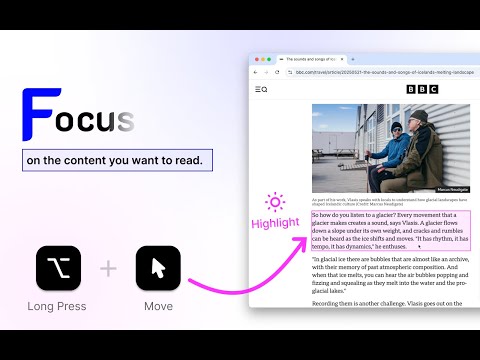
Fopy(Focus+Copy)使用高亮来帮助您聚焦网页内容,让阅读更轻松,让复制更简单。

有时候,长时间阅读网页内容会让眼睛和大脑感到疲劳 👀💻。因此,我开发了这款工具,旨在帮助你更好地聚焦网页内容,同时轻松实现快速复制 ✂️。 工作原理: 1. 聚焦高亮 💡:按下 Alt(Option) 键后,移动光标,网页元素会自动在光标附近增加边框,从而帮助你高亮内容。 2. 一键复制 📋:在聚焦内容时,按下复制键即可将整个高亮区域的文字或图片复制到剪贴板,并在右下角弹出通知,提示你复制是否成功 ✅。 快捷键: 1. Alt(Option) + 光标:💡 高亮 2. Ctrl(Command) + C:📑 复制高亮内容 3. Esc:❌ 取消高亮 隐私: Fopy 是一款本地插件,我们不收集你任何使用数据。

0 星(5 星制)无评分

详细了解结果和评价。

详情

  • 版本
    0.0.2
  • 上次更新日期
    2025年8月18日
  • 提供方
    MagicX
  • 大小
    140KiB
  • 语言
    2 种语言
  • 开发者
    邮箱
    support@magicx.dev
  • 非交易者
    该开发者尚未将自己标识为交易者。欧盟地区消费者须知:消费者权利可能不适用于您与该开发者达成的合约。

隐私权

管理扩展程序并了解它们在组织中的使用情况
该开发者已披露,此产品不会收集或使用您的数据。

该开发者已声明,您的数据:

  • 不会因未获批准的用途出售给第三方
  • 不会为实现与产品核心功能无关的目的而使用或转移
  • 不会为确定信用度或放贷目的而使用或转移

支持

相关

Auto Copy – Select to Clipboard

0.0

Highlight any text on any webpage and it's copied to your clipboard automatically — even on sites that block copying.

Summary Generator

3.0

Get an overview of webpages by visualizing a table of contents for easier and more structured reading

UnCopy

0.0

Copy visible text and readable article text, then manage local copy history.

TextFocus

1.0

Focus on reading by blurring surrounding text on webpages

Clean Content Copier

0.0

Easily highlight and copy cleaned text content from web pages.

ReadKatoo: Customizable Read Mode

0.0

Extract clean articles from any web page. Customize the reading experience, remove ads, and easily copy or export content.

Element to Markdown

5.0

Highlight and copy webpage elements as Markdown. DevTools-style inspector with minimap.

网页文本高亮标记

0.0

一个简单实用的网页文本高亮工具,可以标记重要内容

Focal — Bionic Reading

0.0

Automatically turns the text on every page you visit into bionic reading, to help you focus. No copy-paste needed.

Markdown Page Clipper

0.0

Copy the main content—or a selection—of any page to the clipboard in Markdown.

Bionic Reader - Fast Reading Helper

5.0

Make reading faster and easier with bionic text formatting. Instantly highlight key parts of words on any webpage.

Guided Typography Reader

0.0

Reformats web page text with Guided Typography to help readers with dyslexia and reading difficulties.

Auto Copy – Select to Clipboard

0.0

Highlight any text on any webpage and it's copied to your clipboard automatically — even on sites that block copying.

Summary Generator

3.0

Get an overview of webpages by visualizing a table of contents for easier and more structured reading

UnCopy

0.0

Copy visible text and readable article text, then manage local copy history.

TextFocus

1.0

Focus on reading by blurring surrounding text on webpages

Clean Content Copier

0.0

Easily highlight and copy cleaned text content from web pages.

ReadKatoo: Customizable Read Mode

0.0

Extract clean articles from any web page. Customize the reading experience, remove ads, and easily copy or export content.

Element to Markdown

5.0

Highlight and copy webpage elements as Markdown. DevTools-style inspector with minimap.

网页文本高亮标记

0.0

一个简单实用的网页文本高亮工具,可以标记重要内容

搜索
清除搜索内容
关闭搜索框
Google 应用
主菜单