

FontMeter
1 rating
)
Overview
See the type system of any page: font sizes, rendered fonts, type scale, contrast and spacing, right on the page.
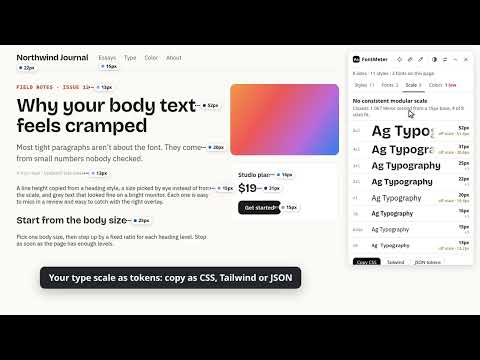
FontMeter shows the type system of any web page, right on the page. Click the icon (or press Alt+Shift+F) and every text style gets a small label with its size. A panel lists every style on the page, the fonts that actually render, the type scale and the colors. No DevTools digging. Built for frontend engineers and designers who review pages, rebuild designs or check a site against its style guide. WHAT YOU GET • Labels on every text style One label per style on screen, placed beside the text instead of on top of it. Labels follow the page as you scroll, and the darker the dot, the bigger the type. • A details card for any style Hover a label for the rendered font, the full font stack, size in px, rem and em, line height and its ratio, weight, letter spacing, color, contrast and line length. Click a value to switch units. Copy CSS gives you a ready-to-paste block. • The fonts that really render See which font the browser actually draws, not just what the CSS asks for. FontMeter flags fallbacks, faked (synthesized) bold or italic, fonts that failed to load, the font files the page downloaded and @font-face rules that are never used. • The type scale, as tokens Every size named sm, base, lg and up, the closest modular ratio and the sizes that sit off it. Export as CSS variables, Tailwind v4 @theme or JSON design tokens. • Contrast and color Every text style is checked against WCAG AA and AAA. Failing pairs are listed and outlined on the page with one click. Text over images or gradients is marked "check by eye" instead of guessed. The page's colors are grouped by role (text, backgrounds, borders, SVG and gradients) with similar shades merged, and the "As seen" view groups the pixels on your screen by how alike they look. • Inspect, measure, pick Inspect shows margin and padding on hover; click to pin an element, hover another to measure the distance, and use the arrow keys to move to its parent, child or siblings. The ruler measures any area and snaps to element edges. The color picker zooms into any pixel, including images and gradients, and copies HEX, RGB, HSL or OKLCH. • Settings px, rem or pt; one label per style or one per text block; contrast badges on labels. The panel can be dragged, collapsed or closed, and remembers where you put it. PRIVATE BY DESIGN FontMeter runs only in the tab where you turn it on, and only after you click its icon or press the shortcut. It has no servers, no analytics and no account. It reads the page locally and sends nothing anywhere. The color picker and the "As seen" palette read a screenshot of the visible tab inside the page and discard it. Try every feature on the website first: https://fontmeter.dev Shortcut: Alt+Shift+F (change it at chrome://extensions/shortcuts). FontMeter can't run on browser pages (chrome://), the Chrome Web Store or the built-in PDF viewer, which extensions may not access.
5 out of 51 rating
Details
- Version2.0.0
- UpdatedOctober 24, 2026
- Size57.08KiB
- LanguagesEnglish
- Developer
Email
vannnyle@gmail.com - Non-traderThis developer has not identified itself as a trader. For consumers in the European Union, please note that consumer rights do not apply to contracts between you and this developer.
Privacy

FontMeter has disclosed the following information regarding the collection and usage of your data. More detailed information can be found in the developer's privacy policy.
FontMeter handles the following:
This developer declares that your data is
- Not being sold to third parties, outside of the approved use cases
- Not being used or transferred for purposes that are unrelated to the item's core functionality
- Not being used or transferred to determine creditworthiness or for lending purposes