

Font Play

概要
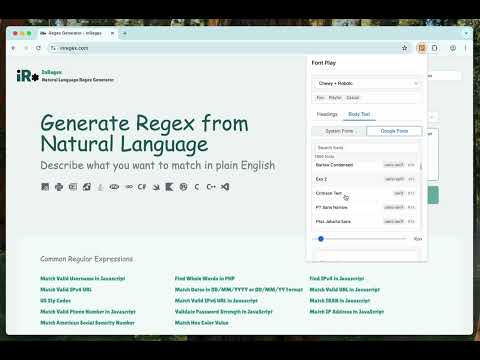
Mix & match custom heading and body fonts on any webpage using Google Fonts or local fonts, to find the perfect combination.
Font Play is a powerful tool for web developers, designers, and content creators that enables instant font testing and visualization on any webpage. Transform your font exploration process with real-time previews of both system fonts and Google Fonts. Key Features: • Instant font previews on any webpage • Separate controls for headings and body text • Access to local system fonts and Google Fonts • Font size customization with smart preservation • Export generated CSS for your selected fonts • Settings persistence across sessions • Non-destructive changes - original webpage stays intact Perfect for: • Web developers testing different font combinations • Designers exploring typography options • Content creators optimizing readability • Digital marketers refining website aesthetics How it works: 1. Click the extension icon to open the interface 2. Choose between heading or body text 3. Select from system fonts or Google Fonts 4. Adjust font sizes as needed 5. See changes instantly on the webpage 6. Export CSS when you find the perfect combination The extension is designed for performance and ease of use, ensuring smooth font previews without affecting webpage functionality. Useful for: - font preview - typography tool - google fonts - web design - font tester - website fonts - font customization - typography preview - design tool - web development
5 点満点で 0評価なし
詳細
- バージョン1.5
- 更新:2025年2月22日
- 提供元Practical Tools
- サイズ20.34KiB
- 言語English
- デベロッパー
メール
takemetothesource@gmail.com - 非取引業者このデベロッパーは取引業者として申告していません。EU 加盟国の消費者とこのデベロッパーとの間に締結された契約には、消費者の権利が適用されません。
プライバシー

このデベロッパーは、お客様のデータについて以下を宣言しています
- 承認されている以外の用途で第三者に販売しないこと
- アイテムの中心機能と関係のない目的で使用または転送しないこと
- 信用力を判断する目的または融資目的で使用または転送しないこと
サポート
質問や提案、問題がある場合は、パソコンのブラウザでこのページを開いてください