Item logo image for Font Play

Font Play

Item media 2 (screenshot) for Font Play
Item video thumbnail
Item media 2 (screenshot) for Font Play
Item video thumbnail
Item media 2 (screenshot) for Font Play

Overview

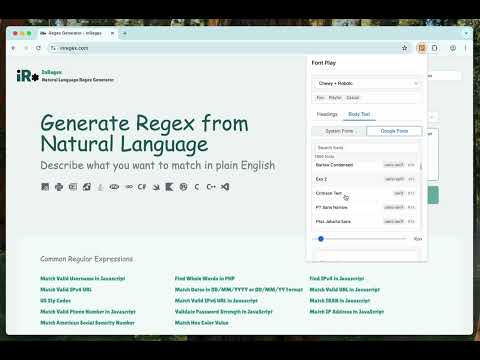
Mix & match custom heading and body fonts on any webpage using Google Fonts or local fonts, to find the perfect combination.

Font Play is a powerful tool for web developers, designers, and content creators that enables instant font testing and visualization on any webpage. Transform your font exploration process with real-time previews of both system fonts and Google Fonts. Key Features: • Instant font previews on any webpage • Separate controls for headings and body text • Access to local system fonts and Google Fonts • Font size customization with smart preservation • Export generated CSS for your selected fonts • Settings persistence across sessions • Non-destructive changes - original webpage stays intact Perfect for: • Web developers testing different font combinations • Designers exploring typography options • Content creators optimizing readability • Digital marketers refining website aesthetics How it works: 1. Click the extension icon to open the interface 2. Choose between heading or body text 3. Select from system fonts or Google Fonts 4. Adjust font sizes as needed 5. See changes instantly on the webpage 6. Export CSS when you find the perfect combination The extension is designed for performance and ease of use, ensuring smooth font previews without affecting webpage functionality. Useful for: - font preview - typography tool - google fonts - web design - font tester - website fonts - font customization - typography preview - design tool - web development

Details

  • Version
    1.5
  • Updated
    February 22, 2025
  • Offered by
    Practical Tools
  • Size
    20.34KiB
  • Languages
    English
  • Developer
    Email
    takemetothesource@gmail.com
  • Non-trader
    This developer has not identified itself as a trader. For consumers in the European Union, please note that consumer rights do not apply to contracts between you and this developer.

Privacy

The developer has disclosed that it will not collect or use your data.

This developer declares that your data is

  • Not being sold to third parties, outside of the approved use cases
  • Not being used or transferred for purposes that are unrelated to the item's core functionality
  • Not being used or transferred to determine creditworthiness or for lending purposes

Support

Related

fontSwap - Custom fonts for every website

4.3

Change fonts on any websites. Set different fonts per domain. Support system & google fonts. Change font size, color, letter-spacing

fontDownloader - Identify & download fonts

4.7

Recognize and download local or remote fonts from any websites. Find & copy CSS styles of the selected text. Lightweight & faster

What font - font finder

3.8

What font? Easily identify the font on a web page, HTML font size, color, and font family.

Type-X

5.0

Test your fonts across the web!

Font Finder

3.9

Font finder for images, texts and websites to check Font Family, size, height

FontViz: Inspect fonts with ease

5.0

Easily inspect and validate the fonts used on any website or web application

Font finder

4.4

Identify with one click the font used on any text on a web page.

What the Font - find font & color

4.8

Find and identify the font name, its family, color, style, size used on any website.

What Font - find font

3.7

Lets you know what font is used on any website

Whats the Font

5.0

Use Whats the Font – a simple typeface recognizer for any site. Check typeface with this font finder and easy font identifier tool.

Font Changer

3.5

Font Changer allows you change the font of any website with your preferred Google Web Front quickly and easily.

FontFinder

4.8

FontFinder is a powerful font identifier and detector for any webpage.

fontSwap - Custom fonts for every website

4.3

Change fonts on any websites. Set different fonts per domain. Support system & google fonts. Change font size, color, letter-spacing

fontDownloader - Identify & download fonts

4.7

Recognize and download local or remote fonts from any websites. Find & copy CSS styles of the selected text. Lightweight & faster

What font - font finder

3.8

What font? Easily identify the font on a web page, HTML font size, color, and font family.

Type-X

5.0

Test your fonts across the web!

Font Finder

3.9

Font finder for images, texts and websites to check Font Family, size, height

FontViz: Inspect fonts with ease

5.0

Easily inspect and validate the fonts used on any website or web application

Font finder

4.4

Identify with one click the font used on any text on a web page.

What the Font - find font & color

4.8

Find and identify the font name, its family, color, style, size used on any website.

Google apps