


Overview
Keep scattered leads together and follow up on time. Capture from Gmail, Outlook on the web, Salesforce, LinkedIn, and HubSpot.
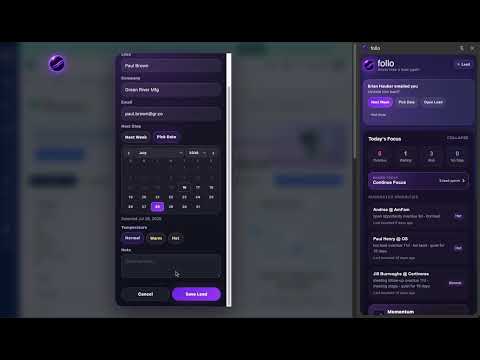
All your important leads. One place. Good leads live everywhere: your inbox, CRM, LinkedIn, notes and reminders. follo keeps the people you want to follow up with together in a Chrome side panel, with the context and next step you need to keep the conversation moving. CAPTURE A LEAD WHERE YOU WORK Use the Follo orb on supported pages or +Lead to save a contact, source link and follow-up date. Review the suggested details, add a personal note or label, and get back to your work. Company is optional. Capture supports Gmail, LinkedIn, Salesforce, HubSpot and Outlook on the web; other websites can offer user-invoked +Lead capture when visible contact information is available. LET DISCOVERY NOTICE POTENTIAL LEADS Enable Gmail Discovery to suggest people from conversations you open: three distinct observed messages including both sent and received, or four sent messages without needing a reply, within 30 days. Same-day exchanges and personal email addresses can qualify. Review the person, choose a follow-up date and add them directly to follo. Optional verified Salesforce/HubSpot context can add the right source link; CRM visits alone do not qualify. You choose what gets saved. Discovery checks permitted pages you view. It does not scan your entire mailbox or save people automatically. Some collapsed replies need Gmail's native header loading; Suggested leads now shows useful status and recovery actions. Outlook Discovery is not included. KNOW WHO NEEDS ATTENTION TODAY Today's Focus brings together overdue follow-ups and other current priorities. A lead constellation shows the people in the selected group. Hover over a highlighted dot for context or click to open that lead. Optional reminders help you return at the right time. KEEP THE CONTEXT WITH THE PERSON See your latest personal note, relationship stage, labels, source links and next follow-up together. Review My notes or All activity, schedule another step with a Follo calendar, or use a cadence. Reusable labels also work with custom tiles and search. SEE YOUR RECORDED PROGRESS Momentum makes recorded engagement, meetings, opportunities and wins visible. Explore this week, quarter or year, compare periods, and open the people behind the highlighted dots. Momentum reflects activity recorded in Follo, not every action in your email or CRM. BRING YOUR OWN LEAD LIST Import a CSV, review the people and dates, and add accepted rows without overwriting existing leads. Export a separate backup when you want to keep a copy or move computers. Follo does not sync leads between devices. START FREE Save up to 15 leads free. Adding lead 16 starts a 14-day Pro preview with no card required and no automatic paid conversion. Pro removes the 15-lead plan limit. After the preview, you can still open, edit, export and delete existing leads; adding beyond the free limit requires Pro. Optional subscriptions are processed by Polar. Current prices, offer eligibility and renewal terms appear before purchase. A Follo account is not required for the core local features. YOUR LEAD DATA STAYS ON YOUR COMPUTER Saved leads, notes and local Discovery evidence stay in this Chrome profile. Optional usage analytics is off until you enable it and excludes lead identities, notes, message content and source URLs. Polar handles checkout and license validation separately. Read the privacy policy for details. Uninstalling or clearing extension data can remove local records; export a backup first. Website: https://usefollo.com/ Guide: https://usefollo.com/guide Privacy: https://usefollo.com/privacy Support: support@usefollo.com
5 out of 51 rating
Details
- Version1.3.23 · Gmail native thread identity
- UpdatedOctober 22, 2026
- FeaturesOffers in-app purchases
- Size5.55MiB
- LanguagesEnglish (United States)
- DeveloperWebsite
Email
support@usefollo.com - Non-traderThis developer has not identified itself as a trader. For consumers in the European Union, please note that consumer rights do not apply to contracts between you and this developer.
Privacy

follo has disclosed the following information regarding the collection and usage of your data. More detailed information can be found in the developer's privacy policy.
follo handles the following:
This developer declares that your data is
- Not being sold to third parties, outside of the approved use cases
- Not being used or transferred for purposes that are unrelated to the item's core functionality
- Not being used or transferred to determine creditworthiness or for lending purposes
Support
For help with questions, suggestions, or problems, visit the developer's support site