

FolderXD: Add Folders to Google Docs, Sheets, Slides, NotebookLM & More

Overview
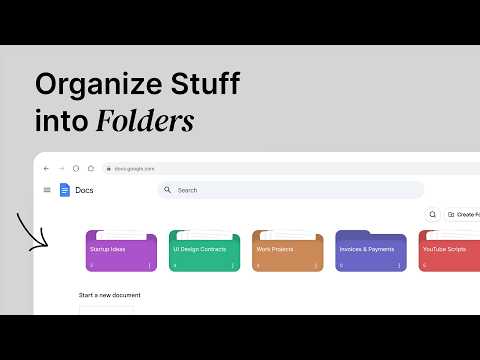
Add folders to Google Docs, Sheets, Slides, Forms, NotebookLM & more. Build your private directory, organize & find files faster.
Google Keep, Docs, Sheets, NotebookLM, etc, they're all great, but finding something you saved two weeks ago? not really great. FolderXD fixes that by letting you create your own folders directly inside these web apps, so everything has a place and nothing gets lost. Just open the web app where you work, find your folders at the top, and get back to your life. 🗂️ What is FolderXD? it is a browser extension that adds a beautiful folder interface into Google Docs, Sheets, Keep & More. You can create different folders, add any file into them using just its title and URL, rename and color-code folders, and find anything instantly with a fast search, all without leaving the page you're working on. KEY FEATURES: 📂 Create a Bunch of Folders: Organize your Workspace Files into as many folders as you need. There's no limit on folders or files per folder. 🎨 Color Your Folders: Assign a custom color to any folder so you can find it fast, Great for separating work projects, personal notes, school assignments, etc... ⚡ Fast Search Across Your Files: Instantly find any document or note by name. The built-in search supports fuzzy matching and handles large file collections with ease. 📄 Save Any Page: All you need is a page title and URL to save any page as a file. That means any document or note can be stored in your folders in one click. 🧊 Optional Cloud Sync (Premium): Want your folders on every device? You can upgrade to premium for cloud backup and multi-device sync. Your folders and files stay backed up even if you uninstall the extension, switch browsers, or move to a new computer. Free users keep full access to all core features with local-only storage. 🔒 Privacy First: By default, FolderXD stores all your folders and files locally in your browser's local storage. No signup required, no data collection. If you choose to enable Cloud Sync (optional, premium feature), your folder data is securely stored in our cloud database, so it can sync across your devices. You're always in control, cloud sync is off by default. i also own this website: folderxd.web.app see ya :) ................................................................. What's new in this update: 2.3.1: Added functionality to sort folders
5 out of 54 ratings
Details
- Version2.3.1
- UpdatedJune 24, 2026
- FeaturesOffers in-app purchases
- Size1.53MiB
- LanguagesEnglish
- Developer
- Non-traderThis developer has not identified itself as a trader. For consumers in the European Union, please note that consumer rights do not apply to contracts between you and this developer.
Privacy

This developer declares that your data is
- Not being sold to third parties, outside of the approved use cases
- Not being used or transferred for purposes that are unrelated to the item's core functionality
- Not being used or transferred to determine creditworthiness or for lending purposes
Support
For help with questions, suggestions, or problems, visit the developer's support site