

Folderloom: Folders, Search, Prompts, Notes, AI Transfer, Export & Sync

Overview
For ChatGPT, Claude & Gemini: nested folders, bookmarks, chat search, prompt templates, Contents, Follow-ups & PDF/Word export.
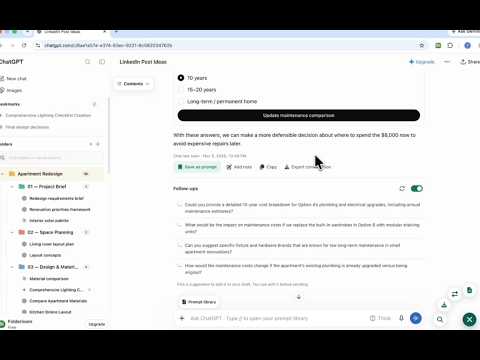
Turn scattered AI chats into a workspace you can return to. Folderloom brings folders, search, reusable prompts, and tools for working with answers into ChatGPT, Claude, and Gemini. ORGANIZE AND FIND YOUR WORK Group chats by project, client, or topic in nested folders. Drag and drop conversations into place, bookmark key chats, and find them by title. Advanced Search finds matching text in chats indexed in this browser and lets you filter by AI platform. Chats you open are saved automatically for search, only in this browser and never synced; Delete Folderloom data in Settings removes them. BUILD A REUSABLE PROMPT LIBRARY Save a draft or turn a useful answer into a prompt. Organize prompts in folders, favorite the ones you use often, and browse prompt packs. Add fill-in variables to adapt a template, then insert it into your chat. WORK WITH LONG CONVERSATIONS Use Contents to jump to a section. Add a note beside a message, copy text, or save it as a prompt. Turn on Follow-ups for suggestions based on the latest answer. Pick a suggestion to add it to your draft, where you can edit it before sending. CONTINUE ACROSS AI OR EXPORT Continue a conversation with Work Across AI. Review and edit a draft from visible chat text before opening a new chat in the AI you choose. You press Send. The separate One-click transfer action sends automatically after you select a destination. Earlier messages, images, uploads, and artifacts may be missing. Export a conversation as PDF, Word, Markdown, plain text, or JSON. Preview a PDF before downloading. ACCOUNT SYNC AND RECOVERY With Pro, sync folders, bookmarks, chat links, and saved prompts with your Folderloom account. Workspace sync excludes chat transcripts, the local search index, and filled prompt variables. One extension session is active at a time. In Data & recovery, you can restore a separate copy of a saved prompt edit when a conflict occurs. Delete Folderloom data in Settings to remove your local and synced workspace. FREE PLAN AND PRO Folderloom works right away, without an account. Your workspace stays in this browser. Free includes 3 folders and 10 bookmarks per workspace, 5 saved prompts in up to 3 prompt folders, the 5 newest search matches for each keyword, and Markdown or text export. Connect with Google when you want account sync or Pro. The first time you connect in this browser, what you created before connecting is copied to your account. Pro removes the Free limits and adds prompt variables, account sync, PDF, Word, and JSON export, export preview, Follow-ups, and Work Across AI. Manage subscriptions in extension Settings, and Polar handles checkout. Your saved data stays put if Pro access ends. PRIVACY AND PERMISSIONS Folderloom keeps its local workspace data and search index in Chrome local storage. Optional Follow-ups sends a limited selection of recent visible text messages through the Folderloom API to Groq to generate suggestions. Attachment contents are excluded, and you can turn Follow-ups off at any time. • storage: saves local settings, workspace data, and account and session state. • unlimitedStorage: provides space for your local workspace and search index. • sidePanel: opens Folderloom's workspace and settings in Chrome. • chatgpt.com, claude.ai, and gemini.google.com: display Folderloom and enable tools on supported chat pages. • api.folderloom.app (required host access): supports account connection, access checks, workspace sync, transfer usage, and optional Follow-ups. Learn more at https://folderloom.app
4.6 out of 55 ratings
Details
- Version1.0.6
- UpdatedNovember 16, 2026
- FeaturesOffers in-app purchases
- Size11.56MiB
- Languages55 languages
- DeveloperWebsite
Email
tuantran06072025@gmail.com - Non-traderThis developer has not identified itself as a trader. For consumers in the European Union, please note that consumer rights do not apply to contracts between you and this developer.
Privacy

Folderloom: Folders, Search, Prompts, Notes, AI Transfer, Export & Sync has disclosed the following information regarding the collection and usage of your data. More detailed information can be found in the developer's privacy policy.
Folderloom: Folders, Search, Prompts, Notes, AI Transfer, Export & Sync handles the following:
This developer declares that your data is
- Not being sold to third parties, outside of the approved use cases
- Not being used or transferred for purposes that are unrelated to the item's core functionality
- Not being used or transferred to determine creditworthiness or for lending purposes
Support
For help with questions, suggestions, or problems, please open this page on your desktop browser