


Overview
AI-powered screen time tracker & focus coach. Track website usage, block distractions, set goals & get AI insights.
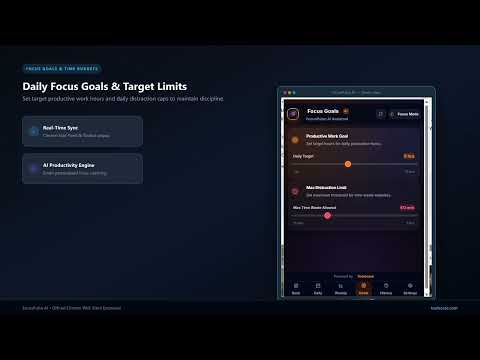
FocusPulse AI is your intelligent, privacy-first screen time tracker and AI productivity coach built directly into Google Chrome. Whether you want to curb digital distractions, build uninterrupted focus habits, analyze weekly productivity trends, or set daily usage limits on distracting websites, FocusPulse AI delivers real-time analytics and personalized AI guidance—all while keeping your browsing data 100% private and stored locally. ⚡ WHAT IS FOCUSPULSE AI? FocusPulse AI transforms how you manage your time online. Instead of wondering where your working hours went or losing focus to social media and entertainment algorithms, FocusPulse AI automatically logs your active browser tab usage, calculates an dynamic AI Focus Score (0 to 100), and provides actionable AI coaching tips to help you achieve peak focus every day. Get instant daily breakdowns, hourly distraction heatmaps, weekly productivity comparisons, custom domain blockers, and smart focus milestone notifications—right inside your browser toolbar or Chrome Side Panel. 🚀 POWERFUL FEATURE SUITE: FocusPulse AI is engineered with a complete set of productivity and focus management tools: • 🧠 AI Productivity Coach & Smart Insights: - Dynamic AI Focus Score (0 to 100) computed based on productive vs. distracting web activity. - Personalized AI coaching tips pointing out specific focus bottlenecks and suggested work habits. - Smart anomaly detection when distraction time spikes beyond your normal patterns. - Powered by edge-optimized AI logic with seamless fallback for offline productivity coaching. • 📊 Real-Time Screen Time Tracking: - Automatic time logging across every website, sub-domain, and tab you visit. - Smart idle detection: tracking automatically pauses when you step away from your computer. - Clean visual breakdown of top websites visited, duration, percentage of total time, and productivity tier. - Categorization across Work, Learning, Entertainment, Social, Communication, and Custom tags. • 📈 Daily & Weekly Productivity Analytics: - Daily view with hourly heatmaps showing exactly when your peak focus hours occur. - Weekly trends comparing this week's total productive hours vs. distractive hours against past weeks. - Category distribution pie charts and interactive domain duration timelines. - Detailed historical logs to audit past work sessions and maintain accountability. • 🛡️ Focus Goals & Distraction Site Blocker: - Set daily time budgets and maximum usage caps for specific distracting websites (e.g., YouTube, Reddit, X/Twitter). - Instant focus blocker screen when website time limit is exceeded, preventing endless scrolling. - Custom focus goals (e.g., "Achieve 4 hours of productive work today" or "Keep social media under 30 minutes"). - Desktop notifications when approaching daily threshold limits or reaching productivity milestones. • 📑 Flexible Chrome Side Panel & Popup Views: - Launch FocusPulse AI in the extension popup for quick stats, or pin it to the Chrome Side Panel for continuous side-by-side tracking. - Light and sleek dark mode design tailored for maximum readability without distracting your workflow. - One-click reset, data clear, and export options for full control. 👥 PERFECT FOR PROFESSIONALS, STUDENTS & REMOTE WORKERS: • Software Developers & Engineers: Protect your flow state, eliminate tab jumping, and ensure deep work hours stay protected. • Freelancers & Remote Employees: Accurately monitor billable hours, stay accountable on client tasks, and prevent burnout. • Students & Academic Researchers: Block distracting study breaks, track time spent on research papers, and maintain high study scores. • Content Creators & Marketers: Set firm time budgets on social media management while maximizing productive strategy hours. • Managers & Executives: Audit personal daily workflow efficiency and optimize time distribution across key platforms. 💡 HOW TO GET STARTED WITH FOCUSPULSE AI: 1. Click "Add to Chrome" to install FocusPulse AI. 2. Pin the FocusPulse AI icon to your Chrome toolbar or open the Chrome Side Panel. 3. Browse the web naturally—FocusPulse AI instantly starts logging active time in the background. 4. Open the dashboard anytime to inspect your AI Focus Score, top sites, hourly breakdown, and AI coaching insights. 5. Head to "Goals" to set daily time budgets and configure site blocker rules for distracting URLs. 🔒 PRIVACY & DATA SECURITY FIRST: Your web browsing history and time logs are sensitive and private. FocusPulse AI is built on a strict privacy model: • 100% Local Storage: All website usage logs, session histories, goals, and settings are stored locally in your browser (chrome.storage.local). • Zero Remote Tracking: We do NOT track, collect, or store your browsing history on external servers. • No Data Selling: We never sell, monetize, or transmit your personal browsing metrics to third parties or advertising networks. • No Background Telemetry: The extension operates locally and securely inside your Chrome browser environment. 🌐 TOOLSCASE PRODUCTIVITY ECOSYSTEM: FocusPulse AI is part of the Toolscase productivity software suite: • Toolscase PDF Tools – Convert, compress, merge, split, and edit PDFs directly in your browser. • AskFiles AI – Chat with PDF, CSV & Excel files using AI conversational intelligence. • CompareLens AI – Real-time product spec and price comparison matrix. • SwitchDoc AI – Instant document converter for Word, PDF, PPT, and Excel. • CapturePDF – Capture web pages into clean downloadable PDFs. Discover more at toolscase.com
0 out of 5No ratings
Details
- Version1.0.1
- UpdatedAugust 12, 2026
- Size1.15MiB
- LanguagesEnglish (United States)
- DeveloperHassan Saeed ChohanWebsite
House No 359, Mohallah Sheikhan , Zafarwal Tehsil Zafarwal District Narowal Zafarwal, Narowal 54000 PKEmail
hassanchohan10@gmail.comPhone
+92 301 1226722 - TraderThis developer has identified itself as a trader per the definition from the European Union and committed to only offer products or services that comply with EU laws.
Privacy

FocusPulse AI - Screen Time Tracker has disclosed the following information regarding the collection and usage of your data. More detailed information can be found in the developer's privacy policy.
FocusPulse AI - Screen Time Tracker handles the following:
This developer declares that your data is
- Not being sold to third parties, outside of the approved use cases
- Not being used or transferred for purposes that are unrelated to the item's core functionality
- Not being used or transferred to determine creditworthiness or for lending purposes
Support
For help with questions, suggestions, or problems, visit the developer's support site