

FocusFlow — Focus Timer & Time Tracker for Notion

Overview
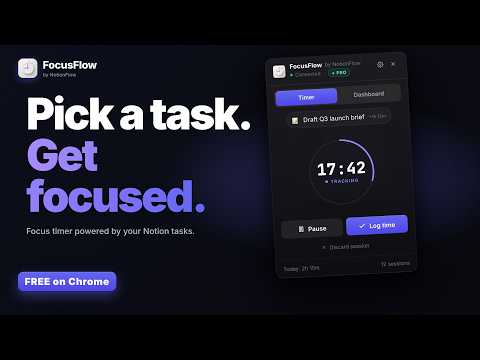
Focus timer for Notion tasks. Read tasks from your database, run focus sessions, log minutes back to Notion automatically.
A focus timer that actually tracks time against your Notion tasks. FocusFlow is the Chrome extension for Notion users who run their day out of a tasks database and want the focus minutes to land back on the right page automatically. Pick a task from your Notion workspace, start the timer, work — when the session ends, FocusFlow writes the elapsed minutes to the task's "Time Logged (min)" property. No copy/paste, no spreadsheets, no separate time-tracking app to keep in sync. Whether you do deep work, study sessions, billable client time, sprint tickets, or just "what did I get done today" tracking — FocusFlow makes "I worked on X for 45 minutes" something Notion knows automatically. ━━━━━━━━━━━━━━━━━━━━━━ HOW IT WORKS ━━━━━━━━━━━━━━━━━━━━━━ 1. Connect your Notion workspace once via OAuth (Chrome's built-in identity API — no copy/pasting tokens). 2. Pick the database where your tasks live. FocusFlow auto-detects your title, status, and due-date properties, and adds a "Time Logged (min)" number column if you don't already have one. 3. Open the popup (Alt+Shift+F, or click the toolbar icon). Pick a task. Pick a duration. Hit Start. 4. Work. When the timer ends — or you stop early — the minutes are written back to that task page in Notion. 5. Click "Mark Done" and FocusFlow updates the task's Status (or Done checkbox) in Notion too. That's it. Your Notion tasks now know how long you actually worked on them. ━━━━━━━━━━━━━━━━━━━━━━ WHY FOCUSFLOW ━━━━━━━━━━━━━━━━━━━━━━ • Real Notion sync — minutes log back to the actual task page, not a separate database. • One-keystroke launch — Alt+Shift+F opens the popup with your last task pre-selected. • Smart property detection — finds your title column, status property, "Done" checkbox, and due dates automatically; works with the database schema you already have. • Due-date awareness — overdue, today, and upcoming tasks are color-coded in the picker so you grab the right one. • Two-way completion — mark a task done in Notion, it disappears from FocusFlow's picker; mark it done in FocusFlow, it gets ticked in Notion. • Custom tasks — log focus minutes against tasks that aren't in Notion. Unlimited. • Analytics dashboard — today, this week, this month, longest streak, 7-day bar chart, 30-day heatmap, and your top 5 tasks by focus time. • CSV export — your full session log as a spreadsheet: date, time, task, duration, note, completion. Detail Notion's "Time Logged" total doesn't preserve. • Custom daily goal — set any minutes target; the dashboard tracks against it. • Session notes — jot a one-line note for each session. • Toolbar badge — a live dot or minutes count on the extension icon while a session runs. • Light & dark mode + Auto (follows your system). • Customizable hotkey: Alt+Shift+F by default; change in chrome://extensions/shortcuts. ━━━━━━━━━━━━━━━━━━━━━━ WHO IT'S FOR ━━━━━━━━━━━━━━━━━━━━━━ • Deep-work practitioners — focus sessions that automatically log to the project you're shipping. • Freelancers & consultants — billable hours tracked against the client task in Notion (export the CSV at month-end for invoicing). • Founders & makers — see which initiatives actually consumed your week. • Students — study sessions logged against the subject or assignment in your Notion course tracker. • Anyone running their day out of a Notion tasks database — stop estimating "I think I worked on this for two hours"; know exactly. ━━━━━━━━━━━━━━━━━━━━━━ 100% FREE — EVERYTHING INCLUDED ━━━━━━━━━━━━━━━━━━━━━━ • Unlimited focus sessions and unlimited custom tasks. • Full analytics dashboard — today, week, month, streaks, heatmap, top tasks. • CSV export of your complete session log. • Session notes, custom daily goals, live toolbar badge. • No subscription, no license key, no catch. ━━━━━━━━━━━━━━━━━━━━━━ PRIVACY-FIRST DESIGN ━━━━━━━━━━━━━━━━━━━━━━ • FocusFlow has no backend server of our own. The extension contacts exactly two hosts: Notion's API and PostHog (for anonymous usage events). • Your Notion access token is stored only in your browser's chrome.storage.local — never sent anywhere except Notion. • Your task names, session notes, and durations live only on your device and in your own Notion workspace. We never see them. • Anonymous analytics only: event names like "popup_opened" and "session_completed", plus the extension version. Never task contents, database names, tokens, or browsing history. • No host permissions for arbitrary websites — only api.notion.com and us.i.posthog.com. Full policy: https://www.notionflow.io/focusflow/privacy ━━━━━━━━━━━━━━━━━━━━━━ WHY FOCUSFLOW vs. ━━━━━━━━━━━━━━━━━━━━━━ vs. a standalone focus timer — FocusFlow ties each session to a real task in your Notion workspace, not a free-text label. vs. a separate time-tracking app (Toggl, Clockify) — FocusFlow keeps your time inside Notion where the task already lives. Nothing to keep in sync. vs. typing minutes into a Notion property manually — FocusFlow does it automatically when the timer ends. vs. a Notion template button — FocusFlow works from any tab; the popup is one keystroke away. ━━━━━━━━━━━━━━━━━━━━━━ SUPPORT ━━━━━━━━━━━━━━━━━━━━━━ Questions, feedback, bug reports: support@notionflow.io Privacy policy: https://www.notionflow.io/focusflow/privacy Built by NotionFlow — sibling extensions: Clipper (save anything from the web to Notion), DailyFlow (one-click daily notes in Notion).
0 out of 5No ratings
Details
- Version0.1.2
- UpdatedOctober 4, 2026
- FeaturesOffers in-app purchases
- Size365KiB
- LanguagesEnglish (United States)
- DeveloperBeast Creative LLCWebsite
30 N Gould St Ste N Sheridan, WY 82801-6317 USEmail
treyinchina@gmail.comPhone
+1 503-308-8900 - TraderThis developer has identified itself as a trader per the definition from the European Union and committed to only offer products or services that comply with EU laws.
- D-U-N-S143977674
Privacy

FocusFlow — Focus Timer & Time Tracker for Notion has disclosed the following information regarding the collection and usage of your data. More detailed information can be found in the developer's privacy policy.
FocusFlow — Focus Timer & Time Tracker for Notion handles the following:
This developer declares that your data is
- Not being sold to third parties, outside of the approved use cases
- Not being used or transferred for purposes that are unrelated to the item's core functionality
- Not being used or transferred to determine creditworthiness or for lending purposes
Support
For help with questions, suggestions, or problems, visit the developer's support site