

Focus Station: Study Focus & ADHD Tool

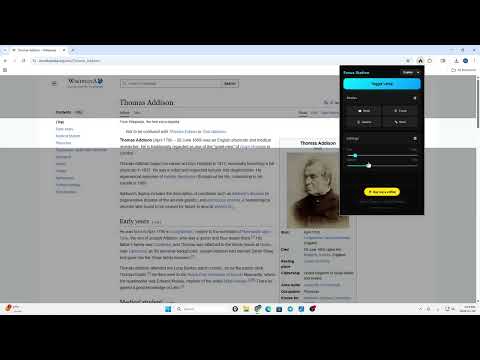
Overview
Boost concentration with a customizable screen dimmer, reading ruler, and focus spotlight. Perfect for studying and ADHD.
Boost your concentration and cut through visual clutter with Focus Station. Whether you are studying, reading long articles, or dealing with ADHD, this tool gives you full control over your screen's visibility. Focus Station creates a customizable overlay that dims the distraction on your browser, highlighting only the section you are reading or viewing. It works like a digital reading ruler or a cinema mode for any website. 🚀 Key Features: ✅ Focus Spotlight: Dim the background and highlight only the area around your mouse cursor. ✅ Reading Ruler Mode: A full-width horizontal guide perfect for speed reading and keeping your place in long texts. ✅ Cinema Mode: Turn any webpage into a theater experience by darkening everything except the video or content you want. ✅ ADHD & Dyslexia Friendly: Reduces visual noise and helps maintain attention on the task at hand. ✅ Freeze Mode (Alt+K): Lock the highlight in position so you can take notes or read without the light following your mouse. ✅ Fully Customizable: Adjust the size, opacity, shape (Circle/Ruler), and toggle instantly. ⌨️ Shortcuts: • Alt + L: Turn On/Off instantly. • Alt + K: Freeze/Unfreeze the highlight position. 🔒 Privacy & Security: Focus Station is designed with privacy in mind. It runs entirely locally on your browser. We do not collect, store, or transmit any of your browsing data or personal information. The extension only requires permission to access the current tab to draw the visual overlay. This extension is completely free. If it helps you study better, consider supporting us!
0 out of 5No ratings
Details
- Version1.1
- UpdatedFebruary 5, 2026
- Offered bya544961000
- Size134KiB
- LanguagesEnglish
- Developer
Email
azozking64@gmail.com - Non-traderThis developer has not identified itself as a trader. For consumers in the European Union, please note that consumer rights do not apply to contracts between you and this developer.
Privacy

This developer declares that your data is
- Not being sold to third parties, outside of the approved use cases
- Not being used or transferred for purposes that are unrelated to the item's core functionality
- Not being used or transferred to determine creditworthiness or for lending purposes