

Focus Grade Calculator
14 ratings
)
Overview
Add a hypothetical grade calculator to the FOCUS portal
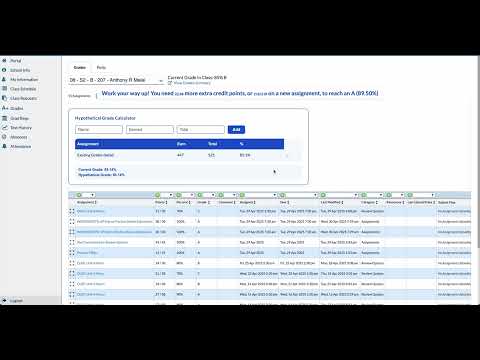
Hypothetical Grade Calculator > Easily calculate your current and potential grades directly in your school portal! What this extension does: Displays your current grade by reading your assignment scores from your school’s gradebook page. Lets you add “what-if” assignments to see how future or missing work could affect your grade. Handles extra credit and excluded assignments automatically. Works entirely in your browser. No data is sent, collected, or shared. How to use: Open your gradebook page in your school portal. The calculator will appear above your assignments table. Enter hypothetical assignment names and scores to see your updated grade instantly. Remove hypotheticals at any time. The calculator automatically reads your real assignment scores from the gradebook table below. Your current total points earned, total possible points, and percentage are shown at the top. Add Hypothetical Assignments Use the input fields labeled “Name”, “Earned”, and “Total” to add a hypothetical assignment. Name: Give your assignment a label (e.g., “Final Exam”). Earned: Enter the points you think you might earn. Total: Enter the total possible points for that assignment. Click Add to include it in your grade calculation. For extra credit, set “Total” to 0 and enter the extra points in “Earned”. See Your Hypothetical Grade The calculator instantly updates your grade to show what it would be if you earned those points. Both your current and hypothetical grades are displayed for easy comparison. Remove Hypotheticals Click the “×” button next to any hypothetical assignment to remove it. Heads Up for First-Time Users This tool is for informational and planning purposes only. Always refer to your official gradebook for your actual grades. The extension will not modify your grades or submit any changes to your school portal. If your grade does not match the portal, check for excluded assignments or category weights. Enjoy exploring your grade possibilities! You got this! 🎉
3.9 out of 514 ratings
Details
- Version1.2.0
- UpdatedAugust 22, 2025
- Offered bybchowlur0
- Size12.33KiB
- LanguagesEnglish
- Developer
Email
bchowlur0@gmail.com - Non-traderThis developer has not identified itself as a trader. For consumers in the European Union, please note that consumer rights do not apply to contracts between you and this developer.
Privacy

This developer declares that your data is
- Not being sold to third parties, outside of the approved use cases
- Not being used or transferred for purposes that are unrelated to the item's core functionality
- Not being used or transferred to determine creditworthiness or for lending purposes