


Overview
A new tab focus dashboard with timers, website blocking, saved links, and productivity tools.
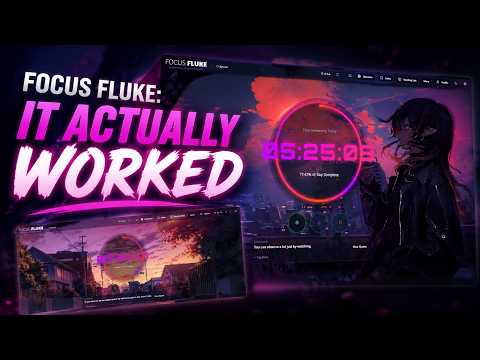
Focus Fluke replaces your new tab page with a focused daily dashboard for planning, timing, blocking distractions, and keeping useful links close at hand. Built for people who want a calmer browser, Focus Fluke combines a daily countdown, focus timers, Pomodoro workflows, saved links, task capture, website blocking, productivity analytics, micro-habits, ambient sounds, wallpapers, and optional cloud sync in one local-first workspace. Use it as your command center every time you open a new tab. Key features: 1. Daily countdown dashboard: See the day’s progress and stay aware of the time you have left. 2. Focus timers: Run custom timers, Pomodoro sessions, categories, tags, and reusable session templates. 3. Website blocking: Block distracting sites manually or during focus sessions. 4. Block profiles: Create reusable blocking lists for work, study, deep focus, or personal routines. 5. Saved links: Save useful pages from the extension popup, context menu, or browser pages. 6. Task inbox: Capture quick tasks and keep them near your focus workflow. 7. Micro-habits: Track small daily habits alongside your focus sessions. 8. Website analytics: Review browsing patterns, focus activity, and productivity insights when history access is enabled. 9. Ambient modes: Use soundscapes and wallpapers to create a better focus environment. 10. Optional AI tools: Bring your own OpenAI or Gemini API key for coaching, task help, link organization, analytics, and blocking suggestions. 11. Optional sync: Sign in with email or Google to sync supported data across devices using Firebase. 12. Local-first by default: Your timers, links, settings, tasks, and focus data stay on your device unless you choose to sign in or enable sync. Focus Fluke is designed for: * Students managing study sessions * Developers and makers doing deep work * Remote workers who need browser discipline * Creators organizing links, tasks, and routines * Anyone who wants a useful new tab page instead of a distraction portal Privacy-first approach: Focus Fluke stores your data locally by default using browser storage and IndexedDB. Signing in is optional. If you sign in, supported data can sync through Firebase under your user account. Browser history access is used for local analytics and suggestions; this codebase does not sell your data or use it for advertising. Bring-your-own-key AI: AI features are optional. If you add an OpenAI or Gemini API key, requests are sent directly to the selected provider. Your API key is stored in your app settings and is used only to power the AI features you choose to use. Microsoft Edge note: If installing from the Chrome Web Store in Microsoft Edge, Edge may ask you to click “Turn on” because Focus Fluke replaces the New Tab page. This is a browser security prompt for new tab extensions. Host permissions: *://*/* Required so Focus Fluke can apply website blocking rules across websites, show save-link UI where supported, and allow user-configured productivity features to work on the pages the user visits. Focus Fluke is a productivity new tab extension that helps users focus by combining timers, website blocking, saved links, tasks, habits, analytics, ambient focus modes, and optional sync in one dashboard. Privacy: Focus Fluke stores user data locally by default. This includes timers, saved links, settings, block lists, tasks, habits, focus session data, and analytics preferences. If the user chooses to sign in, Focus Fluke may use Firebase Authentication and Firestore to sync supported user data across devices. Sign-in is optional. If the user enables AI features, they may provide their own OpenAI or Google Gemini API key. AI requests are sent directly to the selected provider to perform the user-requested action. Focus Fluke does not sell user data. Focus Fluke does not use user data for advertising. Browser history access is used for local productivity analytics and suggestions. Data Collection Disclosure Guidance For the Chrome Web Store privacy form, based on the current app, you likely need to disclose: Website content: used for save-link/context-page workflows and blocking behavior. Web history: used for optional local analytics and suggestions. Authentication information: used only if the user signs in. User activity: focus timers, blocking settings, tasks, habits, and productivity activity. Website data: saved links and blocked domains configured by the user. Support/FAQ Why does Focus Fluke replace my new tab page? Focus Fluke is designed as a new tab productivity dashboard, so it opens whenever you create a new tab. Is sign-in required? No. Focus Fluke works locally by default. Sign-in is optional and only needed for supported sync features. Why does Focus Fluke request history permission? History permission powers optional on-device analytics and website productivity insights. It is not used for advertising. Why does Focus Fluke need access to websites? Website access is needed for blocking distracting sites, saving links, and supporting browser-page productivity features. Does Focus Fluke sell my data? No. Does Focus Fluke use AI automatically? No. AI features are optional and require the user to provide their own API key.
5 out of 51 rating
Details
- Version1.3.4
- UpdatedJuly 11, 2026
- Size850KiB
- LanguagesEnglish
- DeveloperMindfloWebsite
84/3/1 Buxarah Village Road, Howrah Howrah, West Bengal 711110 INEmail
musique.suman@gmail.com - Non-traderThis developer has not identified itself as a trader. For consumers in the European Union, please note that consumer rights do not apply to contracts between you and this developer.
Privacy

Focus Fluke has disclosed the following information regarding the collection and usage of your data. More detailed information can be found in the developer's privacy policy.
Focus Fluke handles the following:
This developer declares that your data is
- Not being sold to third parties, outside of the approved use cases
- Not being used or transferred for purposes that are unrelated to the item's core functionality
- Not being used or transferred to determine creditworthiness or for lending purposes
Support
For help with questions, suggestions, or problems, please open this page on your desktop browser