

Flying Lyrics - Romanize Your Lyrics

Overview
A floating extension for synchronized lyrics, romanization, and translations to sing along while multitasking.
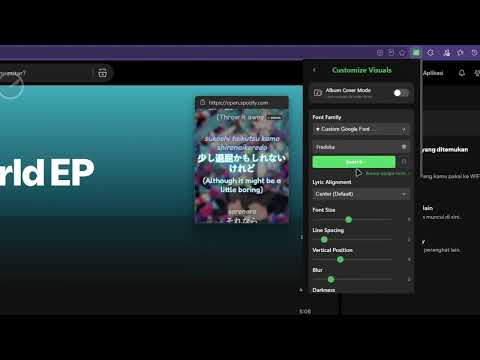
## 🎵 Flying Lyrics: Floating & Synced Lyrics Lyrics that follow you wherever you go. **Flying Lyrics** is a powerful floating browser extension that pulls in synchronized lyrics, romanization, and translations. Sing along, learn languages, and understand your favorite tracks while multitasking—without ever switching tabs. --- ## ✨ Key Features 🚀 Seamless Playback & Synchronization - Always-on-Top: View lyrics inside an adjustable floating player or a completely borderless Picture-in-Picture (PiP) window. - Native Support: Works instantly with Spotify Web Player and YouTube Music with zero complex setup. - Bi-directional Controls: Control track seek, volume, and playback state natively from the overlay player window. 🌍 Read & Understand Everything - Triple-Layer View: Simultaneously display original text, romanization (supporting Japanese, Korean, and Mandarin), and translations. - Background Processing: Translations load asynchronously on the fly (via Google Translate) without blocking instant lyric display. - LRC & Manual Search: Load your own custom .lrc files or search the cloud by artist and title for rare versions. 🎨 Beautiful, Eco-Friendly Customization - Adaptive Design: Extracts background palettes from album art dynamically using a custom, high-speed K-Means color algorithm. - Premium Presets: Over 30 visual themes, Google Fonts styling, and "Galaxy Mode" backdrops with smooth particle effects. - Eco Mode: Caps processing frame rates and visual details when minimized or idle to keep laptop battery drain near zero. - Built-in Editor: Adjust lyric offsets, baseline timings, or correct typos directly inside a theme-integrated editor.
4.9 out of 519 ratings
Details
- Version5.3.0
- UpdatedOctober 20, 2026
- Size294KiB
- LanguagesEnglish
- DeveloperWebsite
Email
kaleksanan.bagus@gmail.com - Non-traderThis developer has not identified itself as a trader. For consumers in the European Union, please note that consumer rights do not apply to contracts between you and this developer.
Privacy

Flying Lyrics - Romanize Your Lyrics has disclosed the following information regarding the collection and usage of your data. More detailed information can be found in the developer's privacy policy.
Flying Lyrics - Romanize Your Lyrics handles the following:
This developer declares that your data is
- Not being sold to third parties, outside of the approved use cases
- Not being used or transferred for purposes that are unrelated to the item's core functionality
- Not being used or transferred to determine creditworthiness or for lending purposes
Support
For help with questions, suggestions, or problems, visit the developer's support site