

Fluxside

Overview
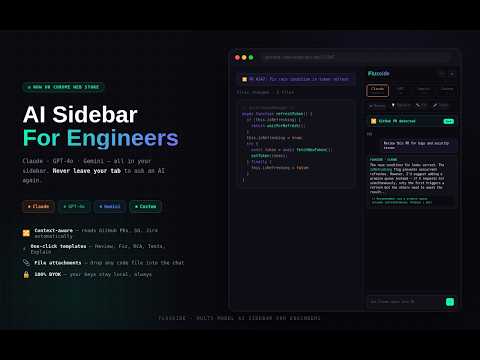
Multi-model AI sidebar for engineers. Claude + GPT + Gemini — never leave your tab.
Fluxside is a multi-model AI sidebar built for software engineers. Bring Claude, GPT, and Gemini directly alongside your development tabs — without interrupting your flow. CONTEXT-AWARE WORKFLOWS Open a supported engineering page and Fluxside detects the relevant content. Capture pull request diffs, Stack Overflow answers, or issue summaries and start prompting immediately — no manual copy-pasting required. CHOOSE YOUR MODEL PER TASK Toggle between Anthropic Claude, OpenAI GPT, and Google Gemini depending on task complexity. Connect to any OpenAI-compatible endpoint — local Ollama instances, Groq, or other custom providers — via the Custom settings tab. 6 DEVELOPER-FOCUSED TEMPLATES Code Review: Analyze formatting, potential bugs, and performance bottlenecks Fix: Diagnose root causes from stack traces and runtime errors Explain: Deconstruct complex algorithms or unfamiliar codebases Tests: Generate unit testing structures for edge cases RCA: Draft root cause analyses using structured troubleshooting methods Ticket to Code: Outline implementation strategies from issue descriptions FILE ATTACHMENTS Upload text-based developer files directly into the chat (up to 500KB per file) for immediate local reference. PRIVACY & DATA HANDLING Your API keys are stored locally using Chrome's storage API. Queries and conversations go directly from your browser to your chosen AI provider. No external servers, no tracking, no subscriptions. SUPPORTED PLATFORMS GitHub: pull requests, issues, files, and commits Stack Overflow and Stack Exchange networks Jira software tickets npm, crates.io, MDN, and standard documentation pages GETTING STARTED Install Fluxside from the Chrome Web Store Click the Settings icon in the sidebar Add your API key for Claude, GPT, or Gemini Navigate to a GitHub PR or docs page and activate the extension
0 out of 5No ratings
Details
- Version1.0.0
- UpdatedJune 1, 2026
- Size24.05KiB
- LanguagesEnglish (United States)
- Developer
Email
ashishjsharda@gmail.com - Non-traderThis developer has not identified itself as a trader. For consumers in the European Union, please note that consumer rights do not apply to contracts between you and this developer.
Privacy

This developer declares that your data is
- Not being sold to third parties, outside of the approved use cases
- Not being used or transferred for purposes that are unrelated to the item's core functionality
- Not being used or transferred to determine creditworthiness or for lending purposes
Support
For help with questions, suggestions, or problems, visit the developer's support site