


Overview
Import products from online stores into your FLUXLIO account and fill Leboncoin ads.
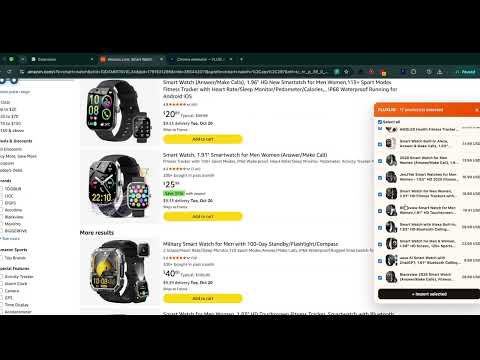
FLUXLIO Helper connects your browser to your FLUXLIO account so you can import product listings in one click. What it does - Import a product from a supported online store into FLUXLIO, with its title, description, price, images and variants. - Fill in Leboncoin ads automatically from your FLUXLIO products. - Check the stock and price of your supplier products through your own browser. - Sign in automatically if you are already logged in at fluxlio.app. How to use 1. Sign in at fluxlio.app. 2. Open a product page on a supported store. 3. Click the FLUXLIO Helper icon and choose Import. A FLUXLIO account is required. The extension only runs on supported shopping sites and on FLUXLIO.
5 out of 51 rating
Details
- Version1.7.3
- UpdatedOctober 13, 2026
- Size39.61KiB
- LanguagesEnglish (United States)
- DeveloperWebsite
Email
devraj93300@gmail.com - Non-traderThis developer has not identified itself as a trader. For consumers in the European Union, please note that consumer rights do not apply to contracts between you and this developer.
Privacy

FLUXLIO Helper has disclosed the following information regarding the collection and usage of your data. More detailed information can be found in the developer's privacy policy.
FLUXLIO Helper handles the following:
This developer declares that your data is
- Not being sold to third parties, outside of the approved use cases
- Not being used or transferred for purposes that are unrelated to the item's core functionality
- Not being used or transferred to determine creditworthiness or for lending purposes
Support
For help with questions, suggestions, or problems, visit the developer's support site