

FlowZone: Hide AI Videos & Shorts for YouTube

Overview
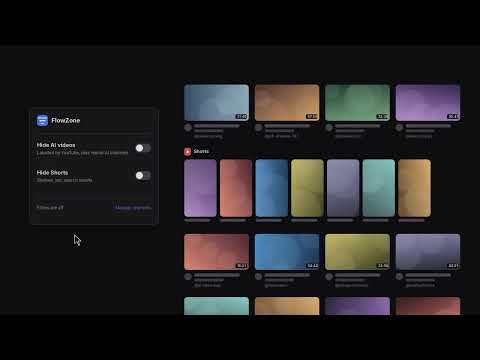
A calmer YouTube: hide videos YouTube labels as AI, channels that keep posting them, and Shorts. Block any channel in one click.
YouTube is an emotion we protect, so a child in a village can be the next Dr. Kalam rather than a Shorts creator. FlowZone keeps YouTube for what you came for: studying, deep dives, unwinding and music. Not AI slop, not endless Shorts. WHAT IT DOES • Hide AI videos: hides videos that YouTube itself labels as AI-generated or altered, in your feed, search, the suggestions beside the player and channel pages. • AI channels disappear: once a channel has posted two videos YouTube labels as AI, FlowZone hides the rest of that channel too. • Also catch unlabelled AI (optional, off by default): hides videos whose titles name AI video tools such as Sora, Veo, Kling or Seedance, or say they're AI-generated. • Hide Shorts: removes Shorts shelves, the Shorts tab, the Shorts search filter and Shorts in search, and opens any Shorts link in the normal player. • Hide a channel in one click: hover any video and press the ⊘ button. Undo is right there. • Never hide: keep channels you trust visible whatever the filters say. • Autoplay guard: if you land on, or autoplay into, a video FlowZone would hide, it pauses it and asks: Go back, or Play anyway. No more AI "history for sleep" at 3 a.m. • Manage channels: your lists as plain text, easy to back up or share. PRIVATE BY DESIGN No accounts, no servers, no analytics, no tracking. Your settings and lists stay in your Chrome profile. To read YouTube's own AI label, FlowZone asks youtube.com for the video's public data, signed out, and sends nothing anywhere else. WHAT IT CAN'T DO FlowZone can only hide what YouTube labels or what you block: YouTube labels realistic AI content, not most animated AI. It works on youtube.com in Chrome on your computer, not in the YouTube phone or TV apps. It is not an ad blocker. Built in Rust, compiled to WebAssembly.
0 out of 5No ratings
Details
- Version1.0.0
- UpdatedNovember 17, 2026
- Offered byshashank.swe.2020
- Size107KiB
- LanguagesEnglish
- Developer
Email
support@rigspark.si - Non-traderThis developer has not identified itself as a trader. For consumers in the European Union, please note that consumer rights do not apply to contracts between you and this developer.
Privacy

This developer declares that your data is
- Not being sold to third parties, outside of the approved use cases
- Not being used or transferred for purposes that are unrelated to the item's core functionality
- Not being used or transferred to determine creditworthiness or for lending purposes
Support
For help with questions, suggestions, or problems, visit the developer's support site