Item logo image for FlowType: Speech to Text

FlowType: Speech to Text

flow-type.app
5.0(

2 ratings

)
Item media 3 (screenshot) for FlowType: Speech to Text
Item media 4 (screenshot) for FlowType: Speech to Text
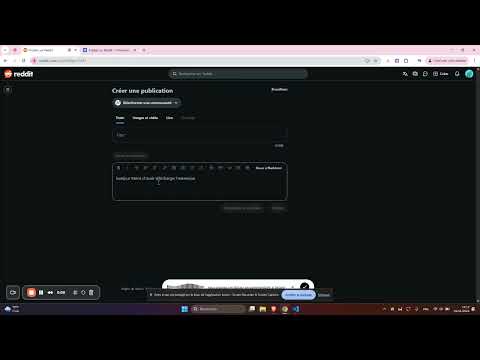
Item video thumbnail
Item media 2 (screenshot) for FlowType: Speech to Text
Item media 3 (screenshot) for FlowType: Speech to Text
Item media 4 (screenshot) for FlowType: Speech to Text
Item video thumbnail
Item media 2 (screenshot) for FlowType: Speech to Text
Item video thumbnail
Item media 2 (screenshot) for FlowType: Speech to Text
Item media 3 (screenshot) for FlowType: Speech to Text
Item media 4 (screenshot) for FlowType: Speech to Text

Overview

Speech to text for Chrome. Dictate anywhere - Gmail, Docs, forms. Free voice typing extension with 40+ languages supported

FlowType is a speech to text extension for Chrome that lets you dictate anywhere on the web. Transform your voice into text instantly on Gmail, Google Docs, LinkedIn, Twitter, forms, and any website. Simple, fast, and accurate voice recognition technology. 🎤 How it works: • Universal speech to text - Works on ANY website (Gmail, Google Docs, social media, forms, CRMs) • Real-time voice recognition - See your words appear as you speak • Direct insertion - No copy-paste needed, text appears directly in input fields • Keyboard shortcut - Press Ctrl+Shift+Space (Windows/Linux) or Cmd+Shift+Space (Mac) • 40+ languages - English, French, Spanish, German, Chinese, Arabic, Japanese, Korean, and more • Hands-free typing - Perfect for accessibility and productivity • Fast and lightweight - No lag or delays 🌍 Supported languages: English (US, UK, Australia, Canada, India), French (France, Canada, Belgium, Switzerland), Spanish (Spain, Mexico, Argentina), German (Germany, Austria, Switzerland), Italian, Portuguese (Brazil, Portugal), Dutch, Polish, Russian, Turkish, Swedish, Norwegian, Danish, Finnish, Czech, Greek, Ukrainian, Romanian, Croatian, Chinese (Simplified, Traditional), Japanese, Korean, Hindi, Thai, Vietnamese, Indonesian, Arabic, Hebrew, Persian, and more. ✨ Perfect for: • Writing emails and messages faster • Filling forms and surveys hands-free • Social media posts and comments • Google Docs transcription and note-taking • Students taking lecture notes • Professionals creating reports • Accessibility - hands-free computing • Reducing typing fatigue and RSI • Multilingual users ⌨️ Keyboard shortcuts: • Ctrl+Shift+Space (Windows/Linux) or Cmd+Shift+Space (Mac): Start/Stop dictation • ESC: Stop recording � Privacy: Your voice data is processed securely. No voice recordings are stored on our servers. Your privacy is protected. speech to text, voice to text, voice typing, voice dictation, speech recognition, audio to text, transcription, voice commands, microphone typing

Details

  • Version
    1.0.0
  • Updated
    November 4, 2025
  • Size
    608KiB
  • Languages
    English
  • Developer
    Website
    Email
    contact@whomails.com
  • Non-trader
    This developer has not identified itself as a trader. For consumers in the European Union, please note that consumer rights do not apply to contracts between you and this developer.

Privacy

The developer has disclosed that it will not collect or use your data.

This developer declares that your data is

  • Not being sold to third parties, outside of the approved use cases
  • Not being used or transferred for purposes that are unrelated to the item's core functionality
  • Not being used or transferred to determine creditworthiness or for lending purposes

Related

Multi-language Keyboard for Google Drive™

3.7

Multi-language Virtual Keyboard for Google Chrome

Quick Translate - AI Language Translator

4.8

Translate text while browsing. Auto-translate, audio, favorites, spaced repetition. PDF support. Language learning tool.

Voice Typing & Dictation for Gmail, Docs & Web → WriteByVoice

4.5

Dictate emails, Google Docs, forms & any website using AI voice typing. Fast, accurate speech-to-text for Chrome and Gmail.

SpeechAgent - Live Voice Typing

4.0

Speech to text converter to fill active text area with your voice using the built-in speech recognition engine of your browser

ChatGPT Reader & Transcriber: Free AI Text to Speech & Speech to Text

4.5

Free AI text to speech (tts) & speech to text (stt) with ChatGPT. Listen to natural voices or transcribe audio instantly.

Read to Me

4.4

Use Read to Me, a chrome extension that acts as a natural reader, offering read aloud and text to speech functionality.

VoiceWave: Voice Mode for ChatGPT, DeepSeek, Claude, etc

4.1

Have voice chat with DeepSeek, ChatGPT, and other AI chatbots. Activate voice mode, speech recognition, text-to-speech, and more.

Voice Out: Text to Speech Voice Reader

4.2

Use text to speech to read any webpage, Google Doc, PDF, or book with natural sounding voices.

Accessibility Screen Reader

5.0

A comprehensive screen reader extension for web accessibility with voice navigation and on-screen text display

Text to Speech Extension

4.3

Convert web pages into speech with the Text to Speech Extension. Your go-to Chrome TTS extension and text to speech reader

Voicy - Voice to Text Powered by AI

4.8

Speech to Text Chrome Extension with +99% accuracy in over 50 languages

Text to Speech Google Docs

3.4

Try Text to Speech Google Docs: Convert text to voice Google in seconds. Efficient TTS Google extension for all your document needs

Multi-language Keyboard for Google Drive™

3.7

Multi-language Virtual Keyboard for Google Chrome

Quick Translate - AI Language Translator

4.8

Translate text while browsing. Auto-translate, audio, favorites, spaced repetition. PDF support. Language learning tool.

Voice Typing & Dictation for Gmail, Docs & Web → WriteByVoice

4.5

Dictate emails, Google Docs, forms & any website using AI voice typing. Fast, accurate speech-to-text for Chrome and Gmail.

SpeechAgent - Live Voice Typing

4.0

Speech to text converter to fill active text area with your voice using the built-in speech recognition engine of your browser

ChatGPT Reader & Transcriber: Free AI Text to Speech & Speech to Text

4.5

Free AI text to speech (tts) & speech to text (stt) with ChatGPT. Listen to natural voices or transcribe audio instantly.

Read to Me

4.4

Use Read to Me, a chrome extension that acts as a natural reader, offering read aloud and text to speech functionality.

VoiceWave: Voice Mode for ChatGPT, DeepSeek, Claude, etc

4.1

Have voice chat with DeepSeek, ChatGPT, and other AI chatbots. Activate voice mode, speech recognition, text-to-speech, and more.

Voice Out: Text to Speech Voice Reader

4.2

Use text to speech to read any webpage, Google Doc, PDF, or book with natural sounding voices.

Google apps