

FlowShot
3 ratings
)
Overview
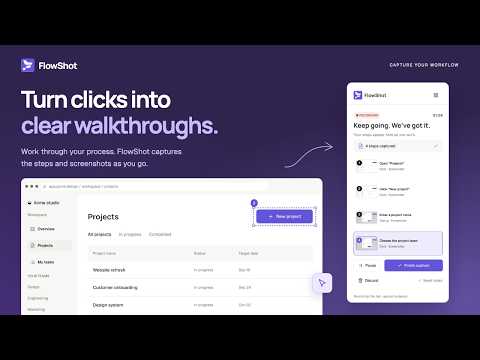
Turn browser workflows into polished, private step-by-step guides.
Ever had to explain the same process for the fifth time? FlowShot does the writing for you. Hit Record, do the task the way you always do, and FlowShot takes a screenshot at every step, highlights what you clicked, and writes the instruction: "Click 'Save changes'", "Enter 'Launch plan' in 'Project name'". When you stop, the guide opens in an editor so you can tidy it up and send it off. RECORDING • Start from the side panel with one click. It keeps going through page loads and inside embedded frames. • Every screenshot shows the element you used. • Typing into a field becomes one step, not a step per keystroke. • Press Alt+Shift+F to drop in a note without leaving the page. EDITING • Change titles and descriptions, reorder or remove steps, add your own. • Highlight, draw arrows, add labels, or blur anything private. • Swap out a screenshot if you need to. Edits save as you go. SHARING • Export a standalone HTML page, print to PDF, or download the annotated images as a zip. • Keep .flowshot.json backups wherever you like and import them again later. • Your library has search, sorting, and a Trash, so a wrong click never costs you a guide. YOUR DATA STAYS YOURS There is no server, no account, and no tracking. Guides and screenshots live in your browser and nowhere else. Passwords, card numbers, and similar fields are never recorded. The only way anything leaves your computer is when you choose to export it. Good for onboarding docs, help articles, team SOPs, and bug reports that people actually understand.
5 out of 53 ratings
Details
- Version0.1.0
- UpdatedSeptember 17, 2026
- Offered byrakibul.h.rocky
- Size215KiB
- LanguagesEnglish
- Developer
Email
rakibul.h.rocky@gmail.com - Non-traderThis developer has not identified itself as a trader. For consumers in the European Union, please note that consumer rights do not apply to contracts between you and this developer.
Privacy

FlowShot has disclosed the following information regarding the collection and usage of your data. More detailed information can be found in the developer's privacy policy.
FlowShot handles the following:
This developer declares that your data is
- Not being sold to third parties, outside of the approved use cases
- Not being used or transferred for purposes that are unrelated to the item's core functionality
- Not being used or transferred to determine creditworthiness or for lending purposes