

FlowKit — Browser Automation

Overview
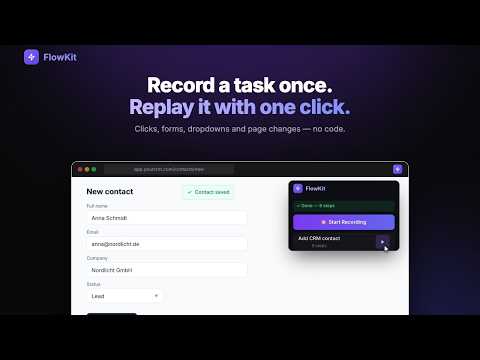
Record browser workflows and replay them automatically.
FlowKit records the repetitive things you do in your browser — clicks, typing, menus, forms — and replays them for you with one click. No coding, no scripts. Record a task once, run it whenever you need it. HOW IT WORKS • Open the page where your task starts and click "Start Recording" • Do the task as usual: click, type, pick options, move between pages • Stop, give the workflow a name and save it • Press ▶ anytime — FlowKit opens the starting page and repeats every step WHAT PEOPLE USE IT FOR • Filling out the same forms again and again (CRM entries, applications, order forms) • Repeating the same clicks every day in admin panels and dashboards • Entering a list of records one by one with "Run with Data" • Running a routine check automatically every hour or every day with "Schedule" • Any sequence of clicks and inputs you repeat in the browser KEY FEATURES ✓ One-click recording — no coding required ✓ Replays start from the page you recorded on, so a workflow works from anywhere ✓ Reliable clicks — each step is verified by the link and text it targets, not just its position ✓ Works inside embedded frames (widgets, demos, embedded forms) ✓ Text fields, text areas, dropdowns, checkboxes and rich editors such as Gmail and X ✓ Run with Data — replay one workflow for many rows of data, each with its own values ✓ Schedule — run a workflow hourly or daily in a background tab, without taking over the tab you are using ✓ Cloud sync and replay history when you sign in FREE • Record and replay as many workflows as you like in your browser • Free account with cloud sync for up to 3 workflows • No credit card required PRIVACY Password fields are never recorded. Your workflows stay in your browser unless you sign in to sync them; synced data is transmitted securely (HTTPS/TLS). We never sell or share your data. GOOD TO KNOW Chrome does not allow extensions on chrome:// pages, the Chrome Web Store or the built-in PDF viewer, so FlowKit cannot record there. Steps that need a password must be completed by you. SUPPORT Website: https://flowkit.digitaladexpert.de Email: info@digitaladexpert.de
0 out of 5No ratings
Details
- Version1.2.5
- UpdatedOctober 13, 2026
- Offered byyigittyldzz
- Size64.17KiB
- LanguagesEnglish
- DeveloperOSMAN YIGIT YILDIZ
Aydın/Didim Aydın/Didim, Aydın 09200 TREmail
info@digitaladexpert.dePhone
+90 506 141 61 51 - TraderThis developer has identified itself as a trader per the definition from the European Union and committed to only offer products or services that comply with EU laws.
Privacy

FlowKit — Browser Automation has disclosed the following information regarding the collection and usage of your data. More detailed information can be found in the developer's privacy policy.
FlowKit — Browser Automation handles the following:
This developer declares that your data is
- Not being sold to third parties, outside of the approved use cases
- Not being used or transferred for purposes that are unrelated to the item's core functionality
- Not being used or transferred to determine creditworthiness or for lending purposes
Support
For help with questions, suggestions, or problems, visit the developer's support site