


Overview
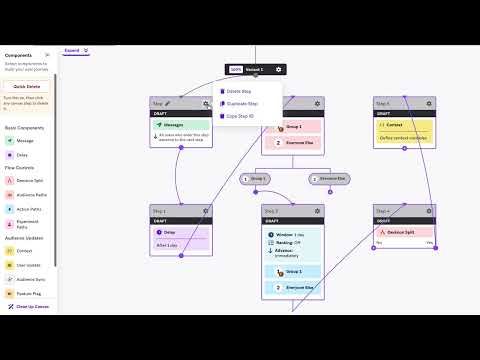
Adds a Quick Delete toggle to Braze Canvas so you can remove steps directly from the canvas.
Flowfriendly's Braze Canvas Quick Delete adds a Quick Delete mode directly inside Braze Canvas so users can remove steps faster while editing a canvas. Instead of opening a step’s settings and manually choosing delete each time, users can turn on Quick Delete and click steps directly from the canvas. This makes cleanup faster, reduces repetitive clicks, and helps teams work more efficiently when updating or simplifying Braze Canvases. Users should install it if they regularly build or edit Braze Canvases and want a quicker, more streamlined way to remove steps without changing how Braze works overall. The extension is lightweight, focused on a single workflow improvement, and only runs on supported Braze dashboard pages.
0 out of 5No ratings
Details
- Version1.0.0
- UpdatedApril 10, 2026
- Size39.85KiB
- LanguagesEnglish
- Developerflowfriendly OUWebsite
Mulla tn 2-57a Tallinn 10611 EEEmail
info@flowfriendly.comPhone
+372 558 6744 - TraderThis developer has identified itself as a trader per the definition from the European Union and committed to only offer products or services that comply with EU laws.
- D-U-N-S565822279
Privacy

This developer declares that your data is
- Not being sold to third parties, outside of the approved use cases
- Not being used or transferred for purposes that are unrelated to the item's core functionality
- Not being used or transferred to determine creditworthiness or for lending purposes