

FlowDesk
Overview
A beautiful all-in-one workspace and utility dashboard opening in a browser tab.
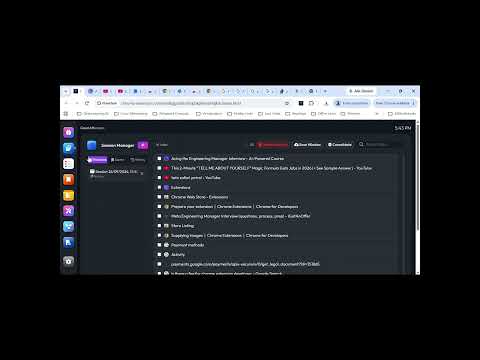
**FlowDesk** transforms your browser into an elegant, distraction-free command center. Inspired by the fluid ergonomics of macOS and modern desktop operating systems, FlowDesk replaces the traditional utility-less new tab with a unified suite of power-user tools—eliminating tab overload, fragmented apps, and context switching. Everything in FlowDesk runs **100% locally** in your browser with zero latency, offline capability, and zero external tracking. --- ## ✨ Core Features & Modules FlowDesk integrates eight essential productivity suites into a single docked workspace: ### 🧠 1. Smart Tabs & Page Intelligence * **Automatic Tab Categorization:** Dynamically organizes open browser tabs into logical work clusters (*Study, Work, Dev, Social, Shopping, Entertainment, Other*). * **Launch Page Intelligence:** Captures and summarizes the webpage from which FlowDesk was invoked, preserving your immediate focus context. * **Instant Filtering & Search:** Rapidly search, focus, or close tabs across all open windows. ### 🗂️ 2. Session & Window Manager * **Window Hierarchy View:** Real-time visibility into all Chromium windows and grouped tabs. * **Session Stashing:** Save entire window configurations and multi-tab workflows with one click. * **Restore & Suspension:** Restore complete sessions or selectively reopen tabs while keeping browser memory lean. * **History Archive:** Access recently closed sessions and tabs with zero risk of accidental loss. ### 📋 3. Task Manager & Calendar Suite * **State-Driven Kanban Board:** 5 lifecycle columns (*Created, ToDo, In Progress, In Review, Completed*) with distinct visual accent states. * **Interactive Views:** * **Kanban Board:** Drag-and-drop card orchestration across states. * **7-Day Week View:** Day-by-day scheduling with start and end dates, sticky headers, and "Today" indicator. * **Monthly Calendar Grid:** Comprehensive 30-day overview with active-day highlighting and date chips. * **Task Editor:** Assign start/end dates, priorities (P1 Urgent to P5 Lowest), tags, checklists, and rich markdown descriptions. ### 📝 4. Dual-Panel Note & Code Scratchpad * **Dual-Track Workflow:** Independent, dedicated workspaces for **Rich Text / Plain Notes** and **Code Snippets**. * **Rich Word Controls:** Typography, headings, blockquotes, code-boxes, table insertion, shapes, and highlights. * **Code Editor:** Fixed-width typography, syntax helpers, line numbers, indentation handling, and one-click code copy. * **Document Quick Info:** Live statistics counter tracking words, characters, lines, and estimated reading time. * **Auto-Save & Export:** Real-time auto-persistence with export to Word (`.doc`), print to PDF, and text/source downloads. ### 📊 5. Mermaid Diagram Studio * **Interactive Flowchart & Diagramming:** Write native Mermaid markup with live SVG rendering in real time. * **Multi-Diagram Support:** Architecture diagrams, sequence flows, ERDs, mind maps, state machines, and Gantt charts. * **Export Options:** Instant export to high-resolution SVG, PNG images, or raw syntax. ### 📄 6. PDF Tools & Annotator * **Local PDF Viewer:** High-performance, offline PDF rendering powered by PDF.js. * **Annotation Suite:** Highlight text, insert callouts, drawings, and shapes without uploading files to third-party cloud servers. * **Export & Save:** Save annotated documents locally using embedded `pdf-lib` compilation. ### 🛠️ 7. Developer & Web Utilities * **Code Formatters:** Built-in beautifiers and validators for JSON, XML, and SQL. * **Encoding & Hashing:** URL Encoder/Decoder, Base64 encoder, UUID generator, and timestamp converter. * **Regex Sandbox:** Real-time Regular Expression testing with group match extraction. ### 🔒 8. Privacy, Security & Lock Screen * **Workspace Protection:** PIN/password lock screen to safeguard notes, tasks, and open sessions from casual viewing. * **Self-Contained Security:** No external script injection, no remote telemetries, strict Content Security Policy (CSP).
0 out of 5No ratings
Details
- Version1.0
- UpdatedSeptember 27, 2026
- Offered byladyankita.patel
- Size2.2MiB
- LanguagesEnglish
- Developer
Email
ladyankita.patel@gmail.com - Non-traderThis developer has not identified itself as a trader. For consumers in the European Union, please note that consumer rights do not apply to contracts between you and this developer.
Privacy

This developer declares that your data is
- Not being sold to third parties, outside of the approved use cases
- Not being used or transferred for purposes that are unrelated to the item's core functionality
- Not being used or transferred to determine creditworthiness or for lending purposes