


Overview
Add Excalidraw and draw.io diagrams to Notion pages. Import Notion AI Mermaid flowcharts in one click. Native Notion blocks.
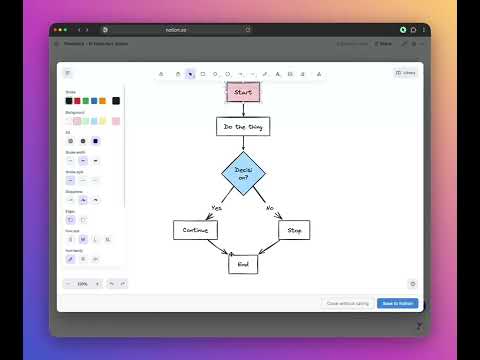
Real diagram editors, native inside Notion. Notion has no diagram block. You either screenshot from draw.io and paste (which breaks the moment anything changes), or you wrestle with Notion AI's Mermaid output in a code block. Flowblock fixes both. Click the floating button on any Notion page and a full Excalidraw or draw.io editor opens right over your doc. Draw, save, and the diagram lands as a native Notion image block. Hover any saved diagram, click Edit, and you're back in the editor exactly where you left off. TWO EDITORS, SWITCHABLE PER DIAGRAM - Excalidraw - hand-drawn style. Perfect for sketches, brainstorming, casual whiteboard moments. - draw.io - rigorous and technical. UML, BPMN, ER, sequence, class, network topology, the full shape libraries. Both save as native Notion image blocks that survive uninstalling Flowblock. IMPORT NOTION AI MERMAID CODE Ask Notion AI for a flowchart and you get a Mermaid code block. Useful, until you need to rename a node or fix an arrow and you're suddenly hand-editing Mermaid syntax in a text block. Flowblock adds an Import button to every Mermaid block in Notion. One click parses the source and reopens the diagram in Excalidraw or draw.io as something you can actually edit visually. HOW IT WORKS 1. Hit the floating Add Diagram button on any Notion page (or hover a Mermaid block and click Import). 2. Draw, edit, or convert in Excalidraw or draw.io, right inside the modal. 3. Save. The diagram lands in your Notion page as a real image block, yours forever. PRO FEATURES - Unlimited drawings - the free plan includes 5 drawings per month (Mermaid imports count toward that bucket); Pro removes the cap. - Version history with one-click rollback - every save snapshots the last versions inside the diagram. Restore any of them in one click. - Multiple Notion workspaces - connect personal, team, and client workspaces and switch between them from the extension menu. - Priority support. PRICING - Free forever - 5 drawings per month, both editors, Mermaid flowchart import, native Notion blocks. - Pro - $4.99/month or $44.99/year (3 months free). Unlimited drawings + version history + multi-workspace + priority support. PRIVACY Diagrams upload directly to your own Notion workspace using your Notion access token. We never store your diagram content on our servers. Authentication tokens stay in Chrome's local storage. Learn more: https://flowblock.app/privacy.html WORKS WITH Notion Free, Plus, Business, and Enterprise plans. Chrome on macOS, Windows, and Linux. Firefox and Edge support in progress. QUESTIONS OR FEEDBACK Email support@flowblock.app or visit https://flowblock.app
0 out of 5No ratings
Details
- Version1.0.11
- UpdatedJune 12, 2026
- FeaturesOffers in-app purchases
- Size103KiB
- LanguagesEnglish
- DeveloperAlexander Masaru KagoshimaWebsite
c/o IP-Management #10049 Ludwig-Erhard-Straße 18 Hamburg 20459 DEEmail
info@trello-attachment-downloader.com - Non-traderThis developer has not identified itself as a trader. For consumers in the European Union, please note that consumer rights do not apply to contracts between you and this developer.
Privacy

Flowblock: Notion Diagrams & Flowcharts has disclosed the following information regarding the collection and usage of your data. More detailed information can be found in the developer's privacy policy.
Flowblock: Notion Diagrams & Flowcharts handles the following:
This developer declares that your data is
- Not being sold to third parties, outside of the approved use cases
- Not being used or transferred for purposes that are unrelated to the item's core functionality
- Not being used or transferred to determine creditworthiness or for lending purposes
Support
For help with questions, suggestions, or problems, visit the developer's support site