

Flow State

Overview
Read faster with RSVP (Rapid Serial Visual Presentation) technology. Select any text and speed read with customizable settings.
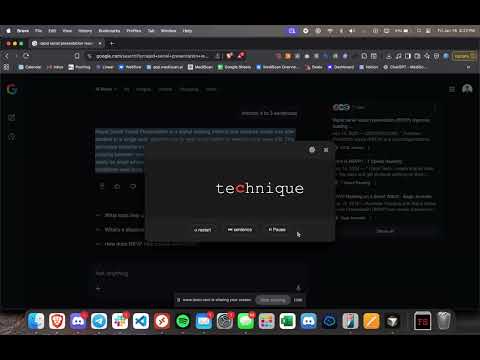
Enter the Flow State. Most reading on the web is full of distractions. Ads, sidebars, and bad formatting break your focus. Flow State fixes that. This extension uses RSVP (Rapid Serial Visual Presentation) to let you speed read any text on the web without moving your eyes. It takes the text you select and flashes it one word at a time, aligning everything to a single Red Focal Point. Your eyes don't have to jump from word to word. You just stare at the red letter, and the information flows into your brain. How it Works: - Highlight any text on a page. - Right-click and select "Flow State" - The reader opens in a clean, dark-mode overlay. - Read at your own pace (default is 300 WPM, but you can crank it up). Why the Red Letter? It’s called the "Optimal Recognition Point." By highlighting the specific pivot point of the word in red and keeping it fixed in the center of the box, your brain recognizes the word instantly. No scanning required. Features: - Distraction-Free UI: A simple dark floating window. No full-screen takeover, just a clean box that sits on top of your page. - Perfect Alignment: Uses a grid system to keep the red letter mathematically centered. Total Control: - Change WPM (Words Per Minute) instantly. - Play / Pause. - Rewind one sentence (if you missed something). - Restart from the beginning. Customizable: Change the background color, text color, and pivot color in the settings menu. Simple. Fast. Focused. Stop scanning. Start flowing.
0 out of 5No ratings
Details
- Version1.2.1
- UpdatedJanuary 22, 2026
- Size19.11KiB
- LanguagesEnglish
- Developer
Email
evanlknecht@gmail.com - Non-traderThis developer has not identified itself as a trader. For consumers in the European Union, please note that consumer rights do not apply to contracts between you and this developer.
Privacy

This developer declares that your data is
- Not being sold to third parties, outside of the approved use cases
- Not being used or transferred for purposes that are unrelated to the item's core functionality
- Not being used or transferred to determine creditworthiness or for lending purposes
Support
For help with questions, suggestions, or problems, visit the developer's support site