Item logo image for Floodlight Inspector

Floodlight Inspector

Item media 5 (screenshot) for Floodlight Inspector
Item video thumbnail
Item media 2 (screenshot) for Floodlight Inspector
Item media 3 (screenshot) for Floodlight Inspector
Item media 4 (screenshot) for Floodlight Inspector
Item media 5 (screenshot) for Floodlight Inspector
Item video thumbnail
Item media 2 (screenshot) for Floodlight Inspector
Item media 3 (screenshot) for Floodlight Inspector
Item media 4 (screenshot) for Floodlight Inspector
Item media 5 (screenshot) for Floodlight Inspector

Overview

A powerful tool to help you easily validate and troubleshoot your Floodlight setup in Google tag format.

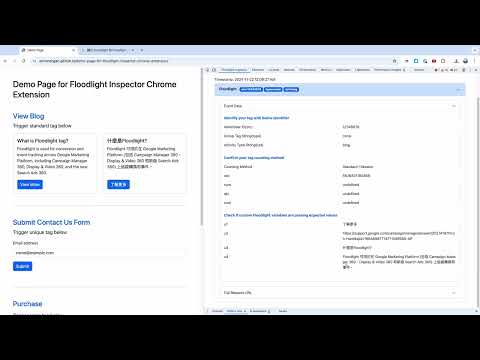
The Floodlight Inspector Chrome extension is a powerful tool designed to help you easily validate and troubleshoot your Floodlight setup in Google tag format . It has the below 3 key features. 1. Retain the necessary Floodlight pings to avoid confusion ➤ When checking Floodlight on the network tab, we usually see different ping being triggered with the same action. It causes confusion as we will be confused on which pings we should refer to. With this tool, we only filter out the Floodlight ping that you need to audit on. 2. Breaks down Floodlight URLs ➤ It deconstructs the Floodlight request URLs to make it easier for you to identify and verify the data, ensuring that everything is set up correctly. 3. Custom Floodlight variable decoding ➤ This tool decodes the custom Floodlight variables so they’re understandable when your captured language isn't in English. Please visit the below page for detailed instruction. https://github.com/annnnangan/floodlight-inspector-chrome-extension?tab=readme-ov-file#floodlight-inspector-chrome-extension

Details

  • Version
    1.0.0
  • Updated
    November 24, 2024
  • Offered by
    anna.ymngan
  • Size
    1.49MiB
  • Languages
    English
  • Developer
    Email
    anna.ymngan@gmail.com
  • Non-trader
    This developer has not identified itself as a trader. For consumers in the European Union, please note that consumer rights do not apply to contracts between you and this developer.

Privacy

The developer has disclosed that it will not collect or use your data. To learn more, see the developer’s privacy policy.

This developer declares that your data is

  • Not being sold to third parties, outside of the approved use cases
  • Not being used or transferred for purposes that are unrelated to the item's core functionality
  • Not being used or transferred to determine creditworthiness or for lending purposes

Support

For help with questions, suggestions, or problems, visit the developer's support site

Related

dataslayer

4.6

Debug and test tag management (Google Tag Manager, DTM, Tealium) and analytics implementations.

Adswerve - dataLayer Inspector+

4.1

DataLayer Tools for Digital Analysts

ObservePoint Debugger

4.1

Troubleshoot analytics tags, variables, events, cookies, and more. Supports Adobe Analytics, Google Analytics, and thousands more.

Datalayer Checker

4.5

The easiest way to debug and check the dataLayer implementations without having to use the browser console!

UET Tag Helper (by Microsoft Advertising)

4.5

This extension helps to identify issues in Microsoft Advertising UET tags

Snap Pixel Helper

3.9

Snap Pixel Helper

Tealium Tools

4.3

Evaluate website data, tags, and events with powerful tools for seamless Tealium iQ integration and server-side enrichments.

Pinterest Tag Helper

4.1

A tool to help you build, troubleshoot and test your Pinterest Tags.

Analytics Debugger

4.6

Your Single Source of Truth (SSOT) for debugging analytics implementations

Omnibug

4.2

Omnibug is a browser extension to decode and display outgoing digital marketing tool requests.

Debugger for Google Analytics 4 (GA4)

3.9

Browser DevTools extension for debugging Google Analytics 4 (GA4) events.

TagHound - Analytics/GTM/Pixel Debugger

4.8

Debug Google Analytics, Google Tag Manager dataLayer, Google Ads, Facebook Ads & +18 ad platforms pixels: Twitter, TikTok and more

dataslayer

4.6

Debug and test tag management (Google Tag Manager, DTM, Tealium) and analytics implementations.

Adswerve - dataLayer Inspector+

4.1

DataLayer Tools for Digital Analysts

ObservePoint Debugger

4.1

Troubleshoot analytics tags, variables, events, cookies, and more. Supports Adobe Analytics, Google Analytics, and thousands more.

Datalayer Checker

4.5

The easiest way to debug and check the dataLayer implementations without having to use the browser console!

UET Tag Helper (by Microsoft Advertising)

4.5

This extension helps to identify issues in Microsoft Advertising UET tags

Snap Pixel Helper

3.9

Snap Pixel Helper

Tealium Tools

4.3

Evaluate website data, tags, and events with powerful tools for seamless Tealium iQ integration and server-side enrichments.

Pinterest Tag Helper

4.1

A tool to help you build, troubleshoot and test your Pinterest Tags.

Google apps