

FloatBar Apps Always On Top
1 rating
)
Overview
Your ultimate productivity dock! FloatBar slides from the edge to launch apps in floating, always-on-top windows.
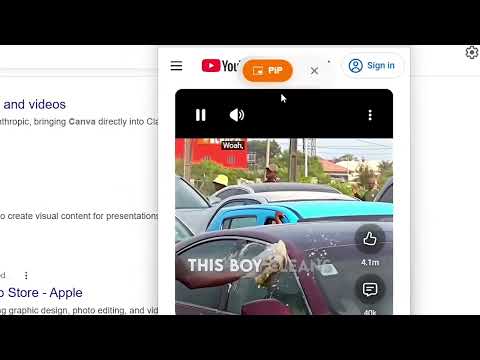
🔓 100% Open Source & Transparent: Feel fully secure knowing exactly what runs in your browser. The entire codebase is open-source and publicly available for anyone to verify, ensuring complete transparency and peace of mind. FloatBar Apps Always On Top: Your Ultimate Productivity Dock. Opera style sidebar with always on top window (PiP) features. Transform the way you multitask with a sleek, invisible dock that brings your favorite web apps to your fingertips—no matter what webpage you are on. Say goodbye to losing track of your most important tools in a sea of messy browser tabs. Quick Access Floating bar is a beautifully designed, globally accessible app dock that lives out of sight on the edge of your screen. Just flick your mouse to the right edge of any webpage, and your personal FloatBar slides into view, ready to launch your favorite web apps instantly. ✨ Key Features 🛡️ 100% Private, No data collection at all & Lightweight Built with modern Web Components (Shadow DOM) so it never breaks or interferes with the websites you are visiting. All your data and customizations are saved purely to your local system storage. No trackers, no bloat. 🚀 Universally Accessible The FloatBar travels with you. Whether you're reading an article, watching a video, or working in a Google Doc, your custom dock is hidden off-screen and instantly accessible the moment your mouse touches the right edge. 📌 Fully Customizable App Dock Add your most-used tools (WhatsApp, ChatGPT, Gmail, Telegram) in seconds. Just drop in a URL, and the extension will automatically fetch the correct, high-quality icon for you, if it doesn't you can add manually. 🖼️ Floating PiP Windows > Launch web apps in "Always-on-Top" Picture-in-Picture windows. No iFrame restrictions, no broken layouts—just clean, independent pop-outs that stay visible while you work in other apps. 🧠 "Auto-Remember" Window Memory Resize an app window to your preferred dimensions and drag it perfectly to the corner of your screen. The next time you open that app, the extension remembers your exact customized width, height, and screen coordinates, restoring it automatically! 🖱️ Drag & Drop Reordering Easily organize your workspace. Just click, drag, and drop your icons to rearrange your dock order exactly how you like it. 🌗 Gorgeous Light & Dark Modes Designed with a premium glassmorphism blur effect that automatically adapts to your system's Light or Dark mode setting, feeling like a native piece of your operating system. How to get started: 1. Install the extension. 2. Navigate to any webpage and move your cursor to the far-right edge of your screen. 3. Click the (+) button to add your first web app!
5 out of 51 rating
Details
- Version1.5
- UpdatedOctober 1, 2026
- Offered byLogno Dev
- Size880KiB
- Languages31 languages
- Developer
Email
lognodev7@gmail.com - Non-traderThis developer has not identified itself as a trader. For consumers in the European Union, please note that consumer rights do not apply to contracts between you and this developer.
Privacy

This developer declares that your data is
- Not being sold to third parties, outside of the approved use cases
- Not being used or transferred for purposes that are unrelated to the item's core functionality
- Not being used or transferred to determine creditworthiness or for lending purposes
Support
For help with questions, suggestions, or problems, please open this page on your desktop browser