

FlixFluent - Dual Subtitles & Language Learning for Netflix & YouTube

Overview
Learn languages on Netflix & YouTube: dual subtitles, hover translation, click-to-explain grammar, and spaced-repetition flashcards.
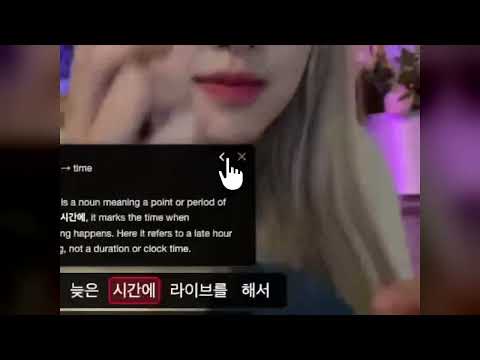
Learn from the shows you already watch. FlixFluent adds dual subtitles, hover translation, and one-click grammar explanations to Netflix and YouTube, then turns the words you look up into flashcards in the FlixFluent web app. 7-day free trial, 30-day money-back guarantee. WHILE YOU WATCH • Dual subtitles: the original line on top, yours underneath. When Netflix or YouTube already has a track in your language it is used as-is; when it does not, the line is translated in context. • Hover translation: hover any word for a translation that fits this exact sentence, without pausing. • Word deconstruction: click a word for its dictionary form, stem, particle, and grammatical role. • Sentence deconstruction: one click breaks the whole line into translation, word-by-word breakdown, meaning, and grammar and cultural notes. Every part of an explanation is itself clickable, so you can keep digging. • Pronunciation audio for any word or line, generated for the sentence it appears in. • Romanization for Korean, Japanese (with kanji readings), Chinese (pinyin), and other non-Latin scripts. Toggle it on or off. • Auto-pause after each line, previous and next line navigation, and 0.5x to 1.5x playback speed for shadowing. • Keyboard shortcuts: A previous line, D next line, S replay, F deconstruct the current sentence. • Caption quality alerts: a visible warning when a YouTube track is auto-generated or auto-translated. AFTER YOU WATCH (web app, included) • Every word you look up becomes a flashcard that keeps its original sentence and episode as context. • Reviews are scheduled with FSRS spaced repetition. Import Anki (.apkg) or CSV decks, export CSV. • CEFR-mapped proficiency tests (A1 to C2) for English, Korean, German, French, and Spanish. MADE FOR • K-drama fans learning Korean: particles and verb endings are labelled on every click. • Anime fans learning Japanese: kanji readings resolved line by line. • Learners of Spanish, French, German, or Chinese who want real dialogue instead of textbook audio. • Intermediate learners who can follow the plot but still cannot parse the sentences. HOW IT WORKS 1. Add to Chrome and sign in. 2. Pick what you are learning and what you speak. 3. Open a show on Netflix or a video on YouTube. Dual subtitles appear automatically. 4. Hover, click, and dig. LANGUAGES Learn any of 28: English, Korean, Japanese, Mandarin Chinese, Traditional Chinese, Spanish, French, German, Italian, Portuguese, Arabic, Turkish, Hindi, Vietnamese, Hebrew, Finnish, Russian, Polish, Thai, Indonesian, Uzbek, Swedish, Norwegian, Danish, Dutch, Greek, Ukrainian, and Slovak. The interface is available in 24 languages. PRICING $17 per month, $159 per year, or $399 once for lifetime access. 7-day free trial, 30-day money-back guarantee. PRIVACY AND SUPPORT FlixFluent does not track your browsing history or sell your data. Support: mail@flixfluent.com. Privacy policy: flixfluent.com/privacy
5 out of 547 ratings
Details
- Version26.1019.4
- UpdatedOctober 19, 2026
- FeaturesOffers in-app purchases
- Size4.05MiB
- Languages26 languages
- DeveloperWebky UGWebsite
Widumstraße 25 Eigeltingen 78253 DEEmail
john@flixfluent.comPhone
+49 1512 8883000 - TraderThis developer has identified itself as a trader per the definition from the European Union and committed to only offer products or services that comply with EU laws.
- D-U-N-S315110886
Privacy

FlixFluent - Dual Subtitles & Language Learning for Netflix & YouTube has disclosed the following information regarding the collection and usage of your data. More detailed information can be found in the developer's privacy policy.
FlixFluent - Dual Subtitles & Language Learning for Netflix & YouTube handles the following:
This developer declares that your data is
- Not being sold to third parties, outside of the approved use cases
- Not being used or transferred for purposes that are unrelated to the item's core functionality
- Not being used or transferred to determine creditworthiness or for lending purposes
Support
For help with questions, suggestions, or problems, visit the developer's support site