

Flick
2 ratings
)
Overview
Tabs, one flick away.
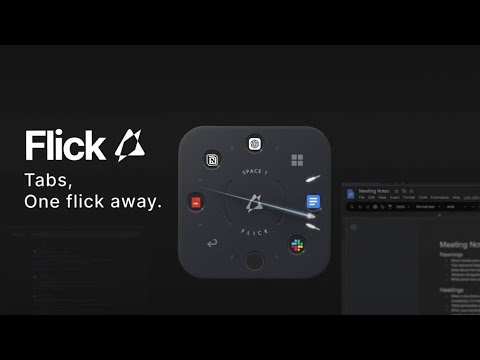
Stop clicking on the tab bars. Stop hitting Ctrl + Tab till you get lucky. Stop hitting Ctrl + 1, 2, 3... keeping track of where things are. Just flick it away. Flick is the fastest visual tab switcher for Chrome, bringing the Weapon Wheel interaction from gaming to your browser. Switch between tabs in 0.1s, seamlessly. 100% free. No account, no sign-in, no tracking. Everything runs locally in your browser — Flick collects nothing. How it works: Call the panel with Alt + Q. Flick: push your mouse toward a slot — that's a flick. Empty slot: flick to assign your current tab. Occupied slot: flick to switch to that tab instantly. Assigned tab closed: flick to reload it. Flick keeps the tab in the slot even if it's gone. Prev & Spaces: dedicated slots to go back to your previous tab and switch between spaces. More: 5 spaces, 5 colors — name them, color them, switch them. Hold the center to close every tab that isn't on the wheel. In-wheel tips guide your first flicks (toggle with Alt + T). Scroll to resize. Works on PDFs too. Works on all Chromium browsers
5 out of 52 ratings
Details
- Version2.0.0
- UpdatedAugust 10, 2026
- FeaturesOffers in-app purchases
- Offered byFlickaway Studio
- Size113KiB
- LanguagesEnglish (United States)
- Developer
Email
flickaway.studio@gmail.com - Non-traderThis developer has not identified itself as a trader. For consumers in the European Union, please note that consumer rights do not apply to contracts between you and this developer.
Privacy

Flick has disclosed the following information regarding the collection and usage of your data. More detailed information can be found in the developer's privacy policy.
Flick handles the following:
This developer declares that your data is
- Not being sold to third parties, outside of the approved use cases
- Not being used or transferred for purposes that are unrelated to the item's core functionality
- Not being used or transferred to determine creditworthiness or for lending purposes