

Flick — Command Palette, Tab Search & Shortcuts

Overview
A keyboard command palette for Chrome: search tabs and bookmarks, jump to sites with shortcuts, paste snippets and run page tools.
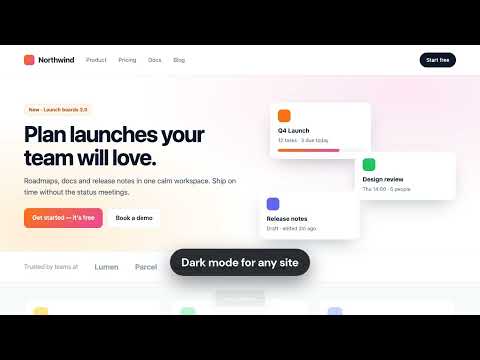
Flick puts your whole browser one shortcut away. Press ⌘⇧K (Ctrl+Shift+K on Windows and Linux) on any page, or click the toolbar icon, and type a few letters. Jump to an open tab, find a bookmark, open a site with your own shortcut, paste saved text, or run a tool on the page — without touching the mouse. SEARCH EVERYTHING • Open tabs — switch to any tab by title or address, across all windows • Bookmarks — find any bookmark in a keystroke • History — optional; turn it on in Settings when you want it • The web — anything else goes straight to a Google search SHORTCUTS THAT TAKE YOU THERE • Make your own: "gh" opens GitHub, "cal" opens your calendar • Search built in: "yt lofi beats" searches YouTube, "pr 482" opens pull request #482 • Open in the current tab or a new one, and sync to every computer you use Chrome on SNIPPETS • Save text you type all the time — your email, address, signature, meeting link • Type "email", press Enter, and it's on your clipboard 15 BUILT-IN PAGE TOOLS • Screenshot the visible page, or just one element • Color picker — hover for a live preview, click to copy the hex code • Dark mode for any site • 12-column grid overlay and pixel rulers for design checks • Copy the URL, title, or a Markdown link • Duplicate, pin, mute, or pop a tab out into its own window • Bookmark the page • Clear this site's cache and hard-reload MADE FOR THE KEYBOARD • Opens in milliseconds and stays out of the page's way • Arrow keys or Ctrl+N / Ctrl+P to move, Enter to run, Esc to close • Recent commands come first, so your favorites are always one keystroke away PRIVATE BY DESIGN • No account, no ads, no tracking, no analytics • Nothing you do in Flick leaves your browser • Flick can't see a site until you open it there • Import and export your shortcuts and snippets anytime Free and open source: https://github.com/Anikets08/Flick
0 out of 5No ratings
Details
- Version1.0.0
- UpdatedNovember 7, 2026
- Size109KiB
- LanguagesEnglish
- Developer
Email
31aniket.singh@gmail.com - Non-traderThis developer has not identified itself as a trader. For consumers in the European Union, please note that consumer rights do not apply to contracts between you and this developer.
Privacy

This developer declares that your data is
- Not being sold to third parties, outside of the approved use cases
- Not being used or transferred for purposes that are unrelated to the item's core functionality
- Not being used or transferred to determine creditworthiness or for lending purposes