


Descripción general
Language learning aid
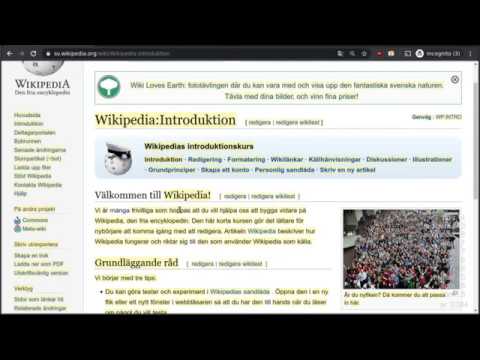
Turn any web page to a learning experience. The extension allows you to build vocabulary by keeping track of known words, and highlighting the new ones to learn. The whole collected vocabulary can be exported as structured text and used to create flash cards. How to use - Open a web page in the language you want to learn - Click on the Flash Cardon icon on the top of the browser. All words which are not added will get an yellow highlight background. - Double click on a word to add or update it's meaning. - You can also see some statistics in the lower right corner of the page Export/Import/Update Vocabulary - Right click on the Flash Cardon icon and select Manage Words from the popup menu. Source code can be found here: https://github.com/aquilax/flash-cardon Changelog: 1.0.3 - Updated to manifest v3 1.0.2 - Adds support for showing translation as a html ruby 1.0.1 - added word review page (only randomized list at the moment) 1.0.0 - added created and updated fields for each word - import from both old and new backups - database migration on install 0.0.4 - added download button on the manage words page
0 de 5Sin valoraciones
Detalles
- Versión1.0.3
- Actualizado24 de agosto de 2023
- Ofrecido poraquilax
- Tamaño19.18KiB
- IdiomasEnglish
- Desarrollador
Correo electrónico
aquilax+chrome@gmail.com - No operadorEste desarrollador no se ha identificado como operador. Los consumidores residentes en la Unión Europea deben tener en cuenta que los derechos de los consumidores no son aplicables a los contratos que suscriban con este desarrollador.
Privacidad

Flash Cardon ha revelado la siguiente información sobre la recogida y el uso de tus datos.
Flash Cardon gestiona lo siguiente:
Este desarrollador declara que tus datos:
- No se venden a terceros, excepto en los casos de uso aprobados
- No se usan ni se transfieren para fines no relacionados con la función principal del elemento.
- No se usan ni se transfieren para determinar la situación crediticia ni para ofrecer préstamos.
Ayuda
Si tienes alguna pregunta, sugerencia o problema, abre esta página en tu navegador para ordenadores