


Overview
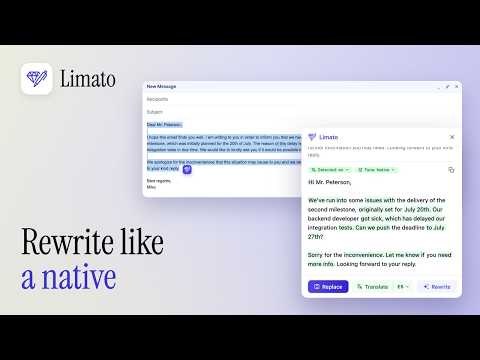
Select text on any website, click Limato, get it back in native English. Rewrite, fix tone, translate, humanize — 34 languages.
Limato rewrites text in place on any website, without copy-pasting. Select text while you type, click the Limato icon, and get it back in native English — with the right tone, cleaner grammar, or in another language. Built for non-native English speakers at work: people who write daily in a second language and want their messages to sound natural — not robotic, not over-formal, not "translated." Works inside Gmail, LinkedIn messages, and any other website with a text field. No copy-paste into a separate tab. No disruptive UI. ━━━━━━━━━━━━━━━━━━━━━━━━━━━━━━ WHAT LIMATO DOES ━━━━━━━━━━━━━━━━━━━━━━━━━━━━━━ ✓ SEVEN WRITING TONES • Native — how a fluent speaker would phrase it • Formal — polished business writing • Casual — relaxed, conversational • Simplify — shorter, clearer sentences • Academic — precise, structured • Grammar only — fix errors, keep your voice • Humanize — strip the telltale phrases and robotic rhythm from AI-generated text ✓ TRANSLATION THAT KEEPS YOUR TONE Write in the language you think in and deliver the result in another one. Tone carries over, so it does not read like machine translation. The full list of supported languages is on our website. ✓ EXPLAIN ANY WORD WHERE YOU READ IT Hit an unfamiliar word or phrase while reading? Select it and tap Explain. You get the meaning as used in that exact sentence — not a dictionary entry — in your own language, plus a short equivalent and an example sentence. Reading English articles, docs, or contracts stops meaning a second tab full of translations. ✓ WORKS EVERYWHERE YOU TYPE Any editable text field on any website — email clients, social platforms, docs, code review tools, forums. If you can select text, Limato can rephrase it. ✓ ONE-CLICK REPLACE OR COPY Paste the result back where the original was. Or copy to clipboard. No switching tabs. ━━━━━━━━━━━━━━━━━━━━━━━━━━━━━━ WHY PEOPLE USE LIMATO ━━━━━━━━━━━━━━━━━━━━━━━━━━━━━━ You already know the language. You don't need a grammar-checker treating you like a beginner. You need something that understands: — Your emails open with "I hope this message finds you well" and take three sentences to get to the point. — Your messages feel stiff because you're translating from your first language in your head. — "Kindly revert" lands differently than you think. — Posts sound like a template because you're hedging every sentence. Limato rewrites the way a native speaker would: shorter, more direct, with the small word choices that separate "clearly foreign" from "fluent." ━━━━━━━━━━━━━━━━━━━━━━━━━━━━━━ HOW IT WORKS ━━━━━━━━━━━━━━━━━━━━━━━━━━━━━━ 1. Select any text on any page. 2. Click the Limato icon and pick a tone. 3. Get the result inline — copy or replace. That's it. No account setup to try it. No dashboard to learn. ━━━━━━━━━━━━━━━━━━━━━━━━━━━━━━ WHO IT'S FOR ━━━━━━━━━━━━━━━━━━━━━━━━━━━━━━ If your English is correct but still reads as translated, this is for you. Most people who use Limato write for work in a language that isn't their first one, and they care that the result sounds like them rather than like a textbook. ━━━━━━━━━━━━━━━━━━━━━━━━━━━━━━ HOW IT'S DIFFERENT ━━━━━━━━━━━━━━━━━━━━━━━━━━━━━━ Grammar checkers fix commas. Translators swap words. Paraphrasing tools shuffle sentences. Limato is an AI rewriter that changes structure, rhythm, and word choice — tone-aware, direct, human. Not a polish. A rewrite. ━━━━━━━━━━━━━━━━━━━━━━━━━━━━━━ EN ESPAÑOL ━━━━━━━━━━━━━━━━━━━━━━━━━━━━━━ Limato es una extensión de Chrome para reescribir texto sin copiar y pegar, en cualquier sitio web. Sirve para redactar correos en inglés como un nativo siendo hispanohablante, humanizar texto de IA en español y traducir sin cambiar de pestaña. Selecciona el texto, haz clic en el icono y elige el tono. ━━━━━━━━━━━━━━━━━━━━━━━━━━━━━━ FREE TO START ━━━━━━━━━━━━━━━━━━━━━━━━━━━━━━ • 5 free rewrites a day — no account needed • 20 a day with a free account • Limato Pro: unlimited, $5.99/month with a 14-day free trial — or $47.99/year (4 months free) ━━━━━━━━━━━━━━━━━━━━━━━━━━━━━━ PRIVACY ━━━━━━━━━━━━━━━━━━━━━━━━━━━━━━ Your text is sent to our servers only when you click. We don't train AI models on your content. We don't store your drafts. Full details: https://limato.app/privacy ━━━━━━━━━━━━━━━━━━━━━━━━━━━━━━ Built by a non-native speaker, for non-native speakers. Questions or feedback → support@limato.app Website → https://limato.app
5 out of 53 ratings
Details
- Version1.1.5
- UpdatedOctober 9, 2026
- FeaturesOffers in-app purchases
- Size458KiB
- LanguagesEnglish
- DeveloperMikhail KonkovWebsite
C. Antonio Maura, 15 4C Oviedo, Asturias 33012 ESEmail
mikhkonkov@gmail.comPhone
+34 657 20 78 03 - TraderThis developer has identified itself as a trader per the definition from the European Union and committed to only offer products or services that comply with EU laws.
Privacy

Limato – Rewrite Like a Native Speaker has disclosed the following information regarding the collection and usage of your data. More detailed information can be found in the developer's privacy policy.
Limato – Rewrite Like a Native Speaker handles the following:
This developer declares that your data is
- Not being sold to third parties, outside of the approved use cases
- Not being used or transferred for purposes that are unrelated to the item's core functionality
- Not being used or transferred to determine creditworthiness or for lending purposes
Support
For help with questions, suggestions, or problems, visit the developer's support site