

Syndex

Overview
A Chrome extension that provides an easy, straightforward way to swap synonyms in Gmail.
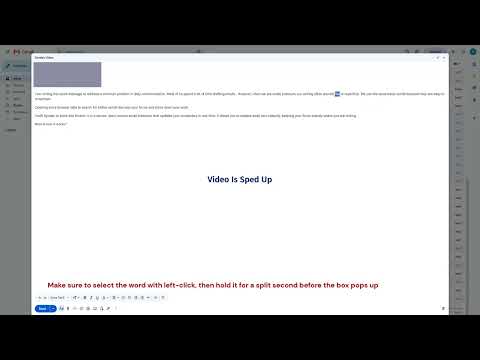
Syndex is especially useful when sending a professional email. It provides support for finding superior word fit without relying on generative AI. This extension will also will help with learning new vocabulary. When activated in Gmail, users can access Syndex's features automatically with no key binds. When typing an email, the user can use their cursor to select a word, either via a double left click or a left click-and-drag. Once the word is selected, hold down the left click for a short moment and then release. There should be a small box below the selected word. On hover, you can scroll through this box and be shown synonyms of the selected word. There will be a counter from 1-100, and it will say what number synonym you are on. Syndex is 100% free and open-source via Github. Future updates and features are planned and in progress.
0 out of 5No ratings
Details
- Version1.1
- UpdatedAugust 5, 2026
- Size17.56KiB
- LanguagesEnglish
- Developer
Email
calebbrooks3481@gmail.com - Non-traderThis developer has not identified itself as a trader. For consumers in the European Union, please note that consumer rights do not apply to contracts between you and this developer.
Privacy

Syndex has disclosed the following information regarding the collection and usage of your data. More detailed information can be found in the developer's privacy policy.
Syndex handles the following:
This developer declares that your data is
- Not being sold to third parties, outside of the approved use cases
- Not being used or transferred for purposes that are unrelated to the item's core functionality
- Not being used or transferred to determine creditworthiness or for lending purposes
Support
For help with questions, suggestions, or problems, visit the developer's support site