


개요
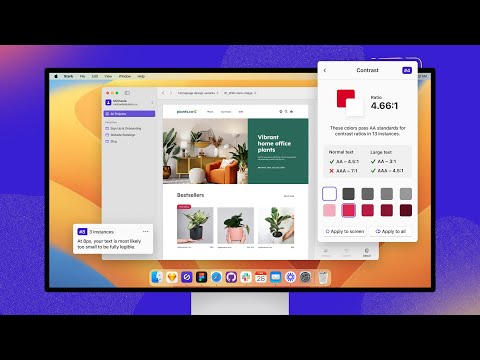
Find and fix compliance issues in record time with automated checks and smart suggestions.
Tired of manually checking spreadsheets, messy handovers, and expensive retrofitting? The all-new Stark Suite is a powerful combination of integrated tools that help you streamline your accessibility workflow. Now, you can create and test accessible software in record time. Whether you’re building a website, online shop, mobile app, or SaaS product, Stark gives every designer, engineer, PM, and QA expert the manual and automated tools to make it accessible with ease. With tools like Contrast Checker, Focus Order, Alt-Text Annotations, Vision Simulator, and more all in one place, you can find accessibility issues in a design before it goes into production—or quickly analyze and fix what’s already in flight. Get started for free today! What’s New We’re thrilled to introduce the all-new Stark Suite, a powerful combination of fully redesigned plugins, even more browser extensions, and all-new tools to streamline you and your team’s accessibility workflow. New tools include: Alt-Text Annotations, Typography Analysis, Touch Targets and more. Contrast Checker with Color Suggestions Check your contrast ratios and get smart color suggestions to ensure your design always adheres to WCAG AA or AAA requirements. Vision Simulator Simulate what your design may look like for people with different types of vision, including 4 different forms of color blindness and 6 other forms of impaired vision. Landmarks and Focus Order Design for easy navigation with Landmarks and Focus Order, allowing anyone to experience your product with screen readers and other assistive technologies. Alt-Text Annotations Get actionable tips for writing alt text optimized for screen-reading tools and even SEO ranking with search engines like Google. We’ll even let you know when an image is decorative and doesn’t require alt text. Typography Analysis Analyze the topography in a design to check that your selected fonts are legible and readable for people with different vision types. Touch Targets Create touch targets large enough for everyone to complete tasks in your web and mobile interfaces with a tap. Live Preview Everything you change, fix or update in Stark reflects directly in your design for maximum efficiency. With Live Preview you can test accessible contrast updates, color suggestions and font-sizes directly in your browser using your live code. Let Stark help you streamline your workflow to get your team to long-term, sustained accessibility compliance faster. Learn more about us at https://getstark.co
5점 만점에 3.8점평점 19개
세부정보
개인정보 보호

개발자가 사용자 데이터에 관해 다음과 같이 선언했습니다
- 승인된 사용 사례를 제외하고 서드 파티에 판매하지 않음
- 항목의 핵심 기능과 관련 없는 목적으로 사용하거나 전송하지 않음
- 신용도 판단 또는 대출 목적으로 사용하거나 전송하지 않음
지원
질문, 제안 또는 문제와 관련하여 도움이 필요하면 데스크톱 브라우저에서 이 페이지를 여세요.