

Eigi

Overview
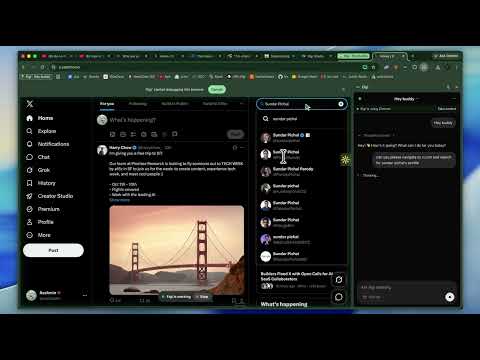
Let your Eigi agent work in Chrome on websites you allow. Chat in the side panel and take control at any time.
Bring your Eigi agent into Chrome. Chat in the side panel and let your agent help with tasks on websites you allow. With Eigi, you can: • Chat with your own Eigi agent without leaving Chrome. • Ask it to read a shared page, navigate, click, type, and scroll for your task. • Approve website access and pause the agent or take control at any time. An Eigi account with a running agent, available credits, and My Chrome enabled is required. The extension is free to install. Paid credits for agent usage are purchased separately through Eigi. Sign in to connect this extension to your account. When you allow browser access, relevant page content and screenshots may be sent to your Eigi agent and the AI services used to carry out your request. Chrome displays a debugging notification while Eigi controls a shared tab. Support: buddy@eigi.ai
0 out of 5No ratings
Details
- Version0.1.1
- UpdatedOctober 3, 2026
- Offered byEigi
- Size220KiB
- LanguagesEnglish
- Developer
Email
buddy@eigi.ai - Non-traderThis developer has not identified itself as a trader. For consumers in the European Union, please note that consumer rights do not apply to contracts between you and this developer.
Privacy

Eigi has disclosed the following information regarding the collection and usage of your data. More detailed information can be found in the developer's privacy policy.
Eigi handles the following:
This developer declares that your data is
- Not being sold to third parties, outside of the approved use cases
- Not being used or transferred for purposes that are unrelated to the item's core functionality
- Not being used or transferred to determine creditworthiness or for lending purposes