

Automatically add UTMs to Pardot email URLs
2 lượt xếp hạng
)
Tổng quan
Quickly append Google Analytics UTM parameters to all URLs in Pardot email templates.
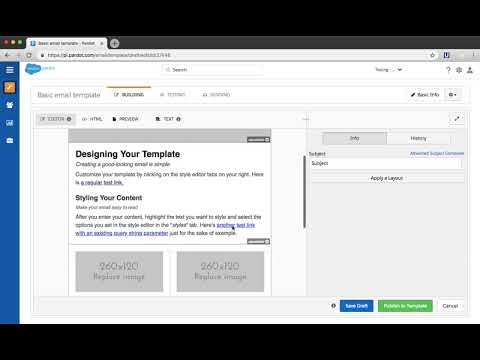
Save time and effort while boosting productivity with this free Chrome extension exclusive to Pardot users. This free extension allows you to define Google Analytics UTM parameters and automatically append them to all URLs in a Pardot email template, without needing to edit each URL one-by-one. Directions to use the plugin after installing: 1. Login to Pardot and edit any email template. 2. Click the plugin icon. 3. Enter your UTM parameters and submit. 4. New HTML with appended parameters will be generated. Copy the new HTML and paste into the HTML tab of your email template. 5. Save. Notes: - Currently works for email templates. - Automatically excludes URLs with variable tags (i.e. %%unsubscribe% and %%email_preference_center%%) - Can only be used when accessing Pardot from https://pi.pardot.com. ** Interested in additional features? Want to provide feedback? Please submit the following form: https://goo.gl/forms/z37zRWtz0EilaIYk1
1,5/52 lượt xếp hạng
Chi tiết
- Phiên bản0.0.0.3
- Đã cập nhật3 tháng 9, 2020
- Nhà cung cấphelptools
- Kích thước12.37KiB
- Ngôn ngữEnglish (United States)
- Nhà phát triển
Email
fixnamic@gmail.com - Người bán phi thương mạiNhà phát triển này không tự nhận mình là người bán. Đối với người tiêu dùng ở Liên minh Châu Âu, xin lưu ý rằng các quyền của người tiêu dùng không được áp dụng trong hợp đồng giữa bạn và nhà phát triển này.
Quyền riêng tư

Hỗ trợ
Nếu bạn có câu hỏi, ý kiến đề xuất hoặc gặp vấn đề, vui lòng mở trang này bằng trình duyệt dành cho máy tính để được trợ giúp