

ReplyWisely - Advanced X (Twitter) Search & Reply Drafting

Overview
Advanced X search + niche keyword highlighting. Find customers for your product, draft replies in your voice, track follower growth.
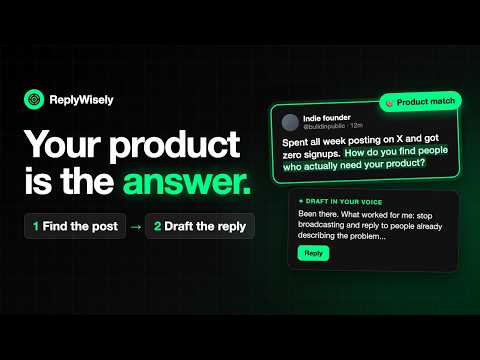
ReplyWisely — Get Your Product in Front of the People Who Need It, One Helpful X Reply at a Time ReplyWisely helps founders spread the word about their product through X replies. Add your product once — ReplyWisely reads its page, finds fresh posts from people describing the problem it solves, and drafts replies that help first and mention your product only where it genuinely fits, in your voice. No searches to build by hand, no cold pitching, and you review every reply before it goes out. Built for founders with a product and a small account (under ~1,000 followers), where your own posts don't reach many people yet but a helpful reply in the right conversation does. 🎁 7-day free trial — no credit card. From $29/month after, with a plain 30-day money-back guarantee. Sign in with X and every feature works immediately. The Problem You spent 45 minutes on X today. How much of it was spent finding something worth replying to? 👉 Your feed isn't your market — The algorithm shows you what's popular, not the founder asking the exact question you can answer. The best conversations for you never reach your timeline. 👉 X search is powerful but painful — Operators, exact phrases, OR-groups, "no replies", the Latest tab… nobody builds a good query on the fly, every day. 👉 Your niche is invisible — The posts you do care about scroll past in a sea of noise. Nothing says "this one's for you." 👉 Double-replying — You start typing, then realize you already replied yesterday. X doesn't mark posts you've engaged with. Four ways to find posts worth replying to Open Reply OS (the ReplyWisely Hub in the corner of X) and pick how you want to search — start with your product. Everything it finds lands in one Discover queue — strongest matches first, with each post's age. 💰 Find customers for my product Add your product once, then let ReplyWisely work out the exact problem it solves and search X for people posting that problem right now. Every post it finds is someone already describing what you fix — and replies drafted for those posts can mention your product naturally, without a sales pitch. 🔍 Fresh across all of X Your niche keywords become an advanced X search — multi-word phrases first, replies filtered out — and every result is pulled into your queue. This is how you find the conversations your feed never shows you. ✨ Describe your ideal post Type what you're looking for in plain English — "founders frustrated with cold email deliverability" — and AI turns it into a precise X search (original posts only, newest first). No query syntax to learn. 📥 Scan my timeline One click scrolls your For You feed for you and pulls out every post that matches your niche. It also collects passively while you browse. Works on x.com and X Pro (pro.x.com) — and any search you type into X yourself is collected into your queue too. Niches: the topics your search runs on ✨ AI Niche Builder Describe one person you want to reach. AI turns it into a tight keyword niche with a 1–10 narrowness rating and a critique on how to sharpen it. Already have one? Tune it with one sentence — "more about rolling AI out inside companies, less about AI research" — review exactly what it adds and drops, and approve. 🎯 Starter niches Pick a ready-made niche for common founder audiences and start searching in under a minute, or copy one and make it yours. Hold several niches and switch instantly. 🖍 Keyword highlighting in your feed Posts matching your niche are highlighted as you scroll, so you spot them without opening anything. Highlight any word in a post to add it to your niche (or remove it) in one click. ⭐ Targets Mark up to 100 people per niche — customers, prospects, peers — and their posts get a gold star in your feed and your queue, so you never miss a reply to someone who matters. Reply fast ✍️ One-click reply drafting in your voice Hit Draft on any post in your queue and the reply writes itself in your voice — trained on your own past posts, guided by your voice rules — while you keep browsing. Re-roll in another tone, shorten, lengthen, simplify or polish, and run a quick "slop check" for AI-sounding tells. Write your own tones or hide the ones you never use. 📨 Paced posting you approve Approve the drafts you like and Reply OS posts them on a randomized, throttled schedule (max 25 per run) that survives page reloads and stops if X rejects one. Nothing is posted that you haven't read and approved. ✏️ Polish in X's composer A Polish button in X's own reply and post boxes fixes grammar and clarity without rewriting your words. Stay on track ✓ Reply tracking Posts you've replied to get a green checkmark and drop out of your queue — never double-reply again. Each queue card also shows when you last replied to that author ("↪ 6d ago"), so you don't look like a reply guy. 📬 Your week at a glance The Post tab shows how many replies you posted this week, on how many days, and how many mentioned your product — the habit that actually grows your product's reach. 🧠 Private and non-intrusive ✅ You approve every reply — ReplyWisely never posts anything you haven't reviewed. ✅ Searching and matching run in your browser — your Discover queue and the posts you scroll past stay on your device. ✅ AI only when you ask — a search description, or the post you chose to reply to, goes to the AI service only when you click to build a search or a draft. ✅ Your data, your control — your settings, niches, reply log and the follower counts X shows on profiles you view sync to your ReplyWisely account so they follow you across browsers. Delete it all from the dashboard. 💳 Pricing Pro — $29/month. Every way to search, niches and the AI Niche Builder, keyword highlighting, Targets, one-click reply drafting in your voice (100 drafts a day), paced posting and reply tracking. Pro Plus — $49/month. Everything in Pro with 300 drafts a day. Pro Unlimited — $99/month. Everything in Pro with unlimited drafts (fair use). Search, highlighting and reply tracking are the same on every plan, with no limits. Plans differ only by how many reply drafts you can generate per day. Polishing text you wrote yourself never counts. 7-day free trial, no credit card, with 30 drafts a day. Sign in with X and the trial starts immediately — there's no card on file, so you can't be billed by surprise. Subscribe to keep access; cancel anytime. 30-day money-back guarantee on your first charge: if it isn't worth it, ask within 30 days and you get it back. After that, cancel anytime. If your trial ends or you cancel, the extension stays installed and your account data is kept; features pause until you subscribe. Disclaimer: ReplyWisely is not affiliated with X Corp. "X" is a trademark of X Corp.
5 out of 55 ratings
Details
- Version5.8.1
- UpdatedSeptember 30, 2026
- Size496KiB
- LanguagesEnglish (United States)
- DeveloperChamsDel Online LLCWebsite
304 S Jones Blvd #3646 Las Vegas, NV 89107 USEmail
chaminda@chamsdel.online - Non-traderThis developer has not identified itself as a trader. For consumers in the European Union, please note that consumer rights do not apply to contracts between you and this developer.
Privacy

ReplyWisely - Advanced X (Twitter) Search & Reply Drafting has disclosed the following information regarding the collection and usage of your data. More detailed information can be found in the developer's privacy policy.
ReplyWisely - Advanced X (Twitter) Search & Reply Drafting handles the following:
This developer declares that your data is
- Not being sold to third parties, outside of the approved use cases
- Not being used or transferred for purposes that are unrelated to the item's core functionality
- Not being used or transferred to determine creditworthiness or for lending purposes
Support
For help with questions, suggestions, or problems, visit the developer's support site