

Follow for LinkedIn by NeverZero - Follow-up Reminders & Outreach Tracker

Overview
Note who you contacted, when, and the next step. Overdue and upcoming lists, optional reminders. Stays on your device.
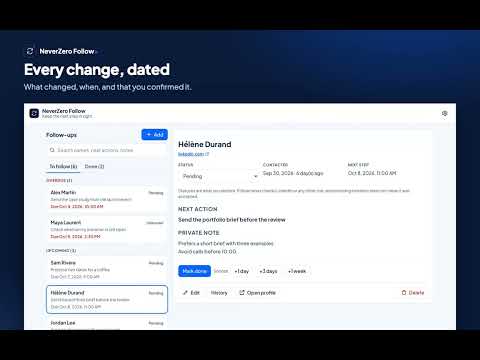
Keep the next step in sight. NeverZero Follow is a manual journal of the people you contacted: when you wrote, the status you confirm, the next action and when to do it. It never checks a site for you, so a status is always what you declared. WHAT YOU CAN DO • Add a follow-up with a name, an optional profile link, the date you contacted them, a next action with its date and time, and a private note • Leave the contact date empty when you do not remember it: it shows as “Date unknown” and is never guessed • See your follow-ups grouped as Overdue, Upcoming and No due date, and the finished ones under Done • Set the status yourself: Pending, Accepted, Declined, Withdrawn or Unknown • Snooze a follow-up by +1 day, +3 days or +1 week, mark it done or reopen it • Open the history of a follow-up: every change with its date, marked “You confirmed” • Get a warning when a profile link is already in your journal, with a shortcut to the existing follow-up • Search names, next actions and notes • Turn on reminders in Settings if you want a notification when a next step is due • Export everything as JSON or your follow-ups as CSV, and import a JSON backup after a review step HOW TO START Click the NeverZero Follow icon to open the side panel, then choose “Add a follow-up”. No account and no sign-in are needed. REMINDERS Reminders are off until you click “Turn on reminders” in Settings and accept Chrome’s prompt. The notification only says “A follow-up is due”, never a name or a note. Chrome may show it a little late, for example while the computer sleeps. If you refuse, nothing else changes: due follow-ups appear under Overdue when you open the extension. DATES AND CLOCK CHANGES A next step is kept as the date and time you typed, in your time zone. When a clock change makes that time skipped or doubled, the form tells you which time the reminder will use; your date is never rewritten. LOCAL DATA AND CONTROL Your journal is stored in your browser on this device. NeverZero Follow has no server, no analytics and no cloud sync, and its pages are not allowed to make network requests. It never opens or reads the profile links you save. Uninstalling the extension can delete your journal, so export anything you want to keep. Exported files are not encrypted. Settings include a button to delete all local data. IMPORTANT LIMITS Statuses are declared by you: a missing invitation is not treated as accepted. Follow never sends, accepts or withdraws invitations or messages, and does not read LinkedIn or any other site. Interface available in English and French. NeverZero is independent and is not affiliated with or endorsed by LinkedIn.
0 out of 5No ratings
Details
- Version1.0.0
- UpdatedOctober 7, 2026
- Size153KiB
- Languages2 languages
- Developer
- Non-traderThis developer has not identified itself as a trader. For consumers in the European Union, please note that consumer rights do not apply to contracts between you and this developer.
Privacy

This developer declares that your data is
- Not being sold to third parties, outside of the approved use cases
- Not being used or transferred for purposes that are unrelated to the item's core functionality
- Not being used or transferred to determine creditworthiness or for lending purposes
Support
For help with questions, suggestions, or problems, please open this page on your desktop browser